
C325WB light scheduling mode - bug?

C325WB light scheduling mode - bug?

C325WB light scheduling mode - bug?
2 weeks ago - last edited 2 weeks ago
Model: Tapo C325WB  
Hardware Version: V2
Firmware Version: 1.2.5 build 260112 release 69632n

Hello


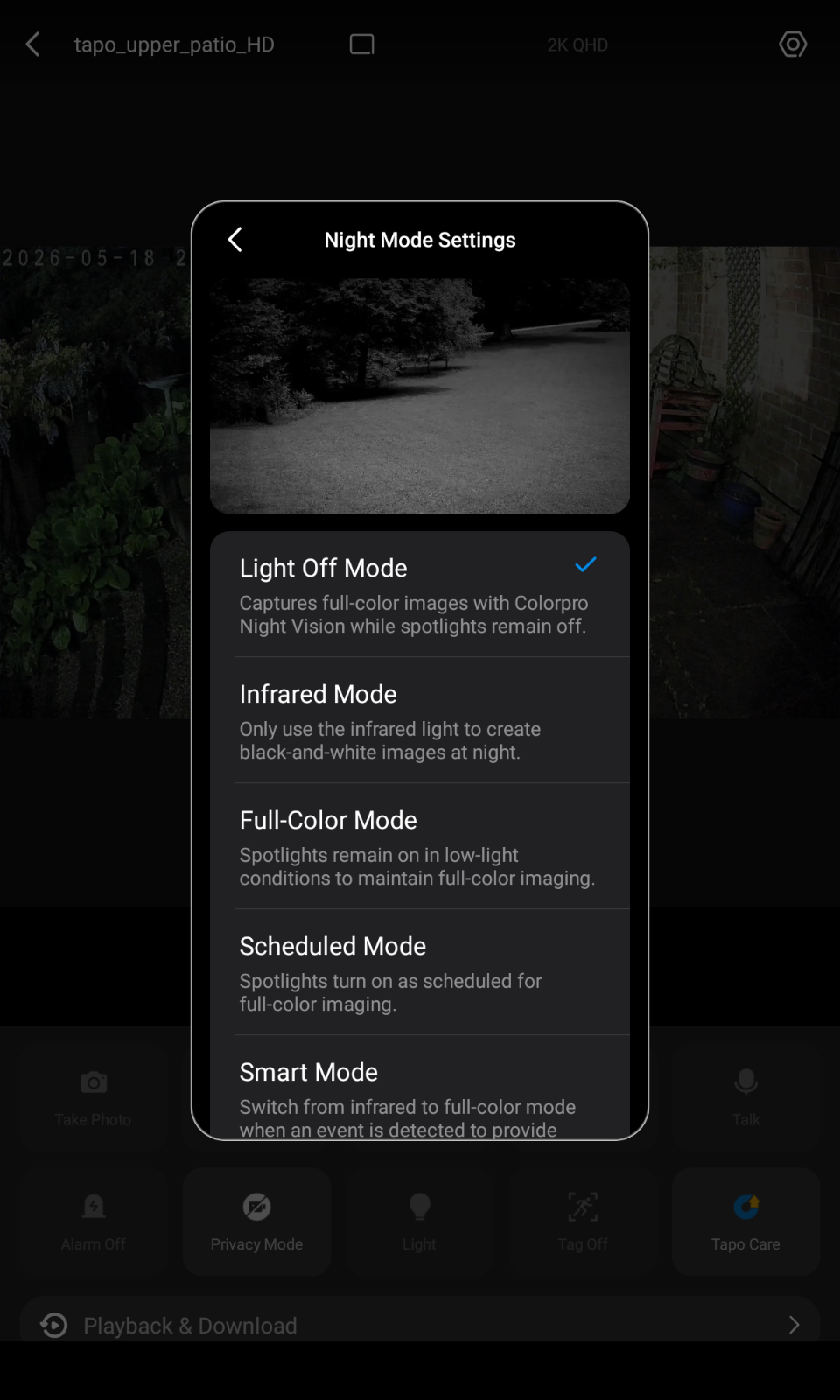
Night mode settings: I wish to run in "Light off" mode during the day and some of the night so that the ambient light from stars/moon/house lights provides colour illumination. However, when the house lights automatically switch off at 2330 I'd like to schedule a switch to "infrared" mode, remaining as such until sunrise at which point switching back to "light off" mode seems an optimal choice.


Having experimented, I find that selecting "scheduled" mode (a) has no ability to switch states in relation to a sun event (sunrise, dawn) and (b) anyway as soon as I select scheduled mode, the camera's illlumination switches away from "light off"  mode and into "infrared mode" immediately.  That's not the intended behaviour, I imagine,  so I propose that it is a bug which might be fixed.


I wonder if there are node-red functions which might allow me to independently control the camera illumination states - does anyone know? The node-red nodes which I have so far seen information for are a bit scant as to the end points they can address.


goal:

between dawn and 2330: illumination  = "light off" mode

between 2330 and dawn: illumination  = "infrared" mode


A poor second cousin would be to switch to "full colour" mode instead of IR mode but even with the white LED brightness set to the minimum value of "1" it does still tend to scare away wildlife and I prefer to avoid light pollution in my immediate vicinity.



  0      
0
#1
Options
3 Reply
Re:C325WB light scheduling mode - bug?
a week ago

  @y95q4j4pxx7k 

Hello,
Thank you for your detailed post. We truly appreciate you sharing your specific needs for the night mode schedule.


If you select Auto for the Night Mode, the camera will automatically switch to night vision based on ambient light. Our system only allows one night mode to be selected at a time.


Regarding the mode switching behavior you mentioned, this is not a bug. Light Off and Schedule Mode are two separate settings. If you switch from Light Off to Schedule Mode and no spotlight is scheduled to turn on, the camera will default to infrared night vision when dark.


If you prefer not to use the spotlight at all, you could simply select Infrared Night Mode for the entire night. Would that meet your needs?


However, based on your description, your goal might not be fully achievable through Schedule Mode, because the schedule currently controls the spotlight only, not the night vision mode itself.


We’ve noted your need for more flexible mode scheduling. Thank you again for your valuable feedback—it helps us understand how we can improve in the future.


Best Regards,

  0  
0
#2
Options
Re:C325WB light scheduling mode - bug?
a week ago

  @Hilbert-TP 


Ok, thanks for the information. I need to do a bit more experimenting to see about the IR/white LED switching.


Yes, if future functionality could include sun events (as is the case for my Tapo P100 mains sockets for example) and general on/off flexibility I think it could be quite a useful feature.


  0  
0
#3
Options
Re:C325WB light scheduling mode - bug?
a week ago

y95q4j4pxx7k wrote

  @Hilbert-TP 


Ok, thanks for the information. I need to do a bit more experimenting to see about the IR/white LED switching.


Yes, if future functionality could include sun events (as is the case for my Tapo P100 mains sockets for example) and general on/off flexibility I think it could be quite a useful feature.


  @y95q4j4pxx7k 

Bj

Hi,

If you’d like to see features like sunrise/sunset-based control or more flexible on/off scheduling added in the future, we recommend posting your idea in the Feature Request section of the community. It would be helpful if you could also include your specific usage scenario, as you described here — this makes it easier for the product team to understand the value and evaluate the request.

  0  
0
#4
Options