
New Feature Introduction to Smart Dual Tracking on Tapo Outdoor Dual-Lens Camera


In today's security landscape, comprehensive monitoring is essential. The Tapo outdoor dual-lens camera features an effective combination of a Pan-Tilt (PT) lens and a fixed lens, significantly reducing blind spots to ensure that no crucial events are overlooked. Its Smart Dual Tracking function intelligently utilizes both lenses to automatically track target events, providing enhanced protection for your home.
How Smart Dual Tracking Works
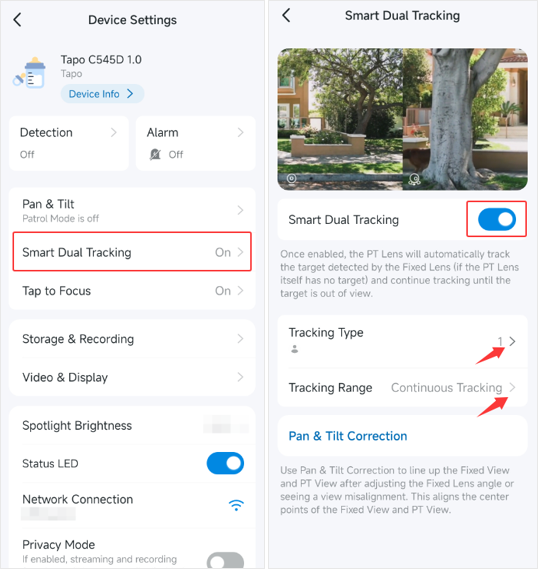
When Smart Dual Tracking is enabled, the camera's PT Lens will automatically track targets detected by the Fixed Lens (if the PT Lens itself does not currently track events) and continue tracking until the target is out of view, ensuring continuous surveillance.
Configuring Smart Dual Tracking
Enable Smart Dual Tracking feature
You can go to the Tapo app > camera’s Device Settings > Smart Dual Tracking page to enable this feature.
Tacking Type Selection
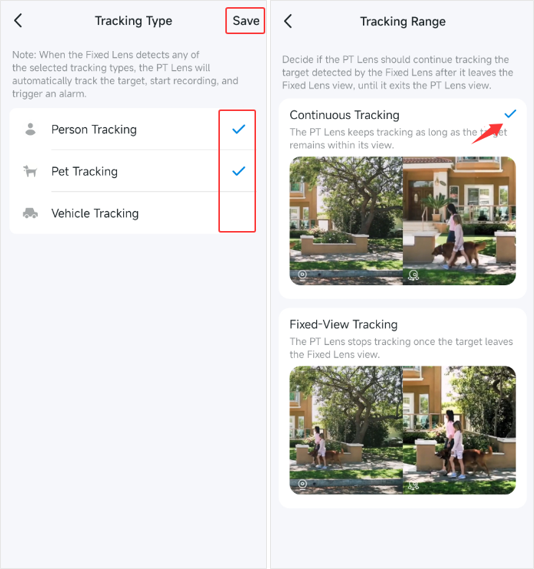
On the Tacking Type page, select your desired tracking categories: Person Tracking, Pet Tracking, or Vehicle Tracking.
When the Fixed Lens detects any of the selected tracking types, the PT Lens will automatically track the target events.
Tracking Range Options
You have two options for tracking range:
- Continuous Tracking: If selected, the PT lens will continue tracking the target even if it leaves the fixed lens's view, as long as the target remains within the PT lens's field of vision.
- Fixed-View Tracking: If this option is chosen, the PT lens will stop tracking as soon as the target detected by the fixed lens moves out of sight.
Interaction Between Smart Dual Tracking and Auto Tracking
When both the Auto Tracking and Smart Dual Tracking features are activated, the PT lens will track the target based on the Auto Tracking settings and those detected by the fixed lens as per the Smart Dual Tracking settings.
For example, if Auto Tracking is set to track a person and Smart Dual Tracking is set to track a vehicle, the PT lens won't track a person when only the fixed lens detects it, and:
- With Continuous Tracking selected, the PT Lens will track the person upon detection or track the vehicle when the fixed lens detects it, continuing until the vehicle is out of its view.
- With Fixed-View Tracking selected, the PT Lens will track a person once detected or track the vehicle when the fixed lens detects it, pausing when the vehicle moves out of the fixed lens's view.
More Articles:
Troubleshooting for Tapo Camera's Privacy Mode Automatic Activation
Smart Home: Introduction to Common Smart Action Scenarios for Tapo Cameras
Enhance Your Tapo App Experience: Introduction to Several Practical Features