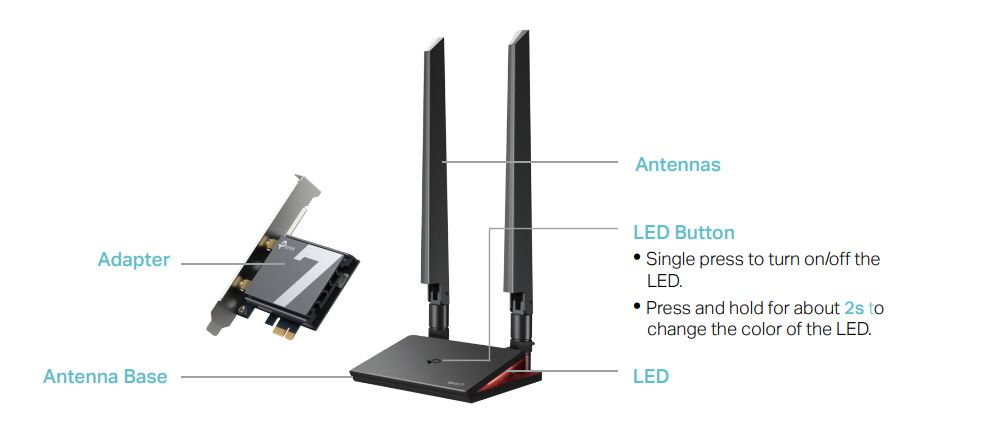
Customize the LED color for the BE9300 pcie adapter antenna

Customize the LED color for the BE9300 pcie adapter antenna

Customize the LED color for the BE9300 pcie adapter antenna
2025-07-27 20:16:53
Model: PCI-e Adapter  
Hardware Version: V1
Firmware Version:

I would love to be able to customize the color of the antenna LED. It seems to be three options: amber, blueish, and white. I use a pure 255 blue for my setup, and the adapter's blue is not pure. If it's possible to change it, please let me know, and if not, please make a way to change it.


Thanks. 

  0      
  0      
#1
Options
1 Reply
Re:Customize the LED color for the BE9300 pcie adapter antenna
2025-07-30 02:20:29

Hello@noxid ,

Thanks for contacting our community.


Is the model of your adapter Archer TBE550E ? You can press and hold the LED button for about 2s to change the color of the LED.

4c5cfd608b7a476184098b7970158dc6

More details, please refer to Archer TBE550E(UN)_V1_User Guide.


Nice to Meet You in Our TP-Link Community. Check Out the Latest Posts: △Pre-release Firmware for Archer AX50 Introduces New Parental Control Features and Enhancements △Introducing AI QoS: Elevate Your Gaming Experience on the Archer GE800 Gaming Router △Connect TP-Link Archer BE550 to Germany's DS-Lite (Dual Stack Lite) Internet via WAN △Tether KidShield Test Recruitment - Safeguarding Children's Online Experience If you found the post or response helpful, please click Helpful. If an answer solves your problem, click "Recommended Solution" so that others can benefit from it.
  0  
  0  
#2
Options