Customize the LED color for the BE9300 pcie adapter antenna

This thread has been locked for further replies. You can start a new thread to share your ideas or ask questions.

Customize the LED color for the BE9300 pcie adapter antenna

This thread has been locked for further replies. You can start a new thread to share your ideas or ask questions.

Customize the LED color for the BE9300 pcie adapter antenna
2025-07-27 20:16:53
Model: PCI-e Adapter  
Hardware Version: V1
Firmware Version:

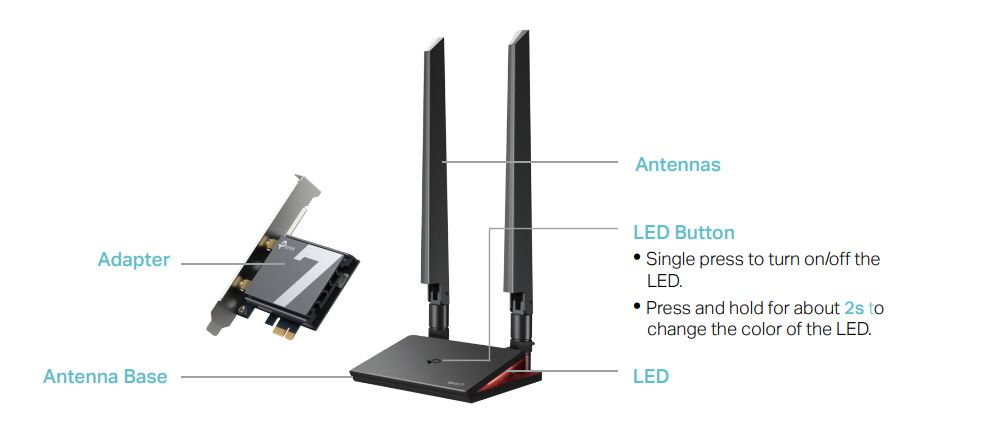
I would love to be able to customize the color of the antenna LED. It seems to be three options: amber, blueish, and white. I use a pure 255 blue for my setup, and the adapter's blue is not pure. If it's possible to change it, please let me know, and if not, please make a way to change it.


Thanks. 

  0      
0
#1
Options
1 Reply
Re:Customize the LED color for the BE9300 pcie adapter antenna
2025-07-30 02:20:29

Hello@noxid ,

Thanks for contacting our community.


Is the model of your adapter Archer TBE550E ? You can press and hold the LED button for about 2s to change the color of the LED.

4c5cfd608b7a476184098b7970158dc6

More details, please refer to Archer TBE550E(UN)_V1_User Guide.


Welcome to Our Community! Get the latest posts: △New Firmware for Archer GE550/GE650 V1 Introduces AI-QoS, EasyMesh IoT Expansion, and More! △New Firmware Releases for Archer BE805 V1/BE450 V1 to Support VPN Merge, New ECO Mode, and More! More posts, please see: △ Get the Ongoing Pre-release Firmware for Wi-Fi Routers Here— Subscribe for Updates! Urgent problems with your Wi-Fi Router, Range Extender, or DSL Modem? Please reach out via private Messages or @Joesph-TP in your new thread directly. Click Or ☆Recommended Solution if the post/answer helps.
  0  
0
#2
Options