
Archer TBE550E BE9300 Wi-Fi 7 Bluetooth PCIe Adapter won't automatically reconnect
 This thread has been locked for further replies. You can start a new thread to share your ideas or ask questions.
I can connect to my TP-Link wifi 7 router, but not reconnect after the PC wakes up from sleep or hibernate. Sometimes, if I wait literally minutes, I can get internet access, but usually I have to manually connect to an SSID to force a new connection, and even then it's slow. I updated to the latest driver version yesterday and the symptoms haven't changed. Please advise.
- Copy Link
- Subscribe
- Bookmark
- Report Inappropriate Content

Hello@JavaJim,
Thanks for contacting our community.
Do you have a different PC or Network adapter to test for comparison?
The latest driver is Archer TBE550E(UN)_V1_20250703_Win11 now. Have you updated to it?
Please provide here the operating system info of the PC:
How can you check and update your Windows Operating System version?
- Copy Link
- Report Inappropriate Content

It sounds like your Archer TBE550E is having issues with Windows 11’s power management. Even with the latest driver, Wi-Fi adapters sometimes fail to auto-reconnect after sleep/hibernate. Try these steps:
-
Disable power saving for the adapter:
-
Go to Device Manager → Network adapters → Archer TBE550E → Properties → Power Management → uncheck "Allow the computer to turn off this device to save power".
-
-
Disable Fast Startup:
-
Control Panel → Power Options → Choose what the power buttons do → Turn off fast startup.
-
-
Set Wi-Fi profile to auto-reconnect:
-
Settings → Network & Internet → Wi-Fi → Manage known networks → select your network → set "Connect automatically".
-
-
Optional: Check for Windows updates or router firmware updates, as Wi-Fi 7 is new and may have compatibility fixes.
If issues persist, sometimes a clean driver uninstall and reinstall (or using TP-Link’s installer instead of Windows driver) resolves reconnection delays.
- Copy Link
- Report Inappropriate Content


James-Miller_23 wrote
It sounds like your Archer TBE550E is having issues with Windows 11’s power management. Even with the latest driver, Wi-Fi adapters sometimes fail to auto-reconnect after sleep/hibernate. Try these steps:
Disable power saving for the adapter:
Go to Device Manager → Network adapters → Archer TBE550E → Properties → Power Management → uncheck "Allow the computer to turn off this device to save power".
Disable Fast Startup:
Control Panel → Power Options → Choose what the power buttons do → Turn off fast startup.
Set Wi-Fi profile to auto-reconnect:
Settings → Network & Internet → Wi-Fi → Manage known networks → select your network → set "Connect automatically".
Optional: Check for Windows updates or router firmware updates, as Wi-Fi 7 is new and may have compatibility fixes.
If issues persist, sometimes a clean driver uninstall and reinstall (or using TP-Link’s installer instead of Windows driver) resolves reconnection delays.
I have the TBE550E on Win11 Home running the latest f/w (Driver 5.4.0.3119) listed on the D/L page for drivers, Archer TBE550E(US)_V1.60_20250703_Win11 and I do NOT have that problem.
In addition to the above 'settings', another to look at is IN your POWER PLAN for Link State Power, I've got it OFF:
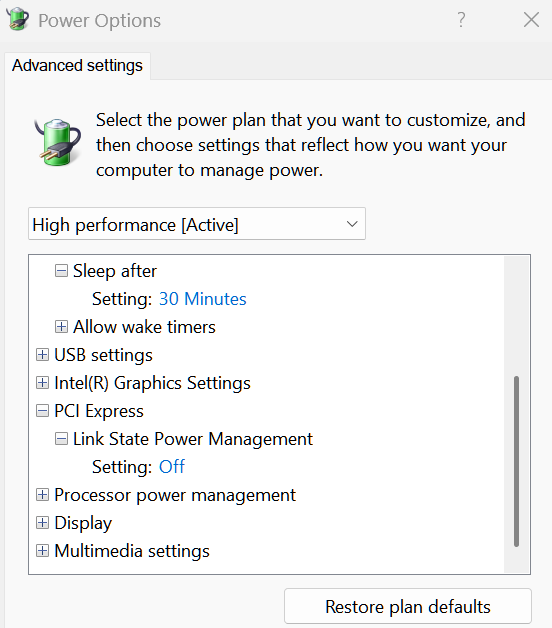
This disables power-saving on PCIe links, which can potentially improve performance in some cases by eliminating the delay that occurs when a link wakes up from a low-power state.
I can't say for sure if this will help, but it is what I have mine set too... this is more for a laptop I assume to save battery power, not needed for desktop on AC power.
- Copy Link
- Report Inappropriate Content
Information
Helpful: 0
Views: 2602
Replies: 3
Voters 0
No one has voted for it yet.