
Cannot Login to Motorola Admin Page at http://192.168.100.1 Through TP-Link Router
 This thread has been locked for further replies. You can start a new thread to share your ideas or ask questions.
Hello,
I have recently installed an Archer AX55 Pro router that connects to my existing Motorola MB8611 modem. My internet connection is fine, but I cannot access the admin page for my MB8611, which is at address http://192.168.100.1. I can ping this address successfully, but http access times-out. Note also that I was able to successfully connect to my MB8611 modem using my previous (Asus) router. Thank you for any advice.
- Copy Link
- Subscribe
- Bookmark
- Report Inappropriate Content


Hello @AstroJ ,
Welcome to our community.
When you try to log in to the modem, have you directly connected the PC to the modem?
Please confirm the IP address is correct, you can try 192.168.0.1", "192.168.100.1", or "192.168.1.1" to log in.
The modem seems to have a separate NAT. Please try to change the Archer AX55 Pro to be Access Point:How to configure the TP-Link wireless router as Access Point.
Also, please make sure you do not have a firewall or other features that restrict access to the modem.
- Copy Link
- Report Inappropriate Content


@AstroJ Try using just the numbers in the browser address bar, 192.168.100.1 leave off the http:// part. This is how I connect to my Arris cable modem
- Copy Link
- Report Inappropriate Content
@DVair Thank you for the suggestion. Browsers pre-pend https:// or http:// to any web address you enter, so I believe you are effectively entering a valid web address with just the numbers. This is at least how all of the different browsers that I use work.
- Copy Link
- Report Inappropriate Content
@Joseph-TP Thank you for the suggestions. I have not tried a wired connection to the modem as that would require taking my wifi offline and I have not had the opportunity to do that. In the end, though, if I can only access the modem via a wired connection, it defeats the purpose of having the web-enabled administration interface. As for the other addresses, 192.68.0.1 is the tp-link router admin address (which does work), 192.168.100.1 times-out (it *should* be the modem admin address), and 192.168.1.1 times-out. I have not tried configuring my AX55 as an AP for the same reason that the wired connection test has not been done.
The main point is that the Motorola router that I am trying to access, through address http://192.168.100.1, was accessible when I was using an Asus router. Switching to a tp-link router has broken this access path. My tp-link router configuration is not specialized either. I followed the defaults for setting it up. The default tp-link configuration seems to be the issue which is blocking access, via a timed-out link, to my modem.
- Copy Link
- Report Inappropriate Content

Seems like I recall with that modem, I needed to change the ip sub net of the router from 192.168.0.xxx to use 192.168.1.xxx.
After changing the router settings, you may need to power off both modem and router and unplug the modem for 5-10 min, then plug in modem, power on, wait a bit then power on the router. Then see if you can get to the modem.
edit... Please let me know if this works for you.
- Copy Link
- Report Inappropriate Content
@AstroJ yep, they do add the http://, but just throwing out a suggestion.
The IP might have something to do with it as suggested above. I use 192.168.10.X for my LAN and am able to navigate to the modem.
- Copy Link
- Report Inappropriate Content
Hello@AstroJ ,
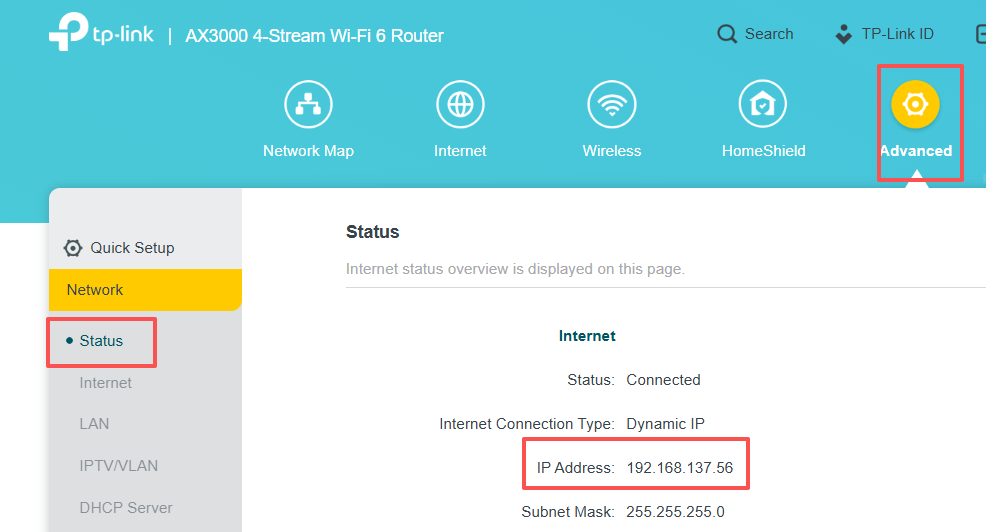
Have you checked the IPv4 address of the Archer AX55 Pro?
If it displays 192.168.100.x, the router and modem are on the same subnet and should be accessible via 192.168.100.1.
If not, what is the specific IPv4 address? If it displays another format, such as 192.168.10.x, you can try logging into the modem via 192.168.10.1.
- Copy Link
- Report Inappropriate Content

@AstroJ Can you please confirm the LAN IP addresses of the MB8611 and Archer AX55 Pro. IF they both start with 192.168.0.xxx then I'm afraid the AX55 will jump to a different subnet.
If what you note is accurate go to the Archer web GUI and change the LAN subnet to 255.255.155.0 . Let us know if you can access the MB8611 afterwards...
- Copy Link
- Report Inappropriate Content
See a previous post on this subject. In the search bar, put in Motorola for more posts.
- Copy Link
- Report Inappropriate Content
Information
Helpful: 0
Views: 3687
Replies: 9
Voters 0
No one has voted for it yet.