
Unable to enable wireless security on Archer_A7

In Wireless Security Settings, 'Disable Wireless Security' is checked. When I try to change it and save, it reverts back to disabled. What can I do? Please help.
- Copy Link
- Subscribe
- Bookmark
- Report Inappropriate Content


Hello @thatgal ,
Welcome to our community.
Do you mean that you are unable to save wireless security to WPA/WPA2? And it always keeps on 'No Security' as below?
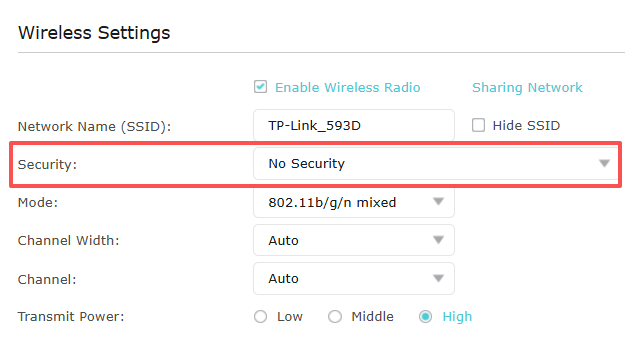
Let's try the following troubleshooting steps:
1. Check your connection: Make sure your PC or mobile device is still connected to the router's network while making changes.
2. Verify your settings: Double-check that all the parameters you entered are correct and meet the router's requirements.
3. Update firmware: Ensure your router's firmware is updated to the latest version, as outdated firmware can sometimes cause issues.
4. Disable antivirus and VPN: Temporarily turn off any antivirus software or VPN on your device, as these can sometimes interfere with saving settings.
5. Reboot the router: Try restarting your router and then attempt to save the settings again.
- Copy Link
- Report Inappropriate Content
Information
Helpful: 0
Views: 304
Replies: 1
Voters 0
No one has voted for it yet.