
Feature request: Let us setup multiple band configurations for a device via connection preferences

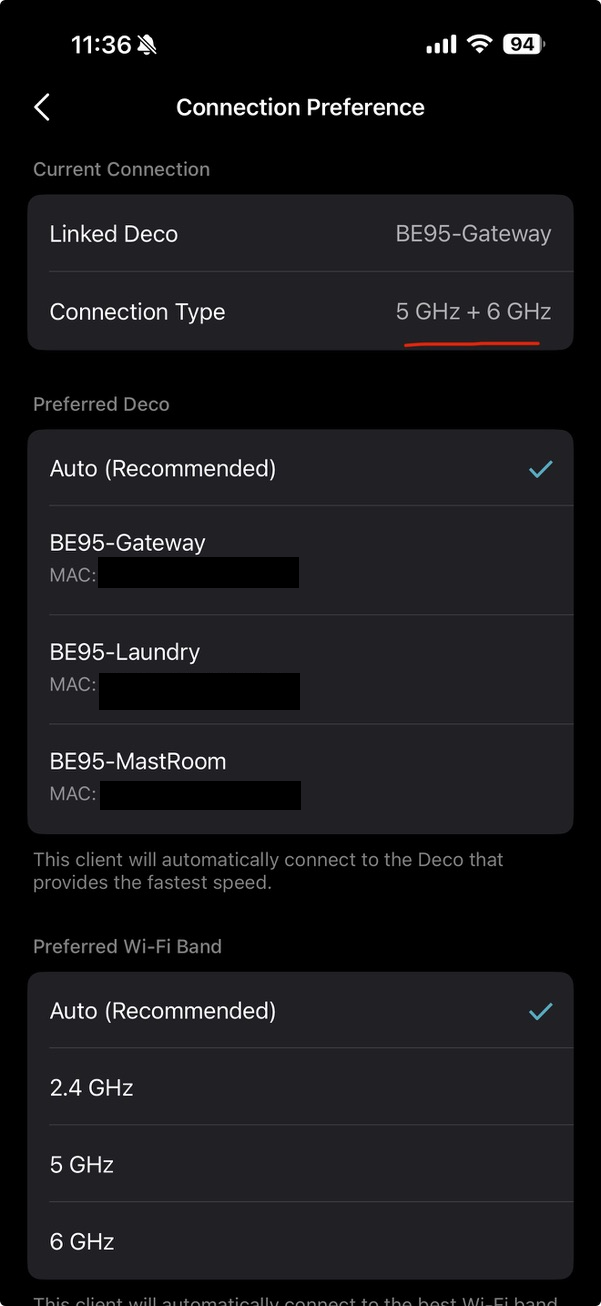
With the rise of Wi-Fi 6E/7 devices, would it be possible in a future update to allow certain devices to prefer at least two WiFi bands in connection preferences (i.e., utilize 5/6 GHz instead of being able to choose one)? This would help ensure that the device achieves a faster Internet connection and will be useful for those that have there units configured/spaced out properly for smooth coverage across these bands (smoother roaming).
I usually find that if I let my devices handle this option automatically, the connection may stall (might be due to 2.4GHz causing the other bands (5/6 GHz) to maintain said connection).
- Copy Link
- Subscribe
- Bookmark
- Report Inappropriate Content


The main problem is what my iPhone Bands on MLO it connected too? Deco App doesn't show me that, just says MLO. It is an iPhone Pro 16.
- Copy Link
- Report Inappropriate Content

Hey there is an important piece here, u got the Ipad Air, that only support WIFI 6e :), Only the Ipad Pro support MLO. You can use your Wifi6 SSID to be able to get good speeds. In the Deco app once you connect to your wifi6 you will search for your Ipad device and it will said 6ghz :)
Hope that helps!
Wi-Fi specifications for the following iPad models are detailed in the table below.
-
iPad Air 13-inch (M3)
-
iPad Air 11-inch (M3)
-
iPad mini (A17 Pro)
-
iPad Pro 13-inch (M4)
-
iPad Pro 11-inch (M4)
-
iPad Pro 12.9-inch (6th generation)
-
iPad Pro 11-inch (4th generation)
-
iPad Air 13-inch (M2)
-
iPad Air 11-inch (M2)
| 802.11 standard, name, frequency |
Maximum PHY data rate |
Maximum channel bandwidth |
Maximum MCS index |
Maximum spatial streams / Type |
|---|---|---|---|---|
| ax@6 GHz |
2400 Mbps |
160MHz |
11 (HE) |
2/MIMO |
| ax@5GHz |
1200 Mbps |
80MHz |
11 (HE) |
2/MIMO |
- Copy Link
- Report Inappropriate Content
No, I understand you 100%.
My iPAD AIr DOES connect using the MLO SSID... that IS not the problem.
See, the 3 BANDS are included in the MLO SSID.... and it is up to both the DEVICE and the DECO to talk to each other to get the BAND choice(s).
Again, since all 3 bands are there, if I had used the SHARED SSID which also has the 3 bands in the SSID it probably might have gotten the 6Ghz band. That or the 5Ghz that I got via MLO... I guess it depends on which is checked first for 'working' by the Deco.
Now like I said, I have TWO network adapters in this PC. One is only 2.4 + 5 or 6Ghz capable and it is this PC's network adapter in use, and it connects with 2.4 + 6Ghz bands. The other one, the Intel one, can do the faster MLO 5 + 6Ghz bands, and it does....
Too bad the iPad didn't grab or be presented with the 6Ghz band... although, the 5Ghz connection is OK on the iPad was well... I might just force it to the 6Ghz SSID though.
- Copy Link
- Report Inappropriate Content
By the way, connection the iPad Air to the 6Ghz SSID yields this:
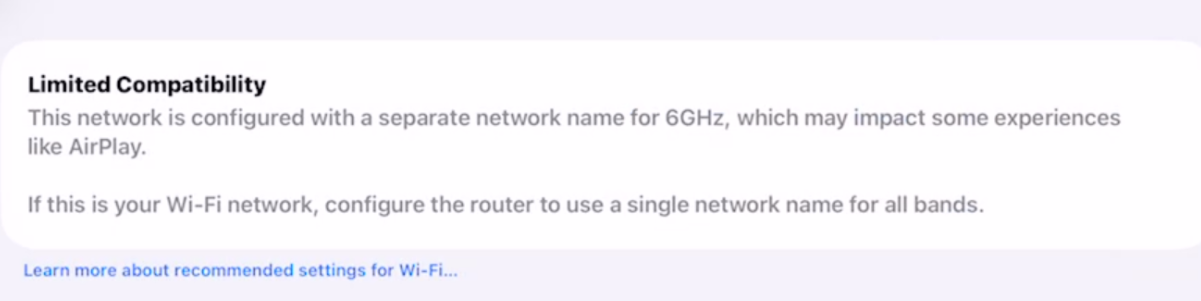
So it wants the Shared Network....
If I do that, I get this:
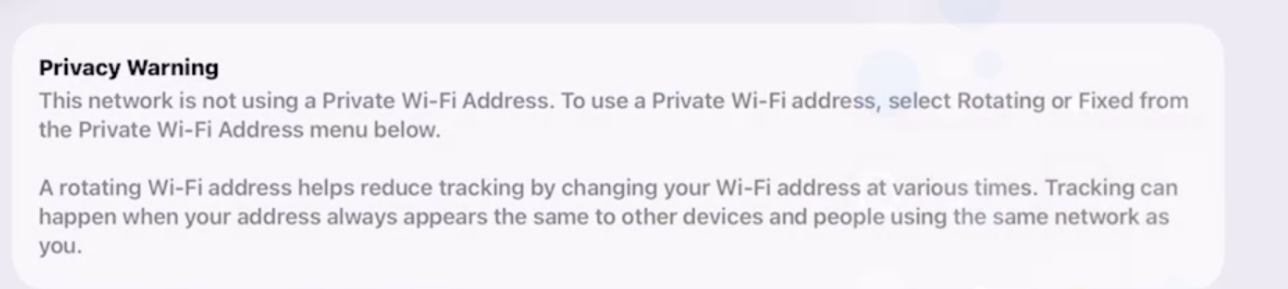
Catch-22....
So I can get the 6Ghz BAND and connect with the warning above, or the Shared SSID and get the bottom warning and a 5Ghz band,,,
- Copy Link
- Report Inappropriate Content
Try connecting to your MLO with the IPad and in the DecoApp you can force it to use the 6ghz band, or the same with your main network you can always force it there also. Remember, 6ghz does not have the same power on 5 and 2.4ghz, thefore if your 6ghz is weak it will prefer the other 2 bands or the one that is stronger :). In my case I dont put the 6ghz on the main network cause it can cause issues sometimes. I leave it in a separate SSID but hide it, in order to manage the channels selection :) . Only main and MLO networks are showed in my case.
- Copy Link
- Report Inappropriate Content

@IrvSp If the iPad is limited to 6E:
1: 6E is MLO capable. It is looking for the 5 GHz and 6 GHz to have the same SSID (and password I suspect), this is the non-MLO SSID. This is the reason for the first warning.
2: It is not WiFi 7 nor WiFi 7 MLO compatible. It can not do AES + GCMP256, which is 256-bit encryption. You may have set your 6 GHz to OPEN network to get that 2nd warning.
Apple 6E in particular typically need Preferred Scanning Channels enabled to see the actual channel.
My only guess, use the Network Analyzer, watch the channel utilization, while you toggle WiFi ON and OFF on the iPad/iPhone. The percentage should change on the channel it connects to.
- Copy Link
- Report Inappropriate Content
No, I know that the iPad I have does not 'support' MLO. I will however connect to it. It seems as if it is the 5Ghz, which of course has the strongest signal over distance vs. 6Ghz, but not as far as 2.4Ghz.
My Deco is putting out 3 band MLO SSID.
I've not seen a true way to 'watch' the channel usage... even with Acrylic Hone.
On the iPad, more than likely for my usage, the 2.4Ghz would be OK.
My iPhone is ALSO connected to the MLO SSID, and the same problem...do not know what band it is on.
Wi-Fi specifications for the following iPhone models are detailed in the table below:
-
iPhone Air, iPhone 17, iPhone 17 Pro, iPhone 17 Pro Max
-
iPhone 16, iPhone 16 Plus, iPhone 16 Pro, iPhone 16 Pro Max
These models also support Wi-Fi 7 in the 2.4 GHz, 5 GHz, and 6 GHz bands and Multi-Link Operation (MLO).
In this case, MLO IS supported. I just don't know what 'mode'? It is connected to the 2.4 + 5/6Ghz bands or the 5 + 6Ghz bands?
Note that it makes much difference to me?
On my PC, even there it is hard to distinquis the different to the band choices each network adapter makes on MLO. I've got 1Gbps ISP service and on both adapters I reach 940Mbps wireless connection.
On my iphone, just test it and I'm getting 933Mbps now.
Still, I'd like to know which BAND I am on?
- Copy Link
- Report Inappropriate Content
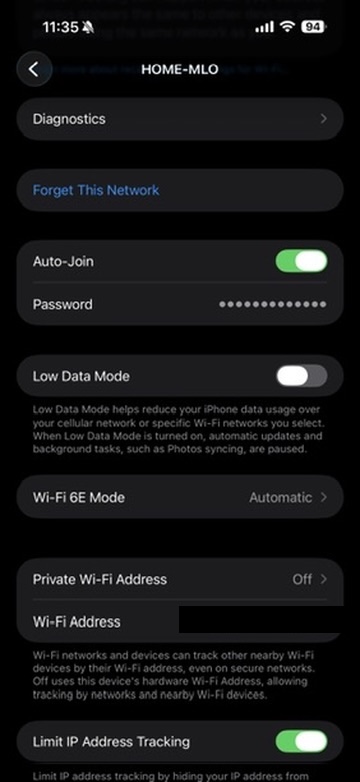
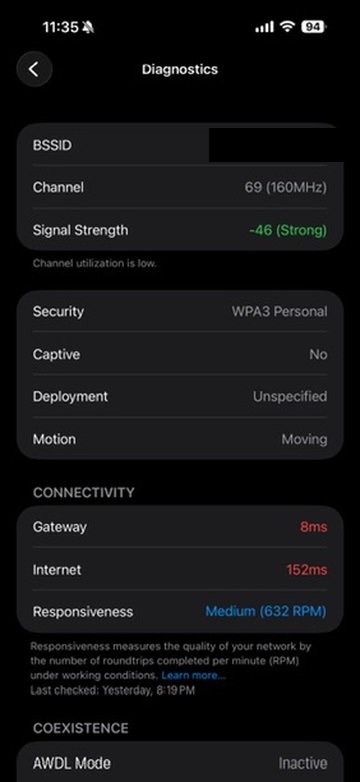
Hey guys you can use the following wifi profile shortcut from Apple, it will tell you on your device which band and channel you are using 💪 below image is from my 17 pro max now.
You can use it on your ipad/iphone. Once you got the profile installed, just go to you wifi/wifi connection name and inside that connection details you will see the Diagnostics option. Also in your deco app you can see of your using MLO or not. Hope this helps you guys!

- Copy Link
- Report Inappropriate Content
jzchen wrote
@RudhyR I was trying to research why Network Analyzer doesn't show detailed info for @IrvSp on the iPhone. It seems that iOS blocks sharing this info with 3rd party apps. The Jiri Techet programmer explains it as a security issue, and notes that Apple's WiFi app (I unfortunately forgot which one because it seemed to use old WiFi standard,) does have access to this info...
Phones seem to connect to a single band at a time even if it is an MLO enabled SSID. I would suggest changing 6 GHz-1 bandwidth to the minimum and 6 GHz-2 to 160 MHz. (I believe the sweet spot for iPhone is 160 MHz). See if your iPhone moves to 6 GHz-2. I'm sorry but I read your post twice and didn't quite understand your conclusion. I think this is because on my Range Extenders I am required to set up individual SSID for 2.4, 5, (and 6 GHz if available), in order to enable MLO, meaning I am required to have a non-MLO SSID for at least two channels, then can create an MLO SSID with those channels that are ON. If I turn off the regular channels or leave only one on, it says I can only create an MLO SSID if more than one (non-MLO) channel is created. From this 6 GHz-1 had to be ON for you to also use it for MLO...
Hey thank you for the time answering! I was trying to check if the Iphone was able to connect and use the second 6ghz-2 band. I was using a beta firmware on the nodes, and I was able to telnet to it. Looking at the mld definition in the wireless file i found:
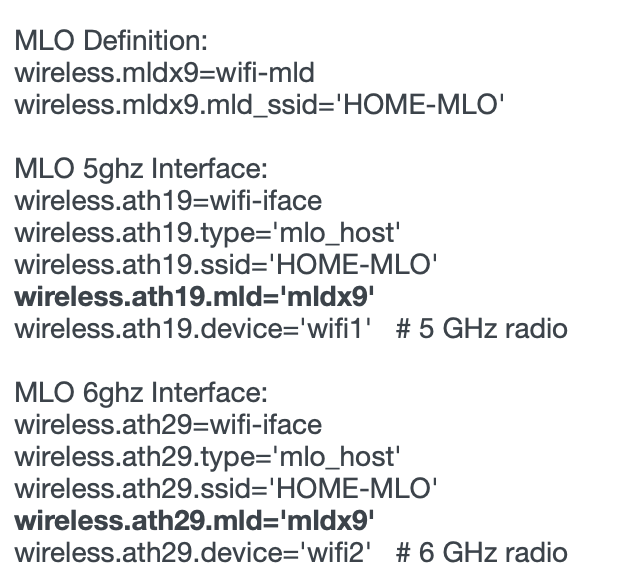
I have to put it as image cause the editor was identifiying the code lines as links :D ....Based on that, it will never use the 6ghz-2 radio for MLO.
- Copy Link
- Report Inappropriate Content
I have the iPhone 16 Plus.
I did NOT get the DIAGANOSTIC choice?
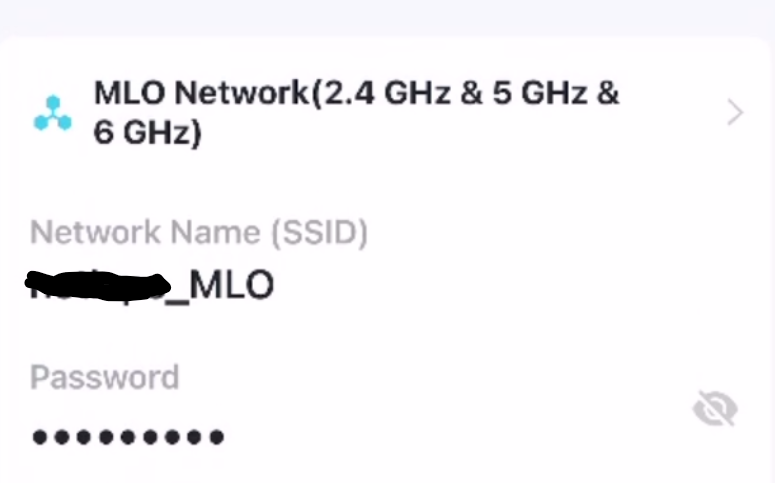
Everything else is set to AUTO on this screen:
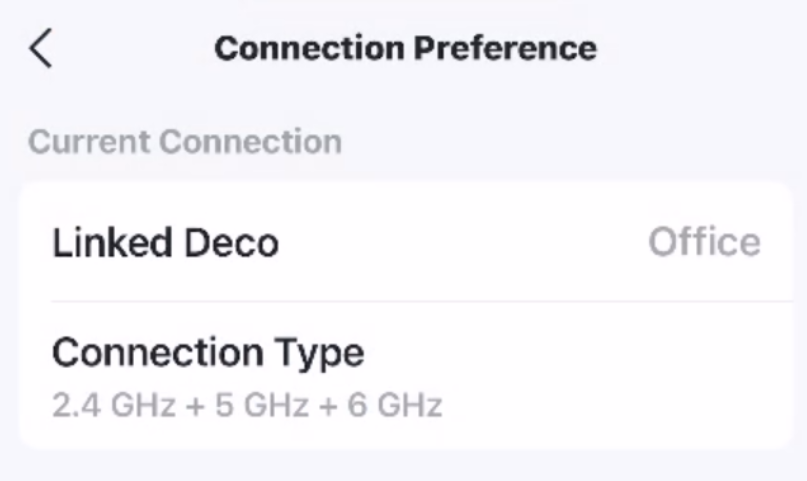
Wondering if since this phone doesn't really support MLO (but can connect to the SSID and get a band to use) is why I don't have it?
- Copy Link
- Report Inappropriate Content
Information
Helpful: 0
Views: 3461
Replies: 42
Voters 0
No one has voted for it yet.