
New router/pci-e wifi adapter unable to maintain proper speeds

Hey guys. I have a new TP-Link BE15000 Archer BE700 router paired with an Archer TBE550E pci-e adapter. Got it set up and PC is on the MLO network. Did multiple speed tests averaging 18-2000 Mbps down and 1800 Mbps up from my Cox fiber 2g down plan. I updated firmware to the latest version and now all tests come back averaging 8-900 Mbps down speeds. Nothing else has changed. Enabling/disabling QoS makes no difference. What can I do to troubleshoot this? Not sure why a firmware update would drastically tank my speeds like that.
I did a factory reset last night and it was getting 1900Mbps down after that. Went to bed and tried again today and it is even worse at 145Mbps down/1069Mbps up. I have no idea what to do or how to troubleshoot this.
Thank you!
- Copy Link
- Subscribe
- Bookmark
- Report Inappropriate Content

Hello @Bonrdaddy ,
Welcome to our community.
May I know if your network topology diagram is as follows:
ISP modem—BE700)))((( PC with Archer TBE550E and other clients
(Note: — stands for wired connection,)))((( stands for wireless connection )
Is the firmware version of your router 1.2.2 Build 20251027 rel.47412 now? What is the driver version of your Archer TBE550E?
Are the speed test results all from a wireless connection on the PC with Archer TBE550E? Please test the router's wired speed. Is it running at full speed and stable?
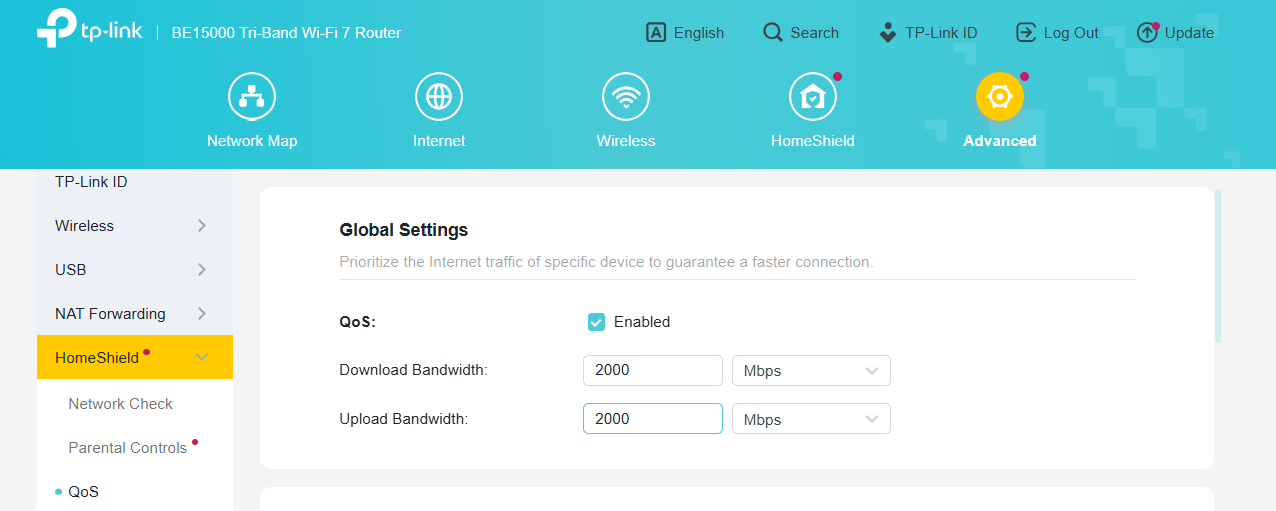
Please enable the QoS feature and set both bandwidths to 2000 Mbps.
By the way, do you have another client to test the BE700's speed for comparison?
- Copy Link
- Report Inappropriate Content
So you have the topography correct. That's exactly how it is currently setup.
I am on the newest firmware version for the router and tbe550e. I'm not currently home so can't confirm but they were both updated to the newest on the website as of last week.
When enabling QoS I am unable to set it higher than 1000 for both download and upload. It keeps telling me 1000 is the highest.
I'll be home tomorrow to test the wired speeds. I believe it's just a wifi issue currently.
- Copy Link
- Report Inappropriate Content

Hi @Bonrdaddy ,
By the way, what model is your modem? If the wired speed also drops significantly, it is recommended that you use a wired PC to test the modem's wired speed directly through the modem's LAN port at the same time.
- Copy Link
- Report Inappropriate Content
@Joseph-TP I do not know the model of modem. It is the one installed in the house from Cox. It is brand new. I tested ethernet on a laptop since I am unable to attach ethernet with my main PC. The laptop averaged about 1.1Gb down with 680Mbps up speeds. My main PC on an MLO network just averaged 1.8Gb down and 1.4Gb up speeds. The problem is that it will randomly tank the download and upload speeds for seemingly no reason. That's why I wasn't sure if it was a router or pci-e card issue. I mostly use the main PC for gaming so would it be better to just leave it dedicated on Wifi 6? Seems like a waste with the equipment we have.
- Copy Link
- Report Inappropriate Content
Hi @Bonrdaddy ,
Is the wired speed stable? If possible, please connect the PC to the 6GHz, 5GHz, or LAN port of the router only for comparison.
By the way, have you tested different clients connected to the MLO network? Can they access a stable speed?
- Copy Link
- Report Inappropriate Content
@Joseph-TP wired speed was stable at about 2.2G down and 1.8G up. I've tested my phone on MLO and it's stable (s24 ultra). I'll test 6g and 5g tomorrow. I'm unable to test lan due to not being able to move my PC or have a cord long enough.
- Copy Link
- Report Inappropriate Content
Information
Helpful: 0
Views: 337
Replies: 6
Voters 0
No one has voted for it yet.