Deco X50/X50Pro/X50-PoE Pre-Release Firmware 1.7.0 Introduces DoH/DoT, Channel Selection, and More!

Deco X50/X50Pro/X50-PoE Pre-Release Firmware 1.7.0 Introduces DoH/DoT, Channel Selection, and More!

Deco X50/X50Pro/X50-PoE Pre-Release Firmware 1.7.0 Introduces DoH/DoT, Channel Selection, and More!
2026-05-19 14:57:41 - last edited a week ago

Hey Everyone,
 
We're excited to share early access to a new firmware update for the following Deco models, packed with a plethora of new features and enhancements designed to elevate your Deco Mesh Home Networking experience. This firmware is currently in beta; however, your testing and feedback may help accelerate its official release!


Applies to:


Deco X50/X55/X3000 V3.0
Deco X55 Pro/X50 Pro V1.0
Deco X50-PoE/HB6300-PoE V2.0


Firmware Modifications:


New Features/Enhancements:

  • Added support for WireGuard VPN and third-party VPN
  • Added IoT network connection preference feature
  • Added Enhanced Client Identification feature
  • Added LED schedule feature
  • Added support for IPv6 Configuration during setup
  • Added Internet Backup feature
  • Added DoH/DoT feature
  • Added Wi-Fi channel selection feature
  • Improved Performance and Stability for Networks with Numerous Deco Nodes. 
  • Enhanced QoS performance
  • Enhanced Smart Home performance
  • Enhanced Homeshield Parental Control performance
  • Enhanced the Client List Performance in the Deco App
  • Improved Overall Security and Stability

 
Firmware Download Link:


Deco X50/X55/X3000 V3.0
Deco X55 Pro/X50 Pro V1.0
Deco X50-PoE/HB6300-PoE V2.0
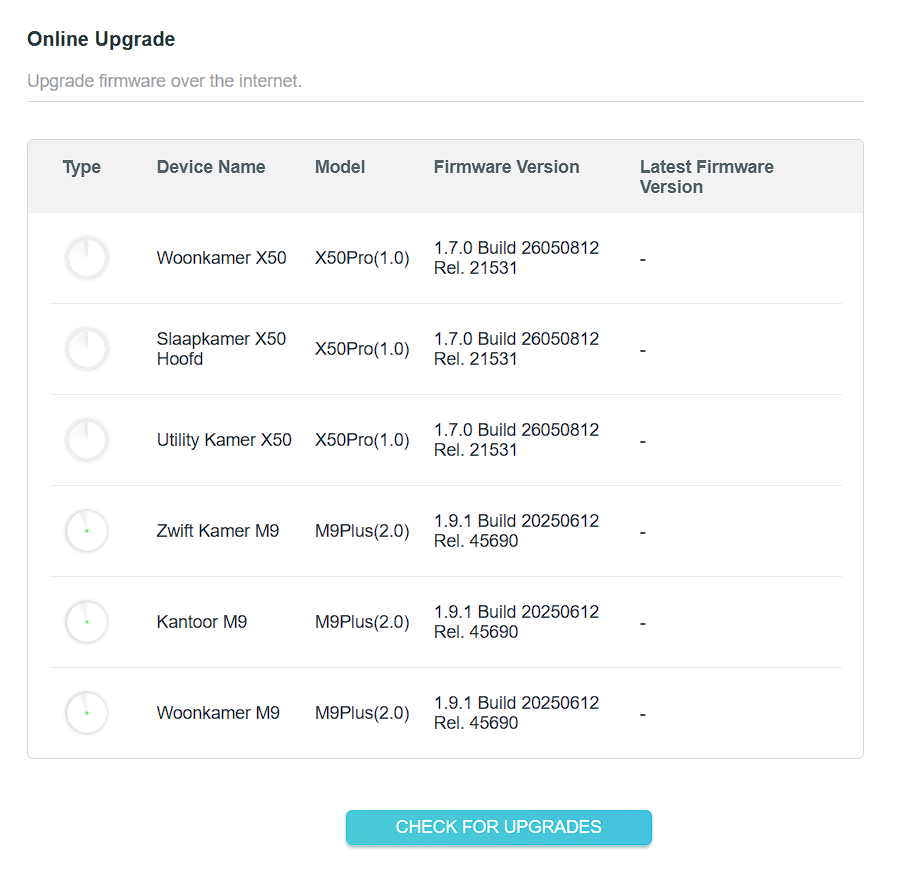
1.7.0_Build_26050812_Rel.21531(Pre-Release)

Note:

  • Pre-release and Beta firmware should be used at your own discretion. We cannot guarantee the functionality of features or technical support for Pre-Release or Beta Firmware. Features and support vary by model and Internet connection type.
  • Please ensure your Deco app is fully up-to-date.
  • This firmware cannot be reverted directly to the previous version. A Firmware Recovery Process is required to revert.
  • There will be an official firmware release in the future. If you are not comfortable using beta firmware, please wait for the official release or contact our support teams for assistance.
  • For detailed instructions on how to install this beta firmware on your Deco Mesh System, visit: How to manually update the firmware via web UI.


As always, we value your feedback. If you happen to encounter any concerns during or after the firmware upgrade, please feel free to comment below with the following information. Your input helps us continue to improve and provide the best possible products and support.
 

  • Provide a detailed network layout, including how the devices are connected.
     
  • Include a detailed description of the issue and as much information as possible regarding the specific conditions that seem to trigger the behavior.


Thank you for your continued support and for being part of our community.

 

  0      
0
#1
Options
9 Reply
Re:Deco X50/X50Pro/X50-PoE Pre-Release Firmware 1.7.0 Introduces DoH/DoT, Channel Selection, and More!
3 weeks ago

  @Ryan 


Happy to see there finally is some updates coming to the X50 Pro.


Could I with limited risk join this test on my X50 Pro devo's?


Regarding the upcoming firmware it would be great if some annoying small issues could be fixed along with the next release:


- I'm unable to name new clients 

- The ability to select preferred deco's for clients


These options where standard before on my M9's both don't work anymore now I switched my old M5/M9 setup to a M9/X50pro setup.

  0  
0
#2
Options
Re:Deco X50/X50Pro/X50-PoE Pre-Release Firmware 1.7.0 Introduces DoH/DoT, Channel Selection, and More!
3 weeks ago

  @Ryan 


Happy to see there finally is some updates coming to the X50 Pro.


Could I with limited risk join this test on my X50 Pro devo's?


Regarding the upcoming firmware it would be great if some annoying small issues could be fixed along with the next release:


- I'm unable to name new clients 


- The ability to select preferred deco's for clients


These options where standard before on my M9's both don't work anymore now I switched my old M5/M9 setup to a M9/X50pro setup.

  0  
0
#3
Options
Re:Deco X50/X50Pro/X50-PoE Pre-Release Firmware 1.7.0 Introduces DoH/DoT, Channel Selection, and More!
2 weeks ago

  @Karstuh 


To know if you can use the beta firmware or not we first need to know what hardware version you have. Please see the post below on how to find the hw version of your deco unit(s)


https://www.tp-link.com/us/support/faq/46/


Once you have the hw version reply back to this post.


Thanks 

Need help with the Deco app, setup, Ethernet backhaul, network switch or rolling back firmware? Router or AP mode? https://community.tp-link.com/us/home/forum/topic/699816?page=1
  0  
0
#4
Options
Re:Deco X50/X50Pro/X50-PoE Pre-Release Firmware 1.7.0 Introduces DoH/DoT, Channel Selection, and More!
2 weeks ago

  @HelpFixDecoApp 


HW version is:


DECO X50PRO EU/1.0

  0  
0
#5
Options
Re:Deco X50/X50Pro/X50-PoE Pre-Release Firmware 1.7.0 Introduces DoH/DoT, Channel Selection, and More!
2 weeks ago

  @Karstuh 


You can install the beta software and give it a try if you like. If you have any issues with it please post them in this thread 


Thanks. 

Need help with the Deco app, setup, Ethernet backhaul, network switch or rolling back firmware? Router or AP mode? https://community.tp-link.com/us/home/forum/topic/699816?page=1
  0  
0
#6
Options
Re:Deco X50/X50Pro/X50-PoE Pre-Release Firmware 1.7.0 Introduces DoH/DoT, Channel Selection, and More!
2 weeks ago

  @Ryan 


Hi!


I sucsefully upgraded the firmware.


Notes:


- Still not able to save names of clients (It will revert in a few seconds back to the old name)

- Still not able to select preffered source deco for clients (Getting the error settings could not be saved at this moment)


So those two are stiil the same as before upgrading. 


Further:


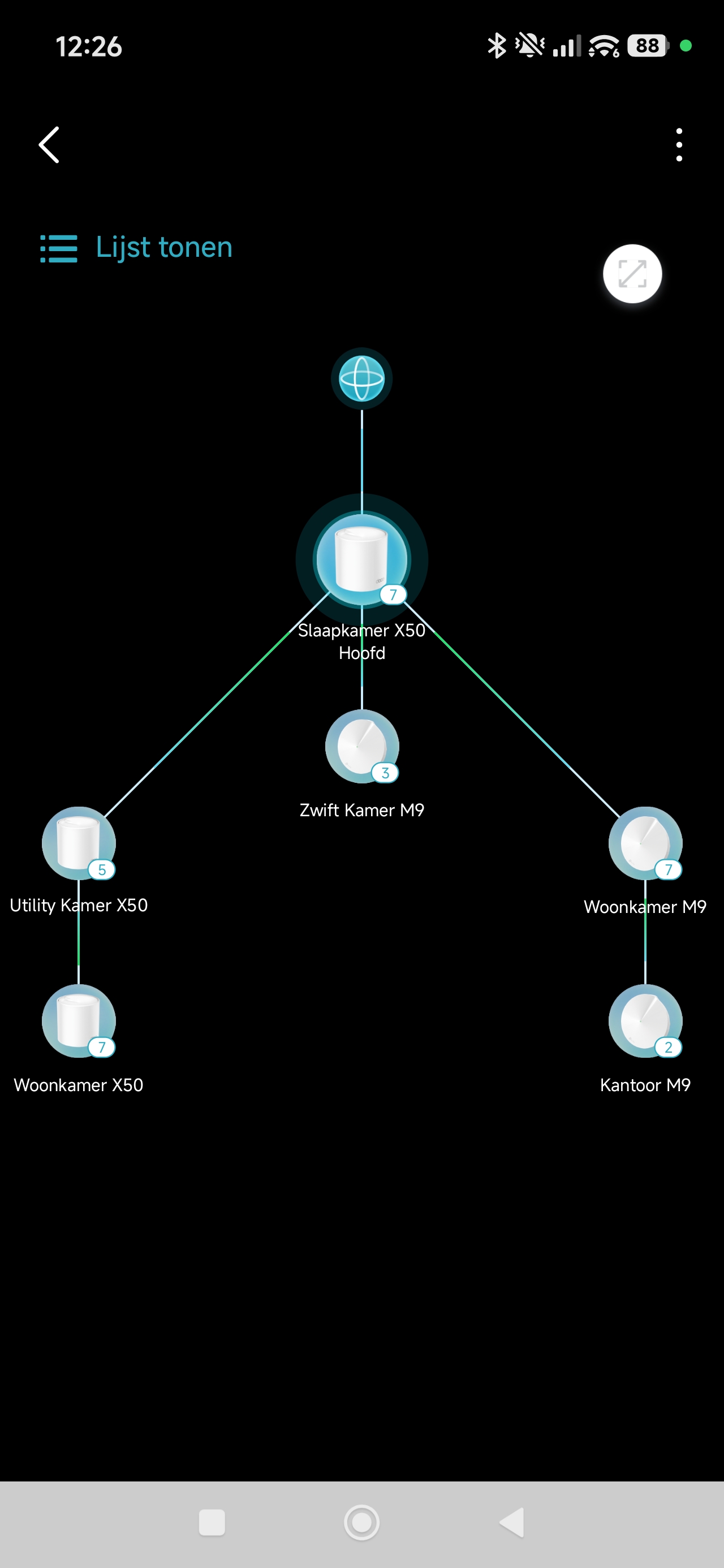
- Deco map has dissapeared from the app, only list visible of the deco's.


My current setup:


Units


Map 2


  0  
0
#7
Options
Re:Deco X50/X50Pro/X50-PoE Pre-Release Firmware 1.7.0 Introduces DoH/DoT, Channel Selection, and More!
2 weeks ago

  @HelpFixDecoApp 


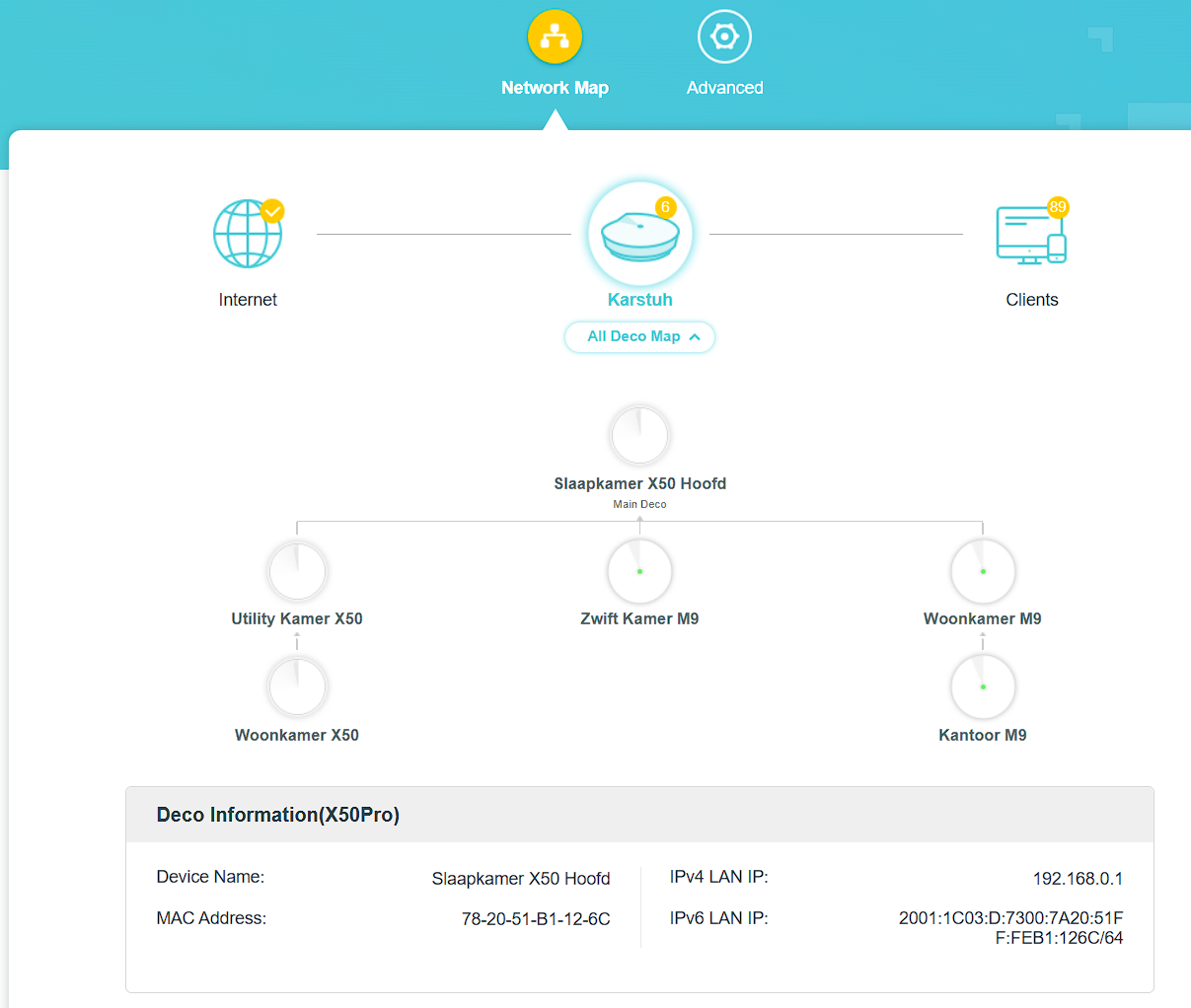
Another strange thing is that the network map seems of from the correct setup.


Most wired deco's show as connected to the Main deco, whilst they are connected in chain through a wired backhaul.


Should be:


Main X50 --> X50-Utility --> X50-Woonkamer --> M9-Woonkamer --> Wifi M9-Kantoor


Instead I get this view:


Chain

  0  
0
#8
Options
Re:Deco X50/X50Pro/X50-PoE Pre-Release Firmware 1.7.0 Introduces DoH/DoT, Channel Selection, and More!
2 weeks ago

  @Karstuh 


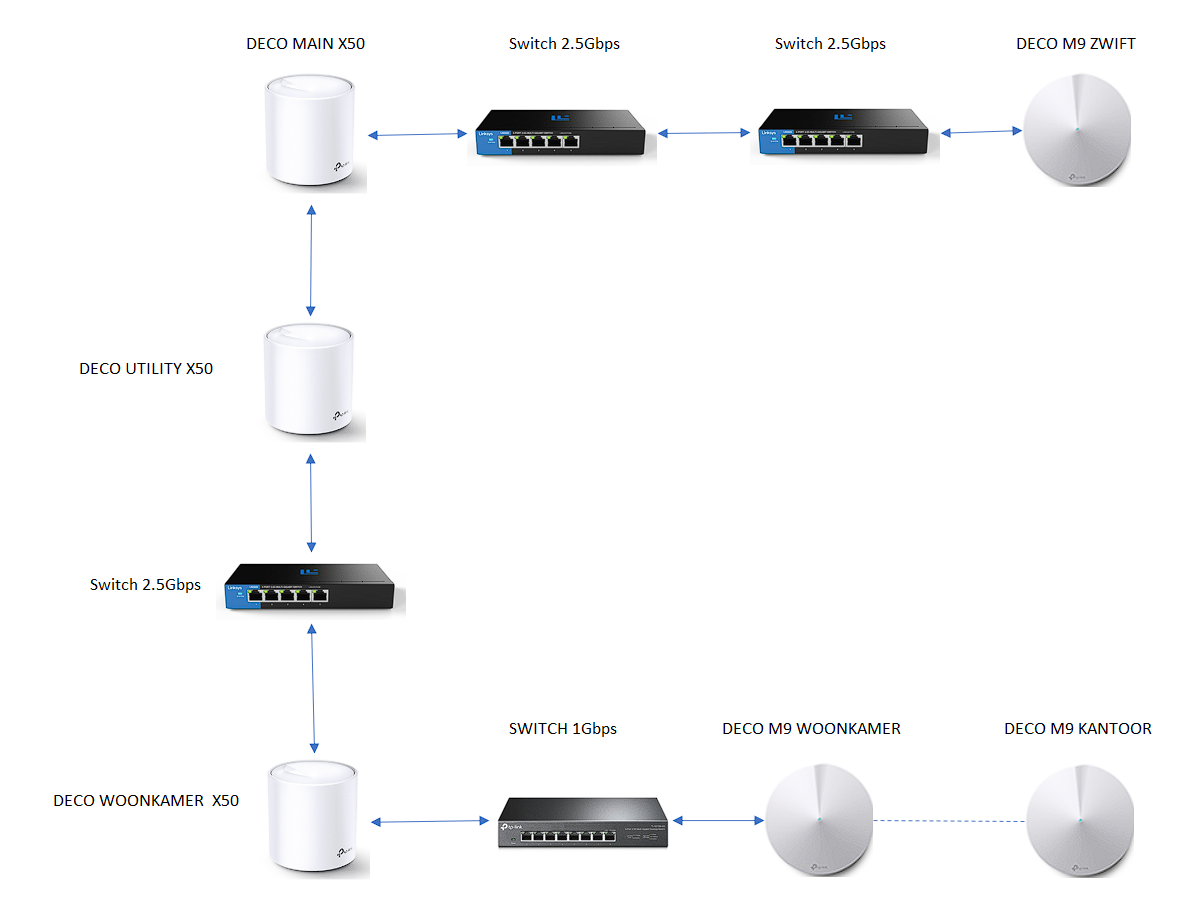
This is the actual network layout of the deco uniits:


Layout

  0  
0
#9
Options
Re:Deco X50/X50Pro/X50-PoE Pre-Release Firmware 1.7.0 Introduces DoH/DoT, Channel Selection, and More!
a week ago

  @Karstuh 


I was really hoping that patch would of cleared up your issues with your setup. Going to have you open up a support ticket so they can figure out why the new patch didn't resolve your issues. 


First please access the Deco web UI by entering "tplinkdeco.net" in your browser. Navigate to Advanced > System > System Log, select "ALL" in the log type, and save the file to your local computer. Then follow the steps below making sure to attach the logs to the email.

I recommend sending an email to forumsupport.usa@tp-link.com with the following information:

Subject: [Forum Escalation][ID 864620Deco X50/X50Pro/X50-PoE Pre-Release Firmware 1.7.0 Introduces DoH/DoT, Channel Selection, and More!

Forum Nickname: [User Provided]

Thread URL: https://community.tp-link.com/us/home/forum/topic/864620?replyId=1699332

Model&Version: [User Provided]

Description: [User Provided]

Any Other Relevant Information (Logs, Config Files, Images, etc.): [User Provided]

In the template above please fill in the areas that say [User Provided].  This will open a case with our engineering team, and they will work with you via email. 

Need help with the Deco app, setup, Ethernet backhaul, network switch or rolling back firmware? Router or AP mode? https://community.tp-link.com/us/home/forum/topic/699816?page=1
  0  
0
#10
Options