
*Resolved* - Tapo C225 - HomeKit Thumbnail View Broken

*Resolved* - Tapo C225 - HomeKit Thumbnail View Broken

*Resolved* - Tapo C225 - HomeKit Thumbnail View Broken
2025-11-14 20:40:12 - last edited a week ago
Model: Tapo C225  
Hardware Version: V2
Firmware Version: Version 1.1.1 Build 250623 Rel.51642n

Edit 1/1/2026 - In my experience, the below issue has been resolved as of this firmware:
 

Tapo C225(US)_V2.6_1.2.2 Build 251121

Published Date: 2025-12-23 

Modifications and Bug Fixes:
1. Added support for displaying a snapshot on Alexa Favorites' camera card.
2. Fixed the issue where the timestamp could have a 1-hour offset in certain scenarios when the camera connects to the NVR.
3. Optimized the audio performance.
4. Enhanced device stability and security.


In Apple Home / HomeKit, when viewing your cameras in your Home, there is a "live" thumbnail snippet from all connected cameras which is supposed to poll the camera every ~10 seconds for the latest still.


However, this functionality appears to be broken on the Tapo C225. Tapo C225 does not appear to be sending to Apple Home/Home Kit a refreshed thumbnail frame every 10 seconds.


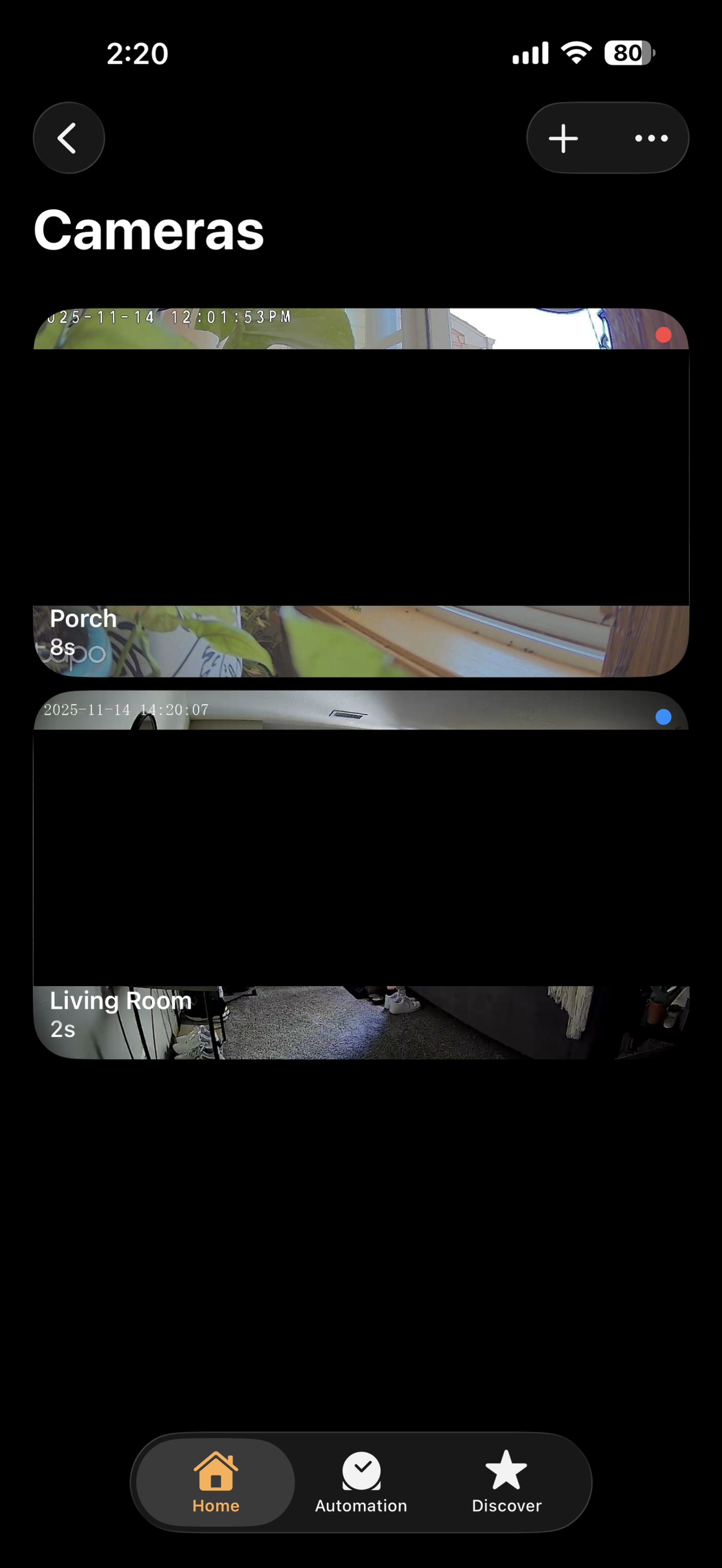
The thumbnail is always many hours old. In the image below, you can see the Camera view where the Tapo C225 is set up as the Porch camera. The Living Room cam is another brand where this functionality works properly.
 

fe35ce8711244b928c695da7f76efb86


When you look at the timestamps of both cameras, you can see that in the Porch camera view, the timestamp in the thumbnail is many hours older than the Living Room camera's time of 14:20 (24hr) which reflected my current time of 2:20pm (12hr). The Tapo C225 cam reflects an outdated thumbnail view, confirmed by the timestamp of 12:01. 


I have tried factory resetting the device and readding to no avail - the Tapo C225 does not seem to support this feature properly. I've also rebooted my router & restarted all HomeKit home hubs.

  0      
  0      
#1
Options
1 Accepted Solution
Re:*Resolved* - Tapo C225 - HomeKit Thumbnail View Broken-Solution
a week ago - last edited a week ago

1/1/2026 - In my experience, the below issue has been resolved as of this firmware:
 

Tapo C225(US)_V2.6_1.2.2 Build 251121

Published Date: 2025-12-23 

Modifications and Bug Fixes:
1. Added support for displaying a snapshot on Alexa Favorites' camera card.
2. Fixed the issue where the timestamp could have a 1-hour offset in certain scenarios when the camera connects to the NVR.
3. Optimized the audio performance.
4. Enhanced device stability and security.


Recommended Solution
  0  
  0  
#3
Options
2 Reply
Re:Tapo C225 - HomeKit Thumbnail View Broken
2025-11-18 10:07:36

  @linkuser8282 

Hi,
For the reported phenomenon, it's recommended to contact technical support for further assistance.
Best Regards

  0  
  0  
#2
Options
Re:*Resolved* - Tapo C225 - HomeKit Thumbnail View Broken-Solution
a week ago - last edited a week ago

1/1/2026 - In my experience, the below issue has been resolved as of this firmware:
 

Tapo C225(US)_V2.6_1.2.2 Build 251121

Published Date: 2025-12-23 

Modifications and Bug Fixes:
1. Added support for displaying a snapshot on Alexa Favorites' camera card.
2. Fixed the issue where the timestamp could have a 1-hour offset in certain scenarios when the camera connects to the NVR.
3. Optimized the audio performance.
4. Enhanced device stability and security.


Recommended Solution
  0  
  0  
#3
Options