
Browser amin access

Since the latest firmware upgrade, I cannot access my AX80 router's administation web page in a browser using either the "192.168.x.x" nor the "tplinkwifi.net" url, although I can access it from the tether app on my mobile devices. I get a "This site can't be reached" message. It also states that it took long to respond. How can I remedy this?
- Copy Link
- Subscribe
- Bookmark
- Report Inappropriate Content


Hello @Wizard7 ,
Welcome to our community.
Is the network working normally, even though you can't access the router's management page?
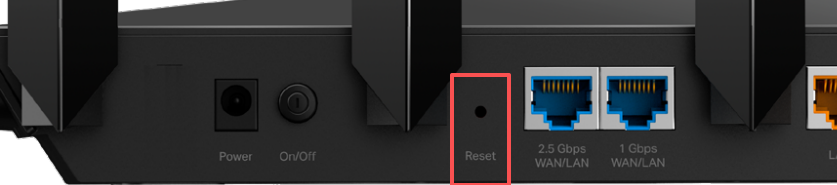
Have you tried a hard reset for the Archer AX80? For insurance, it's always recommended to save a copy of the router's Backup Config file before a hard reset.
How to reset:
Press and hold the button until the LED blinks to reset the router to its factory default settings.
- Copy Link
- Report Inappropriate Content
- Copy Link
- Report Inappropriate Content

Try a different browser and/or clearing the browser history, cookies, and such as it can prevent 192.168.x.x from working. As I recall Firefox gives me the most issues. I use Safari to sign on to the router.
- Copy Link
- Report Inappropriate Content
Information
Helpful: 0
Views: 414
Replies: 3
Voters 0
No one has voted for it yet.