Entire 5Ghz band disappeared, and is no longer functional on Archer AXE75

Entire 5Ghz band disappeared, and is no longer functional on Archer AXE75

Entire 5Ghz band disappeared, and is no longer functional on Archer AXE75
a week ago
Model: Archer AXE75  
Hardware Version:
Firmware Version: 1.4.1 Build 20250717 rel.40472

Last night, while playing music on three Amazon Echo's for music across my apartment, my whole network dropped out and stopped working. I simply tried to skip a song, and it skipped on one device, and dropped the other two, and a few minutes later, every single device on the 5Ghz band dropped out entirely. I have not been able to get a single device to connect back to it since. Here are the steps I took to troubleshoot:

-running the "diagnose" function on the Tether app. Got a message saying "Great! Your network is online." But since I'm connected to the working band, that was kind of a given.

-rebooted router and modem (including unplugging, waiting a couple minutes, and plugging back in).

-updated firmware (updated to current version).

-factory reset on the router.

At this point, after turning Smart Connect off again, the 5Ghz band stopped showing up on any device. After that, I:

-re-enabled and disabled Smart Connect again.

-enabled, tried to use, and disabled MU-MIMO.

-manually set the channel. 52 made the network discoverable on my iPhone 14 Pro Max, but not on any other devices, and it didn't give me internet access anyway.

-tried other recommended channels. None of them work.

-set the channel to "auto" again.

-changed security type. Eventually changed it back to WPA2-PSK.

-tried connecting to the 6G band, which has never worked for me (I know the device needs the capability, but I don't think any of my devices support it).


It's also worth noting that even upon connecting to the 2.4Ghz band, I still had trouble connecting to the internet on my PC, despite my Tether app telling me that everything was okay. I feel like this has all been caused by the Amazon Echo's, as it was the first time I'd used them in a long time (probably since buying this router) and also came right after they all bugged out. I've spent probably a collective five hours researching and trying to find a fix, but none of them work.


Unfortunately, the most likely answer seems to be that something broke internally, and that I would have to buy a new router. If it's important, I'm connected to a Cox Panoramic Wifi modem/router in bridge mode, as it doesn't have the range or reliability that I need in a router.

  0      
  0      
#1
Options
4 Reply
Re:Entire 5Ghz band disappeared, and is no longer functional on Archer AXE75
Tuesday

Hello @Ethan97 ,

Welcome to our community.


If you remove all Amazon Echo, can you detect the 5Ghz?


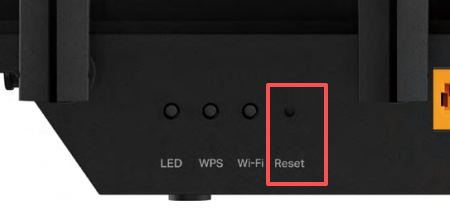
Have you reset the router as below: Press and hold the button for about 6 seconds until the Power LED blinks to reset the router to its factory default settings.

b14c84585cb3459cbad5e3dde04070df

After reconfiguration, are all the lights back on?


Please enable the guest network for comparison and check whether you can detect the 5GHz band.


If the network still doesn't work, it is recommended that you contact local support for further help.

Nice to Meet You in Our TP-Link Community. Check Out the Latest Posts: △Pre-release Firmware for Archer AX50 Introduces New Parental Control Features and Enhancements △Introducing AI QoS: Elevate Your Gaming Experience on the Archer GE800 Gaming Router △Connect TP-Link Archer BE550 to Germany's DS-Lite (Dual Stack Lite) Internet via WAN △Tether KidShield Test Recruitment - Safeguarding Children's Online Experience If you found the post or response helpful, please click Helpful. If an answer solves your problem, click "Recommended Solution" so that others can benefit from it.
  0  
  0  
#2
Options
Re:Entire 5Ghz band disappeared, and is no longer functional on Archer AXE75
Wednesday - last edited Wednesday

  @Ethan97 


Is the wifi 5 Ghz light on?


what happens if you press the wifi on/off button?


Are the antennas tight and secure?


Are you using different SSIDs?

  0  
  0  
#3
Options
Re:Entire 5Ghz band disappeared, and is no longer functional on Archer AXE75
Thursday

  @Joseph-TP I have already reset the router using that button. The Amazon Echo's have all been disconnected as I fear they could have been the problem.


After a reset, the lights are all on. 5Ghz network still doesn't exist. After enabling the guest networks, the 5Ghz guest network also doesn't exist.


Here's where it gets weirder: I was impatient, and got a replacement router of the same model, fearing it to be a hardware failure. After all of the setup, I STILL don't have a working 5Ghz network. Upon disabling the 6G network, the 5Ghz one now shows up on my devices, but is instantly kicked offline as soon as it's joined. Same goes for the guest network; it shows up, but gets kicked offline as it is joined.


I figured maybe it was something to do with my modem, somehow. Maybe Cox's Panoramic modem with its weird always-active hotspot is doing something funny? So I connect a new modem, get it all set up, and I'm still having the same problem of the 5Ghz network not working! So now I'm on entirely new hardware, have tried switching the SSID's, changing passwords, and it's still not working.


Could this be an issue related to my service from Cox? I'm not the most savvy when it comes to networking, but that still doesn't sound like a likely answer. To me it sounds like it's something potentially malicious, maybe a neighbor is doing something weird and fuzzing up the signals somehow? But I just don't know enough about networking to draw a conclusion, and that also sounds pretty far-fetched.

  0  
  0  
#4
Options
Re:Entire 5Ghz band disappeared, and is no longer functional on Archer AXE75
Yesterday

  @Ethan97 


It is not your ISP. Since you changed the modem and I assuming you are not using a gateway (modem router combo) that is using wifi in addition to the router. 
 

Power off the router and see if anything is broadcasting the same SSID as your router. That would cause interference.


Set the show ssid to show the ssid if the router has the option as hiding  it does not and is less safe. 
 

Use different SSIDs for each band.  Consider changing the ssids and passwords. 
 

the wider the bandwidth, the more interference you will get from other things.


On the device with the issue, delete (forget) the network and reset it back up on the device. 
 

Normally I would say do  a factory reset but using a different router would be doing the same.

  0  
  0  
#5
Options