
Feature request: Let us setup multiple band configurations for a device via connection preferences
 This thread has been locked for further replies. You can start a new thread to share your ideas or ask questions.
With the rise of Wi-Fi 6E/7 devices, would it be possible in a future update to allow certain devices to prefer at least two WiFi bands in connection preferences (i.e., utilize 5/6 GHz instead of being able to choose one)? This would help ensure that the device achieves a faster Internet connection and will be useful for those that have there units configured/spaced out properly for smooth coverage across these bands (smoother roaming).
I usually find that if I let my devices handle this option automatically, the connection may stall (might be due to 2.4GHz causing the other bands (5/6 GHz) to maintain said connection).
- Copy Link
- Subscribe
- Bookmark
- Report Inappropriate Content


Not sure what you mean, but I think you mean what I've complained about, Deco App doesn't handle WiFi7 specific SSID's, like the shared 2.4/5Ghz SSID or MLO SSID.
In the App, under the devices Connection Preference you can select 2.4, 5, or 6Ghz. But not the combined SSID nor MLO SSID.
Now I assume you are looking to have the 5 + 6Ghz MLO SSID to chose from?
It can and will be done by the Network Adapter it seems. For instance, I am using the TP-LINK TBE550E PCIe Wifi 7 adapter.
This PC connects on the MLO SSID.
This is what I see for the MLO connection:
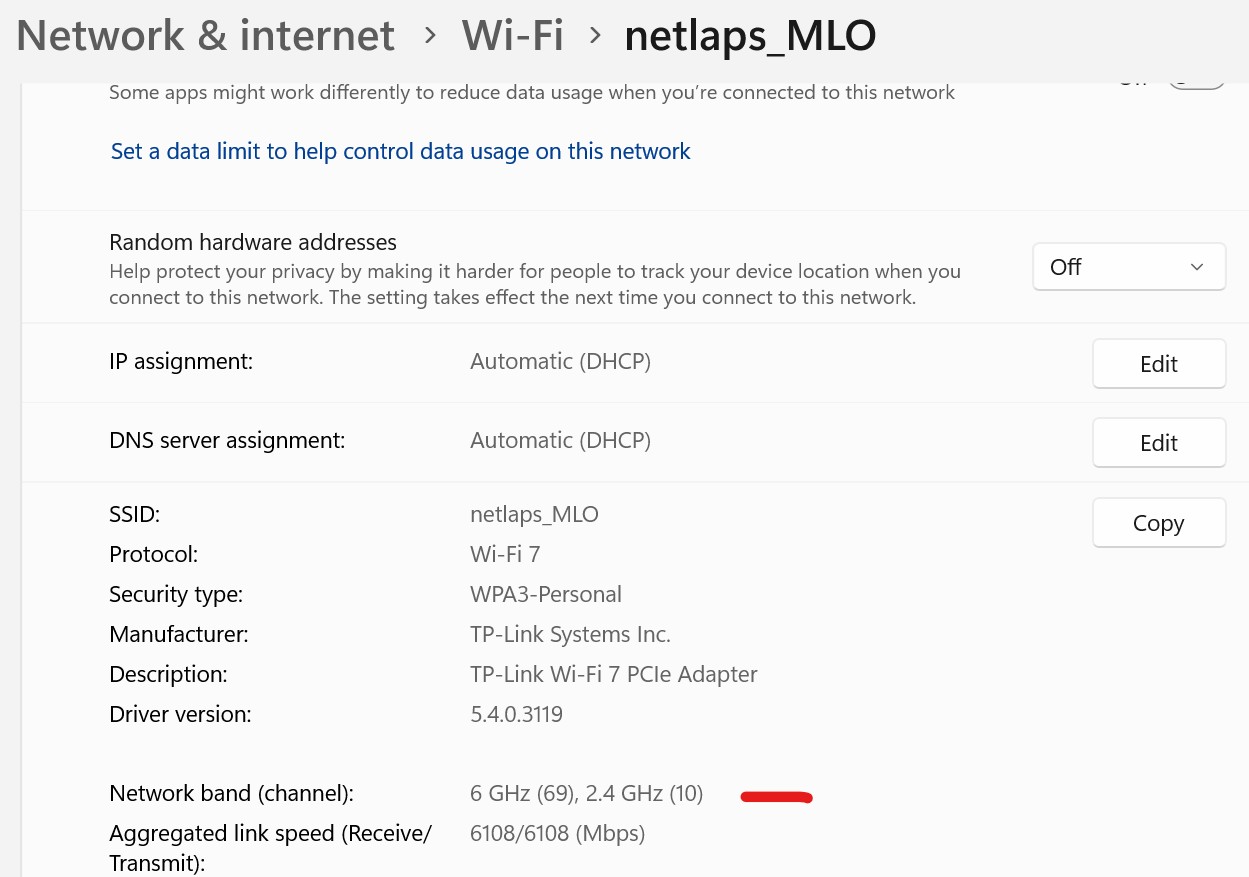
I get NO CHOICE. This is driven by the Network Adapter, the TBE550E it seems does NOT support MLO using the 5+6Ghz SSID.
TP-Link defined these on this web page ---> https://www.tp-link.com/us/wifi7/https://www.tp-link.com/us/wifi7/ , and from it:
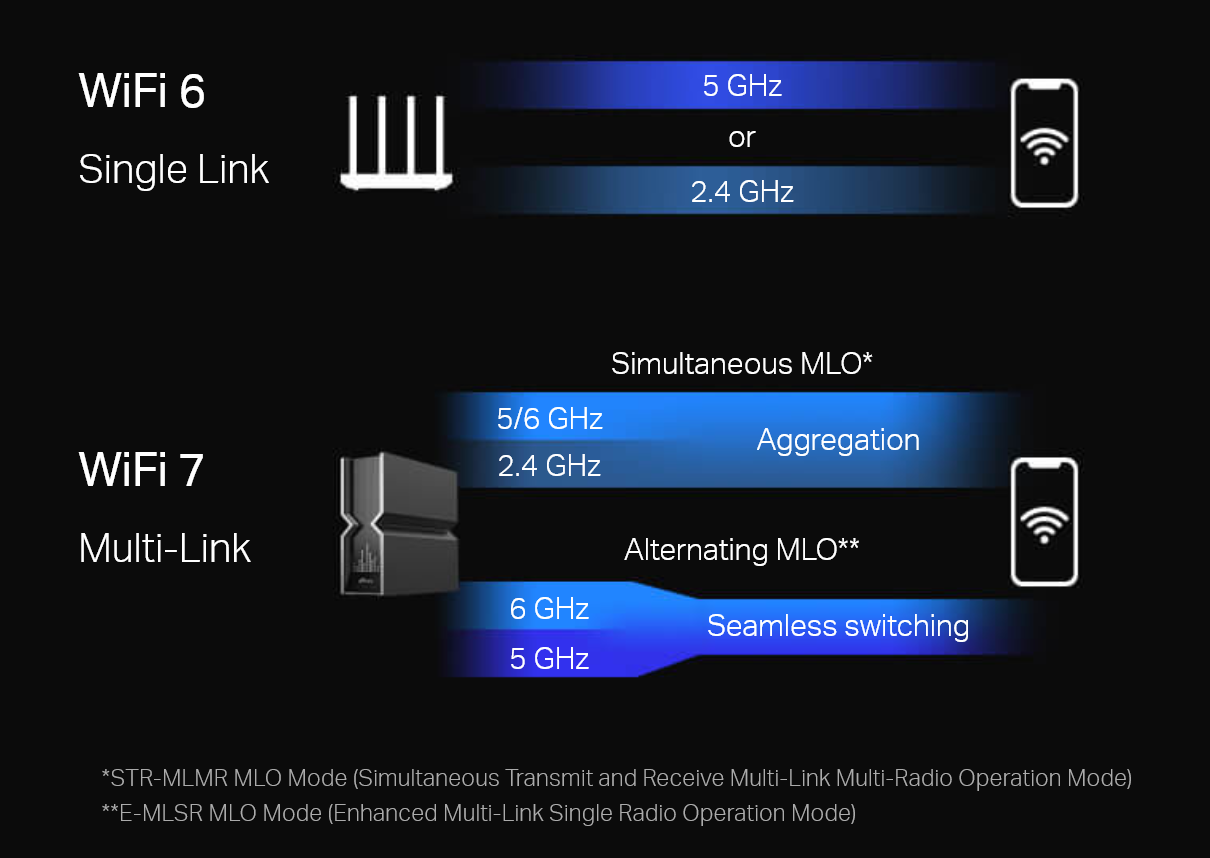
Seamless switching it what you are asking for, called E-MLSR,
However, on my wife's PC (and mine which I am not using right now) is an Intel BE200 M.2 Network Adapter.
Here PC, using the SAME Deco BE68 that I use this is her connection is 5+6Ghz when using MLO SSID.:
It is not the Deco unit nor Deco App that controls this, but the Network Adapter does.
By the way, in the Apps forum I posted this ---> https://community.tp-link.com/us/home/forum/topic/814694 which is my request for MLO support.
- Copy Link
- Report Inappropriate Content
I think what I meant was the roaming aspect and preferred Wi-Fi band choice for a device if you were to utilize a single SSID with all bands (in my case 2.4/5/6 GHz). I understand you can select one preferred Wi-Fi band under connection preferences, but there should be an option to choose at least two (in my case, I'd select 5/6 GHz for higher end devices that support it).
For example, using an iOT network (2.4/5 GHz) and my main network (5/6 GHz). I found that when having it set up like this, devices on the main network roam more consistently across my Deco units. I went back to having a single unified SSID due to connection preferences not working properly on the iOT network (that's a different issue).
When having all bands under a single SSID, roaming isn't as smooth and I believe it's due to the 2.4GHz indicating that the weaker connection (5/6 GHz) is still good.
While having the option to choose one preferred band is good, there are certain situations where 5GHz would be preferred than 6GHz and vice versa for these types of devices.
- Copy Link
- Report Inappropriate Content
Gotcha, but some of what you wish for is in the Network Adapter and some are in the Deco model.
I've got a 3 Deco BE68.
Look ar my MLO SSID:
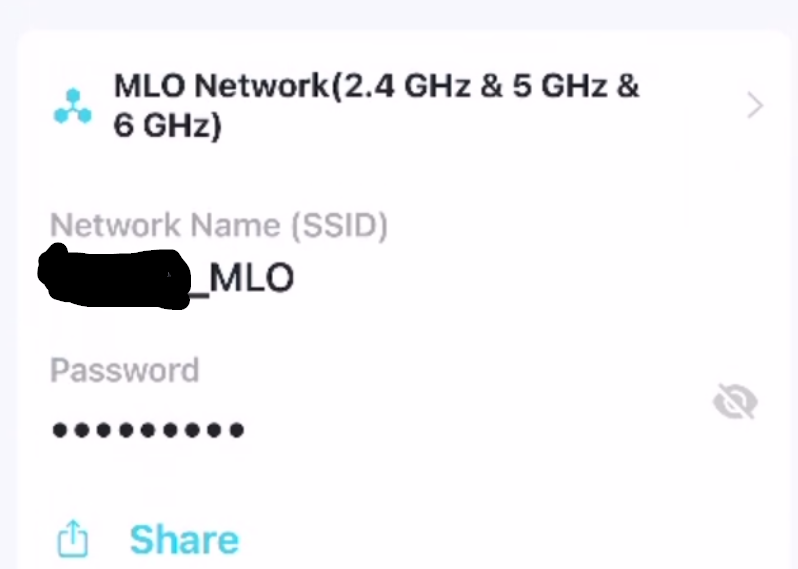
Not all the Routers/Deco's have that capability.
In this case, depending on the ability of the Network Adapter that does connect via MLO, it will use some combination of the 6Ghz and either the 2.4 of 5Ghz band that is can use. 6+5Ghz being the better choice.
Now my iPhone is using the MLO SSID:
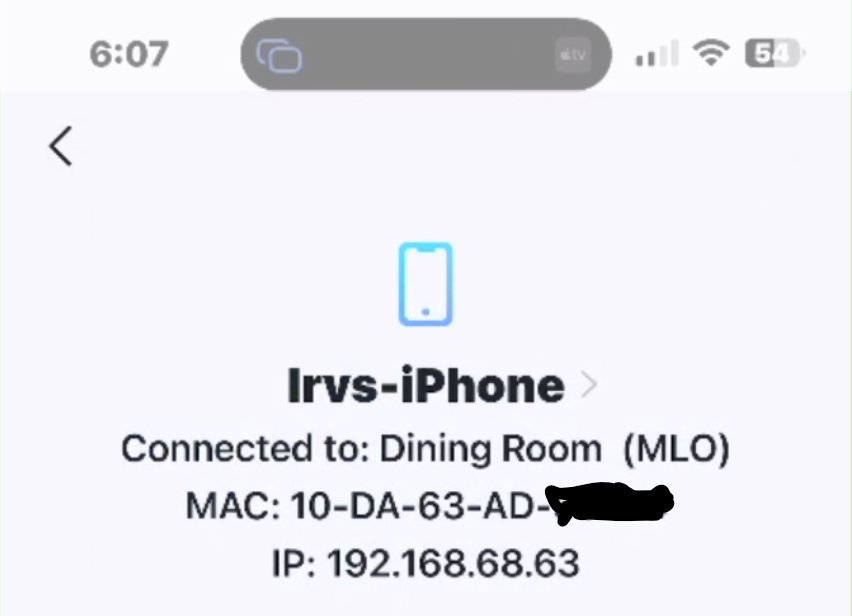
It has no MLO capability.
But it does connect to it:
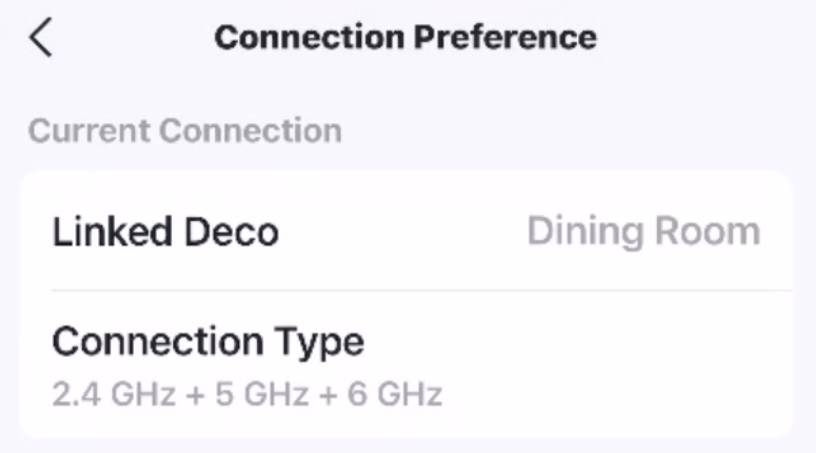
It is like that when my Preferred Wi-Fi Band is set to Auto, but when set it to 5Ghz, out of the 3 bands it uses the 5Ghz band.
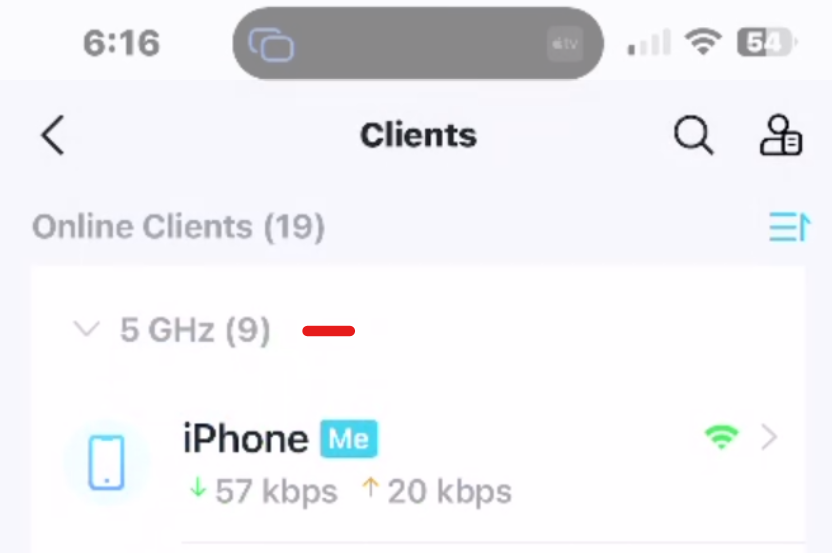
When it is set to Auto for the band I don't know what band it is on? No way to tell via Deco, not the iPhone Wireless settings.
Maybe if I had a WiFI scanner on the iPhone I might be able to see the Channel it connected too and then figure out the Band?
- Copy Link
- Report Inappropriate Content

@IrvSp Try Network Analyzer by Jiri Techet. There's a free version. I've read good things about a WiFiMan by Ubiquiti I think, but since I already am happy with Network Analyzer (and had paid for the no add version) I did not try it.
My Deco BE95 only allows MLO on 5 GHz and 6 GHz, but now I finally realize it seems to max out at 3 channels, as yours does 2.4 as well, and my RE655BE does all 3 too....
- Copy Link
- Report Inappropriate Content
Thanks,
I already have that Network Analyzer on the iPhone, free version that is.
It tells me a LOT, but NOT the SSID BAND it is connected too... right now, on MLO SSID and I can't see, like on a Windows PC, what 2 bands it is using? Only that it is connected via MLO.
It really doesn't matter too much what number of SSID's the router can put out as the Shared or MLO SSID, as much as what the Network Adapter can use for MLO.
Like I said, I have 2 Network Adapters on my PC, the TP-LINK's TBE550E and Intel's BE200. Both are WFi 7 adapters as is my Deco BE68.
The TBE550E can not handle the 5 + 6Ghz MLO connection. Only 2.4 + 5GH or 2.4 + 6Ghz. BE200 however does work with 5 + 6ghz MLO SSID.
The good part about the total Mesh solution is that I have the Shared SSID covering ALL 3 bands... 2.4, 5. and 6Ghz...
If I were 'lazy', I could use just the Shared SSID on ALL devices, 'assuming' the device and the router are capable of making the right choice for the device.
- Copy Link
- Report Inappropriate Content

- Copy Link
- Report Inappropriate Content
It depends if your Deco has the 'mesh' capability.
In the Deco App, on the WiFi settings, click on the MLO network SSID. Now click on Advanced, and then the Band.
I get 2 choices, 5Ghz, 6Ghz, or 2.4Ghz, 5Ghz, and 6Ghz which is what I selected.
Now that 5 + 6Ghz could cause some problems IF your Network Adapter doesn't support using just those 2 bands... not ALL due.
I see NO value personally to having the 3 band MLO SSID? However, since one of my Network Adapters will not do 5 + 6Ghz MLO, I'm not sure what or how it would connect. Suspect 6Ghz only, or know to also fine the 2,4Ghz band to use as well?
- Copy Link
- Report Inappropriate Content
@RudhyR I unfortunately have a single BE95, so nothing needs to be allocated for backhaul. It is wired to the rest of my network which I would use to backhaul if possible. (Not all Decos can do Ethernet backhaul).
I have a couple of WiFi 7 Range Extenders: RE235BE, RE405BE, and RE655BE. Since only the RE655BE is tri-band, it allows me to create an MLO SSID using all three bands. Strangely the BE95, on the Deco app, only allows 5 GHz, and 6 GHz. It appears to be hiding the fact that it is tri-band, in this case 5 GHz, 6 GHz-1, AND 6 GHz-2.
- Copy Link
- Report Inappropriate Content
On the BE95 using Deco App I only got 5 and 6ghz for MLO :). My 3 nodes are also wired
- Copy Link
- Report Inappropriate Content
@IrvSp Yeah I'm afraid at least on my OnePlus Open, the WiFi settings Page shows which SSID and what (EDIT) band it is connected to. That said I just sat it within one ft of my BE95, toggled WiFi off, then on. It only shows connected to 6 GHz, both on the settings page and the Network Analyzer App. Now that I've moved to a couch, it shows me connected the MLO SSID but exclusively on 5 GHz...
- Copy Link
- Report Inappropriate Content
Information
Helpful: 0
Views: 3781
Replies: 42
Voters 0
No one has voted for it yet.