Multi-node mesh won't give out Guest Network WiFi leases from secondary Deco devices

I have four X55 devices connected via Ethernet to a Ubiquiti switch. The "Guest Network" won't allow people to connect when connected to a secondary Deco devices.
Firmware: 1.2.10 Build 20241105 Rel. 40010
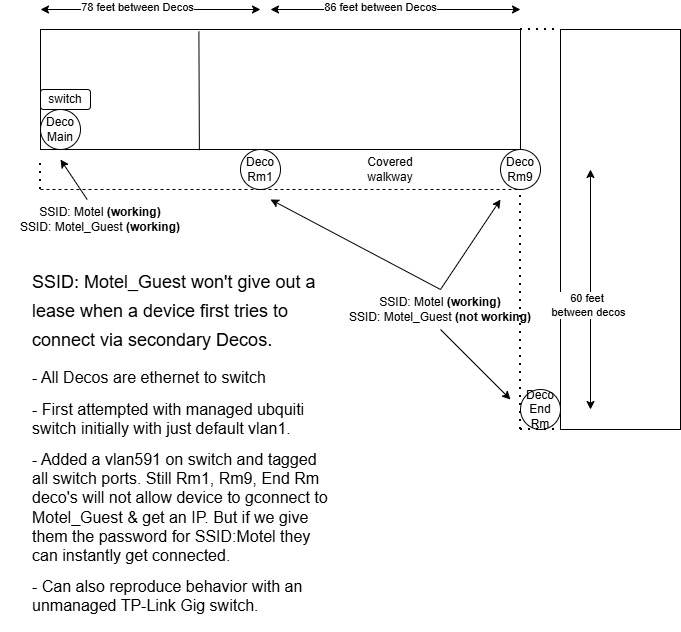
Network Diagram: <image posted below>
I want to enable guest network WiFi for the motel and have BOTH SSIDs on all Decos across the motel building. I did the standard setup but guests can’t connect. I first setup SSID: ‘Motel’ and it works just fine. Then went to the “guest network” feature in the app and created SSID: Motel_guest. Works just fine in the motel lobby/breakfast area guests get connected just fine off the main Deco. But if a guest, that has never been here before, checks in, walks down the building to their room, out of range of the ‘main deco’, they cannot connect to “Motel_guest”. It never connects them.
- Connecting to “SSID: Motel” works perfectly from main node as well as from node2, node3, or node4 but trying to connect to the guest WiFi only works from main node, does not work off node2, node3 or node4.
- As an extra test I gave a guest staying at the far end of the motel farthest from the main deco, the WiFi password to SSID: ‘Motel’ and they instantly connected with no issues. Had same guest’s wife try connecting her phone to SSID: 'Motel_guest' and it fails. She then tried ‘Motel’ and voila, gets connected.
- Initially, I thought maybe because the Ubiquiti switch is a managed switch this was the problem. I temporarily swapped it out with an 8-port TP-link unmanaged switch, same behavior.
I noticed that in the “Advanced” settings of the “guest network” section in the app that a VLAN ID of 591 showing and read in the Deco support pages that for "managed switches" you need to create a vlan and tag the ports. I created a vlan 591 on the Ubiquiti switch and tagged all the ports, still didn’t help, same behavior as before. But the unmanaged tp-link switch I also tested with has no ability to create vlans so it should have worked according to the Deco support article but any device (phone/tablet/laptop) that tried to connect to the guest WiFi from node2, 3 or 4 still failed to get an IP so I switched back to using the Ubquiti switch since putting an unmanaged switch in place didn't resolve the issue.
Something in the Guest WiFi isolation when the mesh is connected via a switch (managed or unmanaged) seems to be causing this behavior for Guest Network.
Anyone know how I can get this working or if this is a known bug that the Deco developers are working on fixing? Doing "wireless backhaul" between the nodes slows the speeds for motel customers too much so we want use ethernet backhaul.
Here's the diagram of deco placements: