BE3600 Guest network security only showing Open, Enhanced Open, Encrypted, and Portal

BE3600 Guest network security only showing Open, Enhanced Open, Encrypted, and Portal

BE3600 Guest network security only showing Open, Enhanced Open, Encrypted, and Portal
Tuesday
Model: Archer BE3600  
Hardware Version: V1
Firmware Version: 1.2.3 Build 20251209 rel.18810(5553)

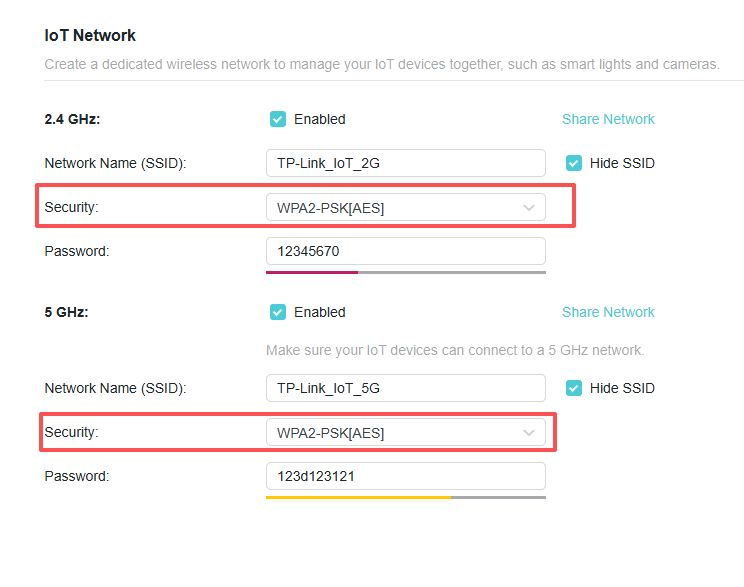
I have a couple of old devices that will not connect to the BE3600 when it is in WPA3-Personal+WPA2-PSK[AES] mode but will when it is in WPA2.  I would prefer not to set my main wireless network to WPA2 but unfortunately the firmware does not allow for anything but WPA3 for the Guest Network if I want a password.  Open works but has not password, Enhanced Open is WPA3 without password, Enhanced does not work even though it is supposed to be both WPA3 and WPA2.


I have updated to the latest firmware but that made no difference.  Is there anyway to get WPA2 on the Guest Network that is password protected??

 

  0      
  0      
#1
Options
3 Reply
Re:BE3600 Guest network security only showing Open, Enhanced Open, Encrypted, and Portal
Thursday

Hello @GPappy ,

Have you tried the IoT network? Please refer to How to set up IoT Network on TP-Link wireless router.


Nice to Meet You in Our TP-Link Community. Check Out the Latest Posts: △New Firmware Update for Archer BE260/Archer BE400 to Support VPN Merge, New ECO Mode, and More △Connect TP-Link Archer BE550 to Germany's DS-Lite (Dual Stack Lite) Internet via WAN △Tether KidShield Test Recruitment - Safeguarding Children's Online Experience If you found the post or response helpful, please click Helpful. If an answer solves your problem, click "Recommended Solution" so that others can benefit from it.
  0  
  0  
#2
Options
Re:BE3600 Guest network security only showing Open, Enhanced Open, Encrypted, and Portal
Yesterday
That works. So I guess I need to use the IoT network for Guests. Not sure why they set the Guest Network Security up differently.
  0  
  0  
#3
Options
Re:BE3600 Guest network security only showing Open, Enhanced Open, Encrypted, and Portal
Yesterday

Hi @GPappy ,

The Guest Network is specifically designed to provide internet access to visitors without exposing your main network or connected devices, ensuring a higher level of isolation and security. 
On the other hand, the IoT Network is intended for smart home and IoT devices and is not isolated from the main network, allowing users to control these devices locally. 
This difference in network isolation and intended use is why the security settings and network behavior may differ between the Guest Network and IoT Network. 

Nice to Meet You in Our TP-Link Community. Check Out the Latest Posts: △New Firmware Update for Archer BE260/Archer BE400 to Support VPN Merge, New ECO Mode, and More △Connect TP-Link Archer BE550 to Germany's DS-Lite (Dual Stack Lite) Internet via WAN △Tether KidShield Test Recruitment - Safeguarding Children's Online Experience If you found the post or response helpful, please click Helpful. If an answer solves your problem, click "Recommended Solution" so that others can benefit from it.
  0  
  0  
#4
Options