Hello @ElFlamaBlanca ,
Thanks for contacting our community.
Here's my recommendation for your setup:
Recommended Configuration: 2 SSIDs
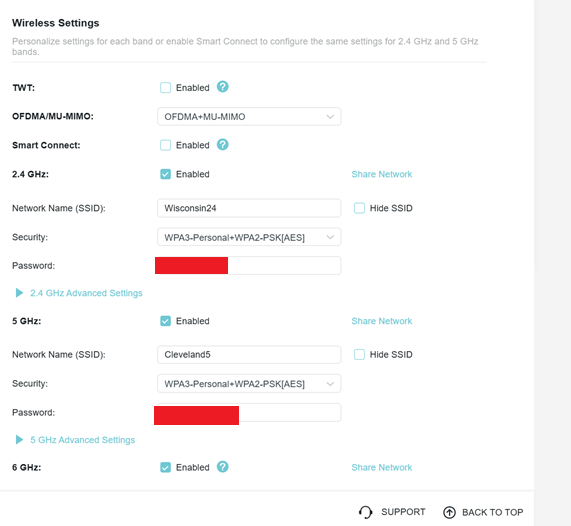
1. Main Network SSID (for 2.4GHz, 5GHz, and 6GHz bands)
• Use the same SSID and password for 2.4GHz, 5GHz, and 6GHz
• This allows your devices to automatically connect to the best available band based on their capabilities
• Your modern devices (Galaxy phones, iPhone 15, laptops, gaming consoles) will automatically select the optimal band
• Your 2.4GHz-only devices (Nest cams, picture frame, Kobo) will connect to 2.4GHz
• Your Wi-Fi 7 capable devices can use the 6GHz band when available
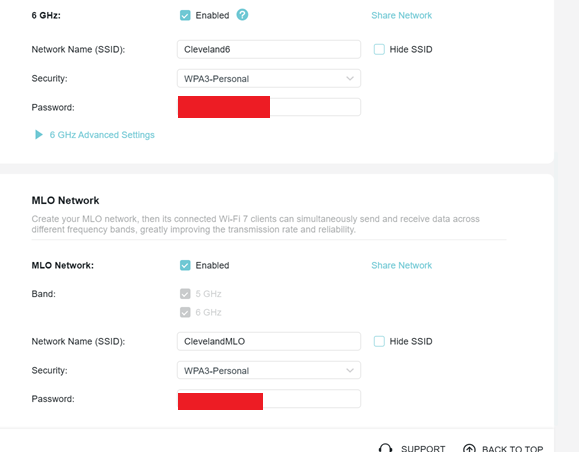
2. Separate MLO Network SSID
• Create a different SSID and password for the MLO network
• Important: The MLO network name should be different from your main network name to avoid potential issues
• It's recommended to use 5GHz and 6GHz for the MLO network, as 2.4GHz does not provide significant performance improvement
• Only your Wi-Fi 7 devices that support MLO (like the Galaxy S25+ and Fold 7) will benefit from this network
• Devices that don't support MLO can still connect to this network but will only use a single band
To set up the MLO network:
• Log in to your router's web interface at http://tplinkwifi.net
• Go to Advanced > Wireless > Wireless Settings
• Enable the MLO network and set a different SSID and password
• Save the settings (the router will reboot)
Alternatively, you can use the Tether app: open the app, log in to your router, go to MORE > Wireless Settings > MLO Network, and enable it.
Why this configuration works best:
The 2.4GHz, 5GHz, and 6GHz bands offer different characteristics:
• 2.4GHz: Better coverage and wall penetration, but slower speeds and more interference • ideal for IoT devices
• 5GHz: Faster speeds with good balance of coverage and performance • great for most devices
• 6GHz: Highest speeds and lowest latency with cleaner signal, but shorter range • perfect for demanding applications
By using the same SSID for your main network across all three bands, your devices will automatically connect to the best band they support, and you won't need to manually manage which device connects where. Your wired devices (Xbox Series X, Nvidia Shield, ROG laptop) will use Ethernet for the best performance anyway.
Note: The Wi-Fi mode for 2.4GHz, 5GHz, and 6GHz must be set to 802.11be (default) for MLO to work. MLO will only function if both the router and client device support this feature.
Hope these suggestions can help.