
BE65 – OpenVPN Client Connects but No Internet (Firmware 1.3.2 Build 26040912 Rel. 40631)
BE65 – OpenVPN Client Connects but No Internet (Firmware 1.3.2 Build 26040912 Rel. 40631)

I recently upgraded from a Deco XE75 Pro to a Deco BE65 Pro, and I’m running into a serious issue with the OpenVPN Client feature that wasn’t present on the XE75 Pro.
Setup details
-
Model: Deco BE65 Pro
-
Firmware: 1.3.2 Build 26040912 Rel. 40631
-
VPN Type: OpenVPN Client
-
Client Device: NAS (assigned in the VPN Client List)
-
Using the exact same .ovpn file that worked perfectly on the XE75 Pro
Issue The BE65 Pro establishes the VPN connection successfully. Running curl ipinfo.io/ip from the NAS returns the correct VPN exit IP, which confirms the tunnel is up and DNS resolution works. However, no other internet traffic works through the VPN. The connection is established, but the device has no actual internet access through the tunnel. The same configuration works normally on the XE75 Pro, so this appears to be a routing or NAT issue introduced in the BE65 Pro firmware.
Troubleshooting already attempted
-
Removed and re‑added the NAS to the VPN Client List
-
Rebooted the main Deco and satellites
-
Tested both UDP and TCP configs
-
Disabled IPv6
-
Tried multiple OpenVPN profiles from the provider
-
Verified DNS settings
None of these resolved the issue.
Related reports from other users TP‑Link’s forum blocks direct URLs, so here are the thread references written in a safe format:
-
community dot tp-link dot com → us → home → forum → topic → 652448
-
community dot tp-link dot com → us → home → forum → topic → 610781
-
community dot tp-link dot com → us → home → forum → topic → 620947
-
community dot tp-link dot com → us → home → forum → topic → 608556
All of these describe the same behavior: the VPN tunnel connects, the device gets the correct public IP, but general internet traffic does not route through the VPN.
Request for support I’d like to know whether this is a known issue in the current BE65 Pro firmware, and if so, whether there is a beta firmware or patch available that addresses the VPN routing problem. If it’s not yet tracked, please escalate this to the engineering team. I can provide logs, the OpenVPN config (with credentials removed), and any additional information needed.
This feature worked reliably on the XE75 Pro, so the regression on the BE65 Pro is significant and currently makes the VPN Client unusable for my setup.
Thank you in advance for any guidance or fixes you can provide.
- Copy Link
- Subscribe
- Bookmark
- Report Inappropriate Content

Hi everyone,
I had the same problem after the BE65 upgraded yesterday here in Spain. My set up is 1 x BE65 in router mode (main), 3 x XE75 Pros, 2 x XE75 & 1 x X50 all individually hard wired back to the BE65 through a network switch. Non of my subscribed wire guard VPNs would work including a home to home (UK to Spain) VPN server / client using the wire guard protocol. Non of the fixes detailed above resolved my issue (VPNs showed connected but would not allow streaming TV traffic to pass through). Eventually I FOUND THE FIX. Turn Off Qos at the top of the more tab in the app and hopefully your problems will go away.
Also to be on the safe side I have disabled auto update on my BE65 system located in the UK which for reasons unknown is still running firmware 1.2.0 Build 20250718 Rel. 43949. The server to client using 2 x systems with BE65s as the main router has been rock solid for nearly one year without any dropped connections so I would conclude TP links firmware upgrade definitely caused the problem for me.
- Copy Link
- Report Inappropriate Content
@Giles-Mullen Lifesaver! Yup — that completely fixed it. QoS was the thing breaking the VPN tunnel. I disabled it and everything works perfectly now.
Red frame QoS enabled
Green frame QoS disabled
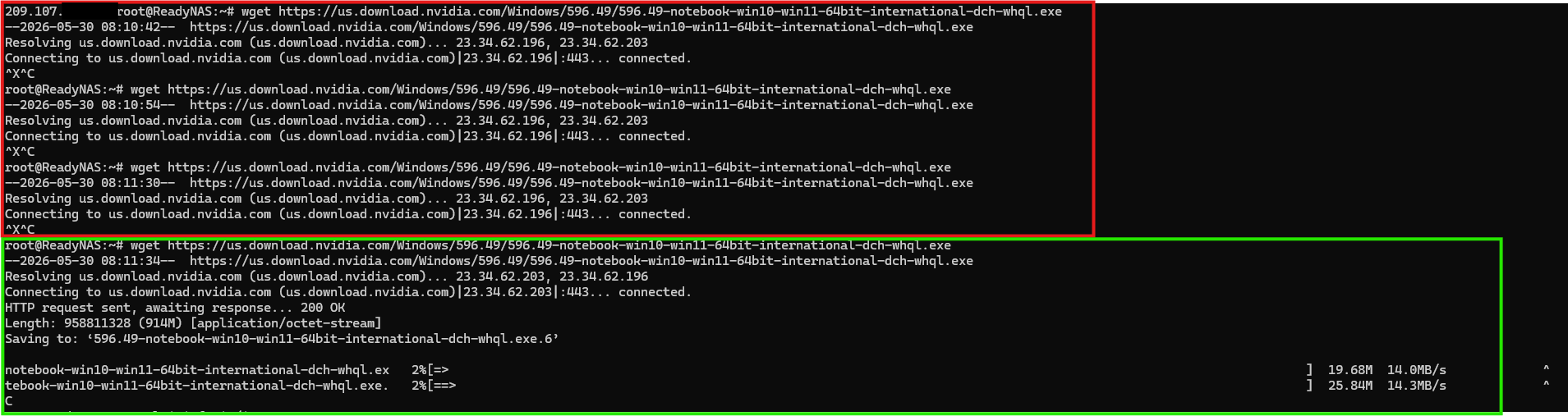
@HelpFixDecoApp I hope TPlink can fix this issue fast and give us back QoS....
@Ryan
- Copy Link
- Report Inappropriate Content

- Copy Link
- Report Inappropriate Content


Hi,
Thank you for your attempt and for sharing your experience. Usually, enabling the QoS feature on the Deco won't affect the VPN connection. In your situation, if you'd like to do further troubleshooting, we suggest emailing forumsupport.usa@tp-link.com with the following information for further analysis.
Subject: [Forum Escalation][ID 864300] BE65 – OpenVPN Client Connects but No Internet
Forum Nickname: [User Provided]
Thread URL: https://community.tp-link.com/us/home/forum/topic/864300
Model&Version: [User Provided]
Description: [User Provided]
Any Other Relevant Information (Logs, Config Files, Images, etc.): [User Provided]
Once sent, a ticket will be created in our support system, and a member of the support team will follow up on your case.
Best Regards
- Copy Link
- Report Inappropriate Content
Information
Helpful: 0
Views: 659
Replies: 15
Voters 0
No one has voted for it yet.