
Deco BE63 + AX3000 constant connectivity issues

Hello, I have a BE63 connected directly to the modem in my basement and an AX3000 upstairs. Previously I used to have two AX3000 points in a 2400 sq ft house but I wasn't getting signal in one bedroom, garage or the outdoor cameras. Now I am getting WiFi signal everywhere but the connectivity keeps dropping. I'm often unable to dial into work calls or watch tv.
Have already tried rebooting and firmware is updated. When connectivity is good, download speed is about 250 mbps.
Any one here can help please?
- Copy Link
- Subscribe
- Bookmark
- Report Inappropriate Content

Welcome to the community.
Can you please provide the model number and firmware versions of your BE63 and the AX3000. You can find this info using the links below.
How to find the firmware version of Deco - How to Find the Hardware Version on Your TP-Link Device
For the AX3000 use the following directions. How to find the hardware and firmware version of my TP-Link device - Once this page loads click on
"How to find the hardware and firmware version of your devices on the Tether app"
Also can you please confirm which AX3000 you have as there are three different tp-link products that use the AX3000 tag. I have included links to all of them below.
Or
AX3000 Gigabit Wi-Fi 6 Access Point
Or
AX3000 Whole Home Mesh Wi-Fi 6 System
Once we have this info we can move forward in trying to solve this problem for you.
Thanks
- Copy Link
- Report Inappropriate Content
for BE63
1.2.10 Build 20251229 Rel. 42008
for AX3000
Model: W6000
Next - gen whole house WiFi system
firmware 1.4.0 Build 20241212 Rel. 48194
thank you
- Copy Link
- Report Inappropriate Content
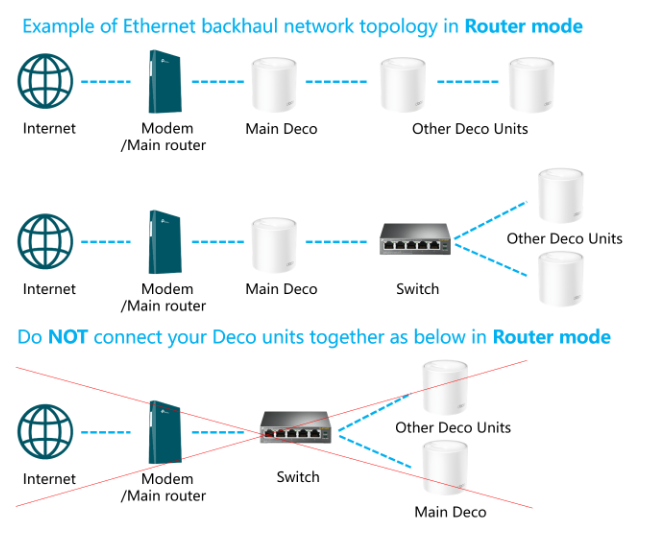
Looking at the image below which one best describes your set up. Also which deco is the main and which one is the satellite deco?
- Copy Link
- Report Inappropriate Content
the first image.
the main deco is BE63
the other deco unit is AX6000.
My home is 2400 sq ft and outdoor space is 6000 sq ft
- Copy Link
- Report Inappropriate Content


Hi,
The main Deco BE63 has a new firmware version 1.3.2. You can visit this link to download the new firmware and update it via the Deco's web UI. Then test if it helps.
How to Update TP-Link Deco Firmware
Please provide the following information if the same phenomenon persists.
1. Please describe your network diagram in detail.
2. What's the LED status on your Deco nodes when the disconnect issue occurs?
3. Do all client devices drop connection simultaneously? Are they disconnected from Wi-Fi, or are they still connected to Wi-Fi but have no internet?
Best Regards
- Copy Link
- Report Inappropriate Content
Information
Helpful: 0
Views: 183
Replies: 5
Voters 0
No one has voted for it yet.