
C225 wifi handshake mesh 3/7 goes wrong
 This thread has been locked for further replies. You can start a new thread to share your ideas or ask questions.
C225 wifi handshake mesh 3/7 goes wrong
This thread has been locked for further replies. You can start a new thread to share your ideas or ask questions.
I just spend one day debugging why my two c225 can't connect to wifi and my c530ws flies trough the setup of the camera.
Turns out that the mesh system I am using combining the different wifi frequencies to one ssid can't make up what type of wifi the c225 needs (2.4). However the c530ws connects fine! The option I refere to: Prioritize 5 GHz OR Tri-band auto-selection : Huawei
We need a new firmware that resembles the c530ws so the mesh system knows to what frequency tho point the c225 to. Also during setup I see my ssid 3 times in the selection list, witch makes no sense at all.
- Copy Link
- Subscribe
- Bookmark
- Report Inappropriate Content


Hi,
If you see three identical SSIDs when configuring the Tapo C225, it may be that your router broadcasts three SSIDs with different MAC addresses but the same name, so the camera recognizes them all. You can confirm this information with the router's technical support.
When configuring the Tapo Camera, we recommend that the router only broadcast 2.4G Wi-Fi if possible. The settings on the router may cause the camera to be unable to connect, and you can change the settings on the router back after successfully configuring the camera.
Best Regards
- Copy Link
- Report Inappropriate Content
Hi,
If you see three identical SSIDs when configuring the Tapo C225, it may be that your router broadcasts three SSIDs with different MAC addresses but the same name, so the camera recognizes them all. You can confirm this information with the router's technical support.
When configuring the Tapo Camera, we recommend that the router only broadcast 2.4G Wi-Fi if possible. The settings on the router may cause the camera to be unable to connect, and you can change the settings on the router back after successfully configuring the camera.
Best Regards
- Copy Link
- Report Inappropriate Content
@Solla-topee your probably right on that one, it's just strange this is the only camera I ever had that does this. Other camera just see one ssid. So let's not make this the main problem being that it can't connect properly like the c530 for example.
I am asking for a solution so it works out of the box not we me having to reconfigure my network and use the feature set I have mentioned of the mesh 3 or 7 set.
hope you understand compatibility is very important for consumers that just send a product back if it does not fit their environment.
- Copy Link
- Report Inappropriate Content
Hi,
We have a new firmware that may be helpful in this situation. Please confirm the following information if you are willing to try it.
1. Would you please describe your network diagram? How many Huawei mesh units do you have? What's the model number of the mesh units?
2. Could you please send us a picture showing the option "Prioritize 5 GHz OR Tri-band auto-selection" on your mesh router?
3. Please send me(@Solla-topee) "Forum ID 817336 + camera's MAC address" via a private message.
Best Regards
- Copy Link
- Report Inappropriate Content
Hi,
I have currectly 1 mesh 7 (WS8800 main router) and 2 mesh 3 (WS8100) devices active and can expand by adding 2 more.
The 3 devices are placed in a triangle on the main floor so the signal trength is more then optimal.
#wifi-mesh3
#wifi-mesh7
This is the main featrue that manages the right connection speeds between devices.
Off as you can see.
ill send you a pm whit one of my C225 cameras hardware adress
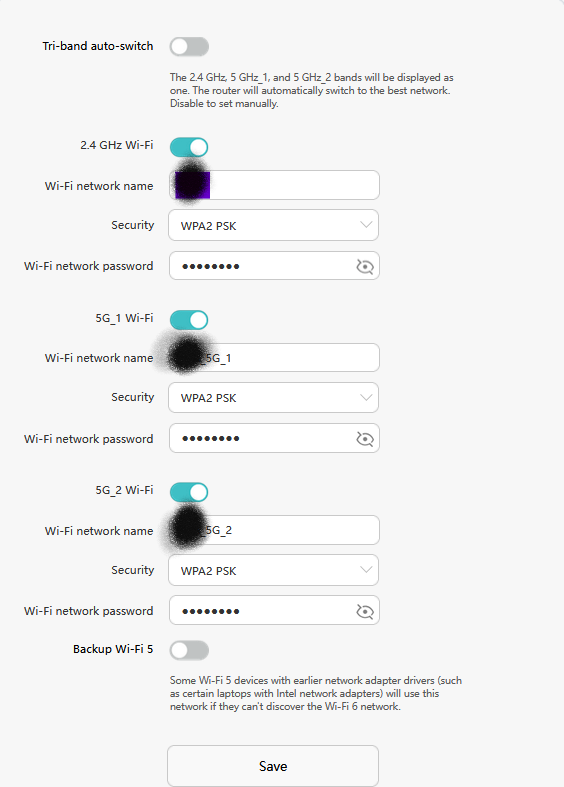
- Copy Link
- Report Inappropriate Content
Hi,
The new firmware has been pushed to your camera, please update it via the Tapo app and check if it helps.
Best Regards
- Copy Link
- Report Inappropriate Content
- Copy Link
- Report Inappropriate Content
Hi,
Thank you for the information provided via the private messages. The new firmware has been pushed to the other camera, please update it via the Tapo app and check if it helps. You can contact us if there are any updates.
By the way, the changes in the firmware may be added to the new official firmware. However, we do not have the information about when it will be released.
Best Regards
- Copy Link
- Report Inappropriate Content
New problem! As the mesh/wifi issue was gone i did a reset.
Now the bluetooth seems to be broke needed for setup of the camera. I seem to have bricked my cameras :|
- Copy Link
- Report Inappropriate Content
Hi,
It does not seem the firmware bricks your cameras, because the camera is working after upgrading the firmware and before resetting.
Regarding the problem you have, please confirm the following information.
1. Please press and hold the reset button on the camera for 10 seconds to factory reset it, remove the camera from the Tapo app if it's there.
2. Wait for 2 minutes and check if the LED on the camera is flashing red and green.
3. If so, try to reconfigure the camera and check if you can set it up successfully.
4. If you have a problem setting it up, please refer to the instructions here to troubleshoot. Please let me know what error message appears and the troubleshooting you did if the problem persists.
Best Regards
- Copy Link
- Report Inappropriate Content
i got as far as resetting the camera then the normal setup/connection failed. I did not try to connect though wifi as I realized later that could be an option. However I replaced the camera for a new model that works out of the box. Thanks for the effort and help.
- Copy Link
- Report Inappropriate Content
Information
Helpful: 0
Views: 1191
Replies: 11
Voters 0
No one has voted for it yet.