
BE230 puts DHCP requests every 30s despite putting it in static IP mode

Hi, TP Link team,
I found another bug, I am currently using this router in AP mode and my ASUS BE86U as the primary router, as the BE230 has a lot of bugs. Some bugs I found:
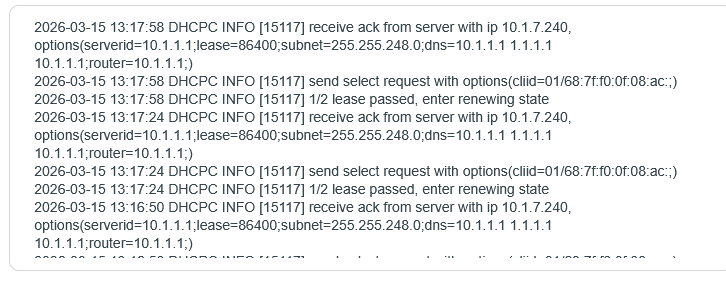
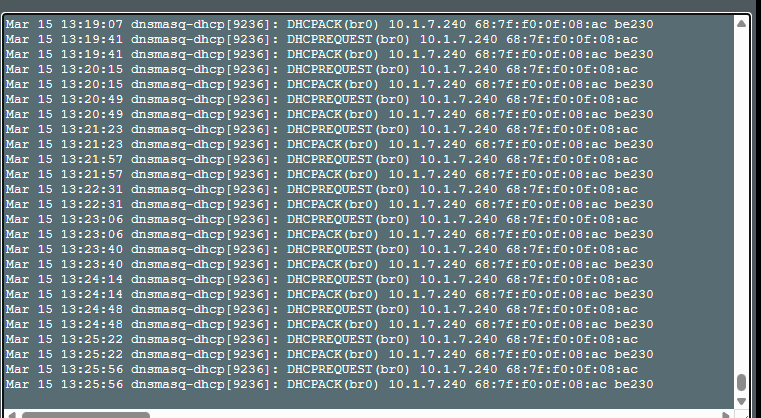
1. DHCP lease failure in AP Mode. My ASUS BE86U has static entry for be230 pointing to 10.1.7.240 bound to be230 MAC address, but BE230 TP link is attempting to lease every 34 seconds even when I have fixed static entry.
Even in static IP mode in TP Link BE230 it puts DHCP requests indefinitely.
CAUTION MY ASUS BE86U is not bugged, it is TP BE230 that is bugged. I am using ASUS Merlin Firmware
.
2. IPv6 is bugged as I mentioned earlier. IPv6 is not connecting after router auto restart in PPPoE, need to manually reboot only then it connects. I found out upon inspecting the packets that the Firmware is not handling these correctly.
TP BE230
ASUS BE 86 U
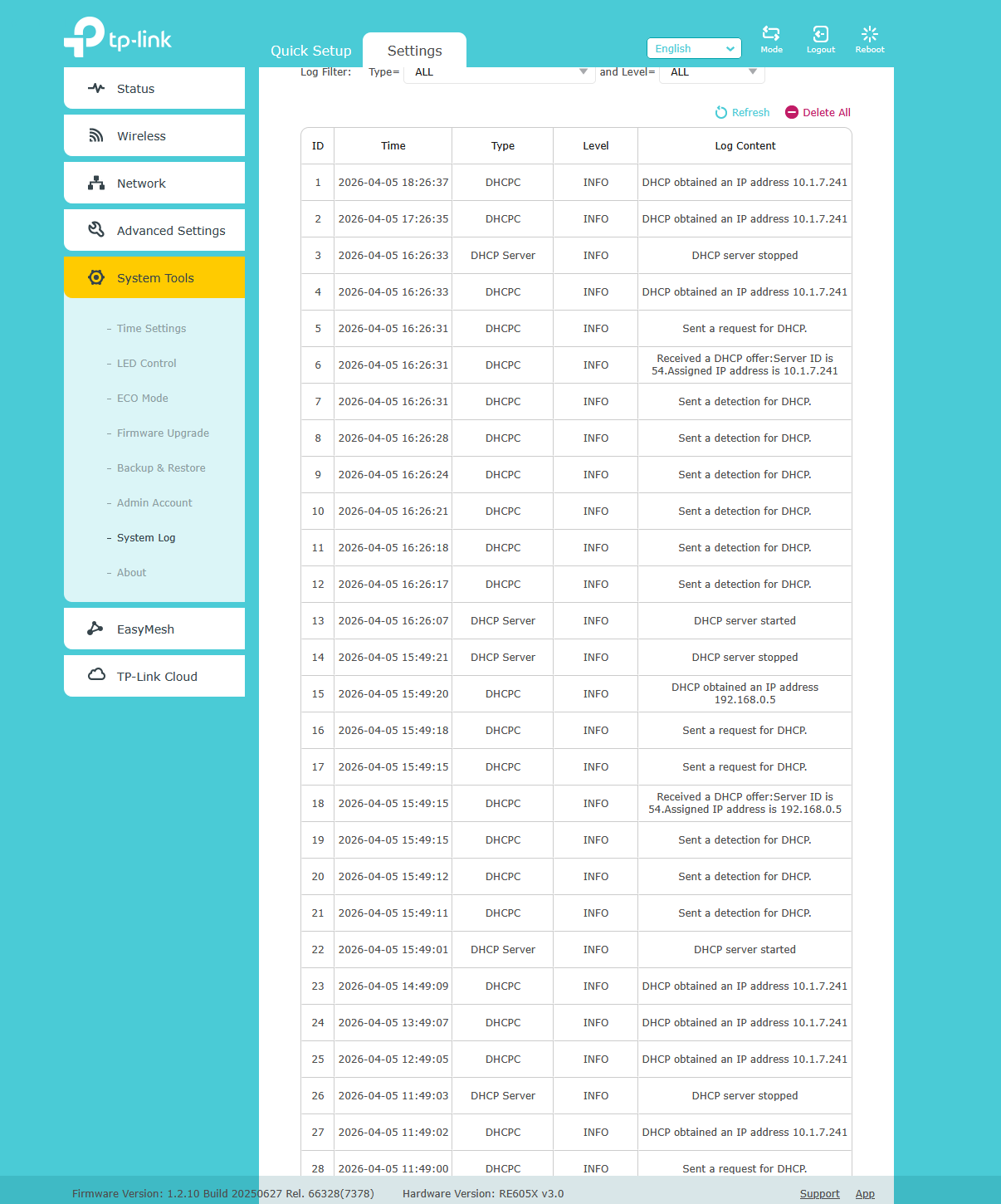
RE605X:
- Copy Link
- Subscribe
- Bookmark
- Report Inappropriate Content


rane61 wrote
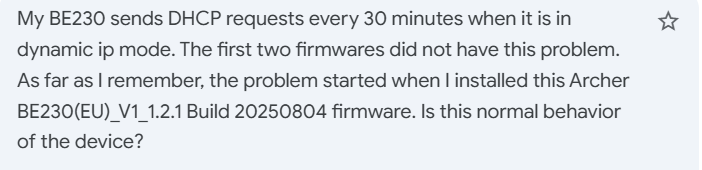
When configured to use a dynamic IP, the AP will periodically send requests to the gateway router to renew its IP address.
If you want to avoid it, please set a static IP address for its LAN as mentioned by woozle in the following response to check whether it stops:
https://community.tp-link.com/en/business/forum/topic/861462?replyId=1680940
BTW, the firmware on your BE230 is not the latest version. Please check for updates and upgrade to the latest version.
If the unexpected behavior persists, please also email us the configuration file on the BE230 for further investigation.
Thank you very much.
- Copy Link
- Report Inappropriate Content

Having the exact same issue, I'm using HALNY HL-4GMV for a fiber connection and BE230 for WiFi. I've already made a DHCP reservation in the HALNY router for the BE230 and set it to static mode, but every 34 seconds it renews the lease. This causes intermittent internet connection issues for connected devices. Firmware is 1.2.5 Build 20260108 rel.68570(4555) and I don't think this issue has been there from the beginning.
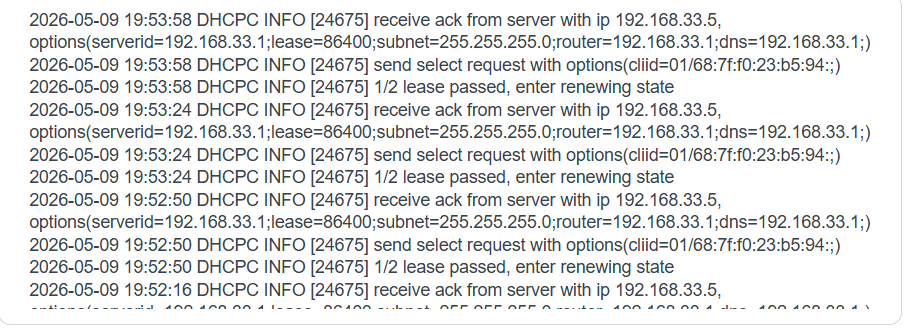
- Copy Link
- Report Inappropriate Content

Hi,
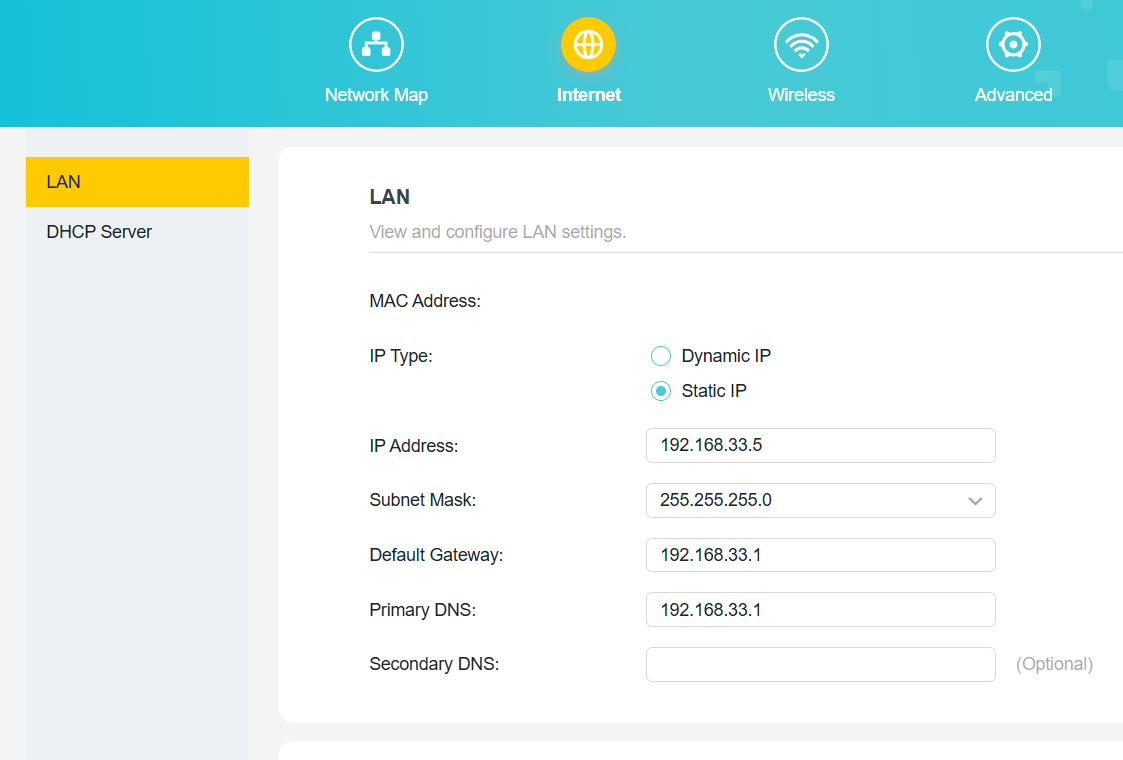
Could you please post a screenshot showing what you entered into the fields below "Static IP" on the BE230?
- Copy Link
- Report Inappropriate Content
I'm unable to upload the image, so I'll just type it out.
IP Address 192.168.33.5
Subnet mask 255.255.255.0
Default gateway 192.168.33.1
Primary DNS 192.168.33.1
- Copy Link
- Report Inappropriate Content
Ok. So, if the BE230 is configured like shown in the picture below, but is still sending out DHCP requests every 34 seconds, then TP-Link needs to correct this.
If you don't mind the effort, could you perhaps do another test?
Make the IP address in the HALNY router's DHCP reservation for the BE230 different from the "Static IP" set in the BE230 (like, reserved IP 192.168.33.5 vs. static IP 192.168.33.7), reboot the BE230 and then check whether the BE230 can be reached via the reserved DHCP IP address or the Static IP address.
- Copy Link
- Report Inappropriate Content
After changing the static IP on the BE230 to 192.168.33.50, I could access the config through that address, and not the one reserved on the HALNY.
- Copy Link
- Report Inappropriate Content
Also, I was curious if extending the DHCP lease from the default 24 hours to the HALNY's maximum of 3 days would change anything. It did not.
- Copy Link
- Report Inappropriate Content
Thanks for testing.
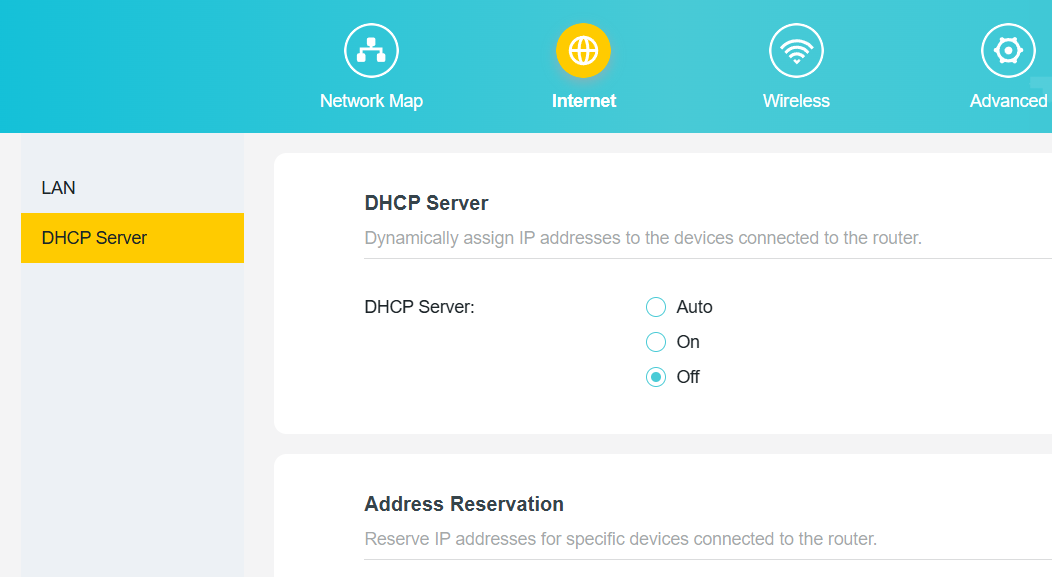
Maybe one more thing you can try. Provided you are not specifically using the BE230 AP's DHCP server, go to the "DHCP Server" menu of the BE230 and change it from "Auto" to "Off" and save. Then check the System Log again.
- Copy Link
- Report Inappropriate Content

I am experiencing this similar issue as well.
My BE230 is operating in AP mode with its IP configuration set to Dynamic.
On my main router/DHCP server, I have an IP reserved for the BE230 with a lease time of 43,200 seconds (12 hours).
Despite receiving the correct lease time from the server, the BE230 ignores it and spams the logs by entering the "renewing state" every 33-34 seconds.
Hardware/Firmware Details:
-
Model: Archer BE230 v1.0
-
Firmware: 1.2.5 Build 20260108 rel.68570(5553)
-
Operation Mode: Access Point (AP) Mode, with DHCP server off
Logs:
====
2026-05-10 18:26:42 DHCPC INFO [8816] receive ack from server with ip 192.168.88.11, options(subnet=255.255.255.0;router=192.168.88.1;dns=8.8.8.8 1.1.1.1;lease=43200;serverid=192.168.88.1;)
2026-05-10 18:26:42 DHCPC INFO [8816] send select request with options(cliid=xx/xx:xx:xx:xx:xx:xx:;)
2026-05-10 18:26:42 DHCPC INFO [8816] 1/2 lease passed, enter renewing state
2026-05-10 18:26:08 DHCPC INFO [8816] receive ack from server with ip 192.168.88.11, options(subnet=255.255.255.0;router=192.168.88.1;dns=8.8.8.8 1.1.1.1;lease=43200;serverid=192.168.88.1;)
2026-05-10 18:26:08 DHCPC INFO [8816] send select request with options(cliid=xx/xx:xx:xx:xx:xx:xx:;)
2026-05-10 18:26:08 DHCPC INFO [8816] 1/2 lease passed, enter renewing state
====
With all due respect, even if manually changing the BE230's network setting to "Static IP" could stop the log spam, this is merely a workaround, isn't it?
In my honest opinion, the BE230's DHCP client behavior is not normal as it does not respect server-provided lease times.
- Copy Link
- Report Inappropriate Content
This did stop the DHCP spam, but it was replaced by different, a bit more irregular spam.
The issue of the BE230 seemingly disconnecting itself from the HALNY router in random intervals persists.
2026-05-10 21:35:58 Led Controller INFO [1973] Start to run WAN1_ON
2026-05-10 21:35:58 Led Controller INFO [1973] Start to run WAN0_OFF
2026-05-10 21:35:58 Led Controller INFO [1973] Start to run LAN_OFF
2026-05-10 21:35:45 Led Controller INFO [1973] Start to run WAN1_OFF
2026-05-10 21:35:45 Led Controller INFO [1973] Start to run WAN0_ON
2026-05-10 21:35:45 Led Controller INFO [1973] Start to run LAN_OFF
2026-05-10 21:35:42 Led Controller INFO [1973] Start to run WAN1_OFF
2026-05-10 21:35:42 Led Controller INFO [1973] Start to run WAN0_OFF
2026-05-10 21:35:42 Led Controller INFO [1973] Start to run LAN_OFF
2026-05-10 21:30:26 Led Controller INFO [1973] Start to run WAN1_OFF
2026-05-10 21:30:26 Led Controller INFO [1973] Start to run WAN0_ON
2026-05-10 21:30:26 Led Controller INFO [1973] Start to run LAN_OFF
2026-05-10 21:29:21 Led Controller INFO [1973] Start to run WAN1_ON
2026-05-10 21:29:21 Led Controller INFO [1973] Start to run WAN0_OFF
2026-05-10 21:29:21 Led Controller INFO [1973] Start to run LAN_OFF
2026-05-10 21:29:06 Led Controller INFO [1973] Start to run WAN1_ON
2026-05-10 21:29:06 Led Controller INFO [1973] Start to run WAN0_OFF
2026-05-10 21:29:06 Led Controller INFO [1973] Start to run LAN_ON
2026-05-10 20:55:15 Led Controller INFO [1973] Start to run WAN1_ON
2026-05-10 20:55:15 Led Controller INFO [1973] Start to run WAN0_OFF
2026-05-10 20:55:15 Led Controller INFO [1973] Start to run LAN_OFF
2026-05-10 20:55:07 Led Controller INFO [1973] Start to run WAN1_ON
2026-05-10 20:55:07 Led Controller INFO [1973] Start to run WAN0_OFF
2026-05-10 20:55:07 Led Controller INFO [1973] Start to run LAN_ON
2026-05-10 20:37:04 Led Controller INFO [1973] Start to run WAN1_ON
2026-05-10 20:37:04 Led Controller INFO [1973] Start to run WAN0_OFF
2026-05-10 20:37:04 Led Controller INFO [1973] Start to run LAN_OFF
2026-05-10 20:36:53 Led Controller INFO [1973] Start to run WAN1_ON
2026-05-10 20:36:53 Led Controller INFO [1973] Start to run WAN0_OFF
2026-05-10 20:36:53 Led Controller INFO [1973] Start to run LAN_ON
- Copy Link
- Report Inappropriate Content
Information
Helpful: 3
Views: 1471
Replies: 21
Voters 2
