!! IMPORTANT, MUST BE FIXED !! Firmware Bug Found On Deco BE25 (Wired Backhaul Throughput Defect)

TP-Link Deco BE3600 / BE25 Wired Backhaul Throughput Defect
Troubleshooting Report and Firmware Bug Evidence
Tested on both the latest stable firmware and the latest beta firmware. The defect is present and identical on both. Both Deco nodes run as access points only, behind an OPNsense router (gateway/DHCP) on a flat Layer 2 network.
1. Summary of Findings
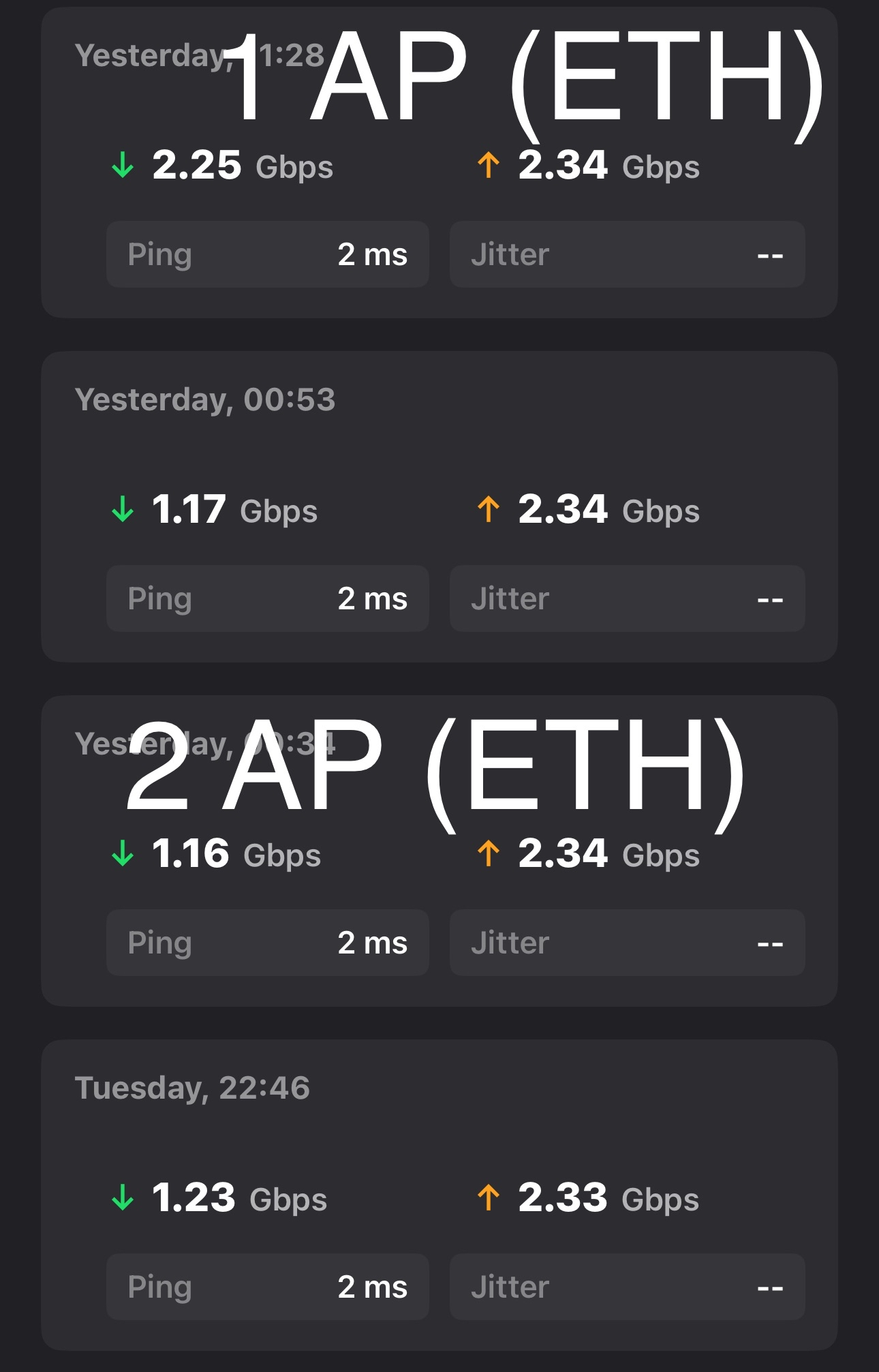
Two Deco nodes in AP mode behind an OPNsense router fail to deliver expected throughput over wired (Ethernet) backhaul. Download collapses to roughly half of upload (typically ~600 Mbps down) regardless of cabling, switch, or topology. The condition is stable, not intermittent flapping. The defect is present and identical on both the latest stable firmware and the latest beta firmware.
Extensive isolation testing ruled out the physical layer (cables, switch ports, link negotiation, topology). Device syslogs across three separate capture windows show three independent, repeating internal firmware failures in the Deco mesh/backhaul subsystem:
- The firmware cannot read its own Ethernet link rate/duplex (
Unknown Duplex! (255)). - The firmware cannot read backhaul uplink capacity (
uplinkRate:0/0/0/0). - The combined wired+wireless backhaul aggregation setup fails outright (
fail to get ptr aggregation_network).
Conclusion: this is a firmware defect in the Deco combined-backhaul (Hy-Fi aggregation) stack, not a fault in the user's cabling, switching, or network topology. No physical-layer or configuration change resolves it.
2. Network Topology
ISP Router (192.168.1.1/23)
        |
        v
OPNsense Router
   LAN: 192.168.10.1/24
   WAN: 192.168.1.170/23
        |
        v
Managed MokerLink SFP+ switch (192.168.10.2/24)
        |
        | 10G SFP+ AOC uplink
        v
Unmanaged MokerLink switch (2.5 GbE copper + SFP+ 10G)
        |
        |---- Main Deco        (192.168.10.10)
        |---- Second Deco node  (192.168.10.11)

Other hosts:
  - Lenovo P510 (primary server): on the managed SFP+ switch, 10G
  - HP ProDesk SFF (Proxmox node): on the unmanaged switch, 1G NIC
- ISP service: 10 Gbps.
- Both Decos in Access Point mode (confirmed: both pull DHCP leases from OPNsense, .10 and .11).
- All Ethernet runs are Cat6a.
- Switch port for each Deco negotiates and holds 2.5 GbE (confirmed via switch port LED state).
3. Initial Problem
After upgrading to a 10 Gbps ISP service, the two Deco APs could not deliver expected wired-backhaul throughput.
Observed baseline symptom:
- With both Decos wired to the same switch, download was cut to roughly half of upload (example: ~600 Mbps down / ~1200 Mbps up).
- Briefly, after a clean re-establishment, both nodes reached ~1100/1100 Mbps symmetric.
- Within ~1 minute, a ~5 second connectivity drop occurred, after which throughput latched back to the halved state (~600 down / ~1200 up) and stayed there.
- The Deco app reported the backhaul as "wired" in both the good (1100/1100) and bad (600/1200) states. It did not visibly flip to wireless backhaul.
- The "Ultra-Speed Mode" wireless setting (2.4 GHz) only became available when the second node was on wireless backhaul. With both nodes on wired backhaul, Ultra-Speed Mode switched off / became unavailable. This shows the firmware changes its own wireless behavior depending on backhaul state, further indicating the backhaul state machine, not the physical link, drives the problem.
4. Isolation Testing Performed
The following were tested to rule out physical-layer and configuration causes.
| # | Test | Result | Conclusion |
|---|---|---|---|
| 1 | Single node wired (other off or on Wi-Fi) | Wired node reaches full speed (~1400/1200) | Single node is fine; problem appears only with two wired nodes |
| 2 | Both nodes wired directly to switch | Main node ~1000/100; second node unavailable, drops clients on roam | Loop/aggregation instability when both are wired peers |
| 3 | Daisy-chain: second node off Main's LAN2 (second node not on switch) | Both connect and stay connected, but ~600 down (still halved) | Removing the parallel path stops drops but does NOT restore download |
| 4 | Cable swap (nodes placed next to each other, different short cable) | Still degraded | Not a cable fault |
| 5 | Switch port link state check | Negotiates and holds 2.5 GbE in both good and bad states | Not a duplex/speed renegotiation or PHY link fault |
| 6 | Latest stable firmware AND latest beta firmware | Defect present and identical on both | Not a single-build regression and not beta-only; core firmware behavior on both release channels |
| 7 | App backhaul type during degraded state | Reports "wired" | The degraded state is not a visible wired-to-wireless failover |
Recovery from the latched degraded state required a specific ritual: bring the nodes up on wireless backhaul first, then reconnect the Ethernet cable so the unit migrates wireless to wired. A normal reboot with the cable already attached did not restore full speed. This behavior points to the firmware backhaul state machine, not the physical layer.
5. Log Evidence
Three syslog captures were taken during testing. Relevant lines below. MAC and certificate material trimmed.
5.1 Failure 1: Firmware cannot read its own Ethernet link rate / duplex
Process ai-center queries the Ethernet PHY link rate and receives 255 (the "unknown" sentinel value) on every single read, with zero successful readings anywhere in any capture.
Wed Jun 17 12:29:40 2026 daemon.err ai-center: [eth_get_linkrate:103]: Unknown Duplex! (255)
Wed Jun 17 12:29:45 2026 daemon.err ai-center: [eth_get_linkrate:103]: Unknown Duplex! (255)
Wed Jun 17 12:29:50 2026 daemon.err ai-center: [eth_get_linkrate:103]: Unknown Duplex! (255)
Wed Jun 17 12:29:56 2026 daemon.err ai-center: [eth_get_linkrate:103]: Unknown Duplex! (255)
Occurrence counts per capture window:
- Capture 1 (12:29 to 14:16): 1273 occurrences, 0 successful reads
- Capture 2 (17:08 to 17:23): 110 occurrences, 0 successful reads
- Capture 3 (17:13 to 17:40): 164 occurrences, 0 successful reads
The physical port was confirmed linked at 2.5 GbE throughout. The firmware's inability to read it is purely a software/driver-layer failure.
5.2 Failure 2: Firmware cannot read backhaul uplink capacity
The mesh daemon (awn) reports the backhaul uplink rate as all zeros, and repeatedly fails to obtain uplink signal data.
Wed Jun 17 17:14:22 2026 daemon.warn awn[6593]: [AWN:W][update_wifi_tpie_qca:1558]: ... uplinkMask:0, uplinkRate:0/0/0/0
Wed Jun 17 17:xx:xx 2026 daemon.err nrd: triggerMonSteering: Failed to get uplink rssi for 52:4D:67:B9:6F:2D
uplinkRate:0/0/0/0 means the backhaul path selection and aggregation logic has no valid capacity metric to work with. Failed to get uplink rssi recurred 13+ times in the window.
5.3 Failure 3: Combined backhaul aggregation setup fails
The access point daemon (apsd) fails to retrieve the aggregation network configuration, and the Hy-Fi loop-avoidance layer repeatedly reconfigures the bridge. The PLC/sync backhaul lookup also fails.
Wed Jun 17 17:xx:xx 2026 daemon.err /usr/bin/apsd: uci_get_value:1884: Error: fail to get ptr aggregation_network
Wed Jun 17 17:xx:xx 2026 daemon.err /usr/bin/apsd: loop_avoidance_configure_bridge_with_mode:459: Error: configure hyfi bridge with mode FAP
Wed Jun 17 17:xx:xx 2026 daemon.err awn: [AWN:E][awnd_config_get_plc_backhaul:3424]: fail to get plc backhaul vid plc_sync
Wed Jun 17 17:40:56 2026 daemon.err nrd: send ioctl failed
fail to get ptr aggregation_network: 11 occurrences in capture 3. This is the combined wired+wireless backhaul aggregation feature erroring out during configuration.loop_avoidance_configure_bridge_with_mode ... mode FAP: the Hy-Fi bridge being reconfigured on the fly, consistent with the transient loop/dropout observed when the second node is brought online as a wired peer.
5.4 Client steering observed (context)
A client was steered from the Wi-Fi interface to the Ethernet interface, confirming the firmware does attempt to use the wired path:
Wed Jun 17 17:18:07 2026 daemon.err nrd: wlanif_isSTAMoved: 60:57:C8:4B:B9:2A move from ath1 to eth1.
So the wired path is recognized and used. The problem is not that the wired link is ignored; it is that the firmware schedules traffic over it using invalid capacity data (see 5.1 and 5.2) and the aggregation setup fails (5.3), resulting in halved download throughput.
5.5 Inter-node mesh management churn (context)
The two nodes re-authenticate their internal encrypted mesh management channel (certificate CN "DecoMesh", user "UserName_DecoMesh") roughly every 90 seconds across all captures (TPAP / NOC_CLIENT login and noc auth done cycles). This is internal Deco mesh management, not Omada controller traffic. No Omada SDN adoption, inform-URL, or controller-mode activity appears in any capture.
6. Root Cause Analysis
The three logged failures are consistent and reinforcing:
- The firmware cannot read the Ethernet link rate/duplex (returns 255).
- Therefore the backhaul capacity metric is zero (
uplinkRate:0/0/0/0). - Therefore the combined-backhaul aggregation, which decides how to weight/stripe traffic across the wired and wireless paths, has no valid data and its configuration fails (
fail to get ptr aggregation_network).
The Deco BE3600/BE25 always runs combined wired + wireless backhaul aggregation (a marketed Wi-Fi 7 MLO feature) and provides no option to disable the wireless backhaul. When the aggregation scheduler operates on invalid link-state data, the download direction is mis-weighted onto a degraded path and collapses to roughly half capacity, while upload (re-converging on a clean path) stays near full. The Hy-Fi loop-avoidance layer reconfiguring the bridge explains the client drops and the ~5 second outage that precedes the latched degraded state.
This fully accounts for every observed symptom:
- Halved download, full upload.
- App reporting "wired" while degraded (the wired member is present; only the capacity weighting is wrong).
- Switch port holding 2.5 GbE while throughput is halved (the link is fine; the firmware's reading of it is not).
- Both nodes affected (the aggregation/forwarding state is shared).
- Recovery only via wireless-first re-establishment (forces a rebuild of the backhaul state from a different code path).
- Persistence across firmware channels: present and identical on both the latest stable and the latest beta firmware.
- "Ultra-Speed Mode" (2.4 GHz) toggling itself off when both nodes are on wired backhaul, confirming the firmware alters its own wireless behavior based on backhaul state.
7. Conclusion
The defect is in TP-Link Deco firmware, specifically the link-rate readout and the combined-backhaul (Hy-Fi) aggregation subsystem. It is reproducible and identical on both the latest stable firmware and the latest beta firmware, and is independent of:
- Cabling (Cat6a, multiple cables tested)
- Switch hardware and ports (2.5 GbE confirmed and stable)
- Network topology (star and daisy-chain both fail)
- Configuration on the OPNsense/router side
No user-side change resolves it. The only paths to resolution are:
- A TP-Link firmware fix that corrects the Ethernet link-rate readout and the aggregation configuration, and/or provides an option to force wired-only backhaul (disabling wireless/combined backhaul), which TP-Link has historically declined to offer; or
- Replacing the Deco units in the wired-backhaul role with access points that use a plain wired uplink and no proprietary combined-backhaul aggregation, which I'll be doing (e.g. TP-Link Omada EAP, Ubiquiti UniFi, or OpenWrt-based APs).
8. Appendix: Capture Index
| Capture | Time window | Unknown Duplex (255) count | Key lines |
|---|---|---|---|
| 1 | 12:29:39 to 14:16:28 | 1273 | eth_get_linkrate 255 (continuous), DecoMesh re-auth ~90s |
| 2 | 17:08:24 to 17:23:14 | 110 | uplinkRate 0/0/0/0, Failed to get uplink rssi, STA move ath1 to eth1 |
| 3 | 17:13:08 to 17:40:56 | 164 | fail to get ptr aggregation_network (x11), hyfi loop_avoidance reconfigure (FAP), fail to get plc backhaul, send ioctl failed |