
Early Access New Firmware for Archer GE800 V1 Introduces VPN Enhancements, EasyMesh IoT/Guest Expansion, and More


Hello, All GE800 Users!
We are excited to announce that the highly anticipated firmware update for the Archer GE800 V1 is now available! This update introduces comprehensive VPN enhancements, EasyMesh IoT/Guest Expansion, critical bug fixes, and various system optimizations.
We recommend that all users upgrade to the latest firmware and share their feedback. Your valuable input is crucial to our continuous product improvement! We look forward to hearing about your experience.
Download the update now to experience the router's new features!
New Features:
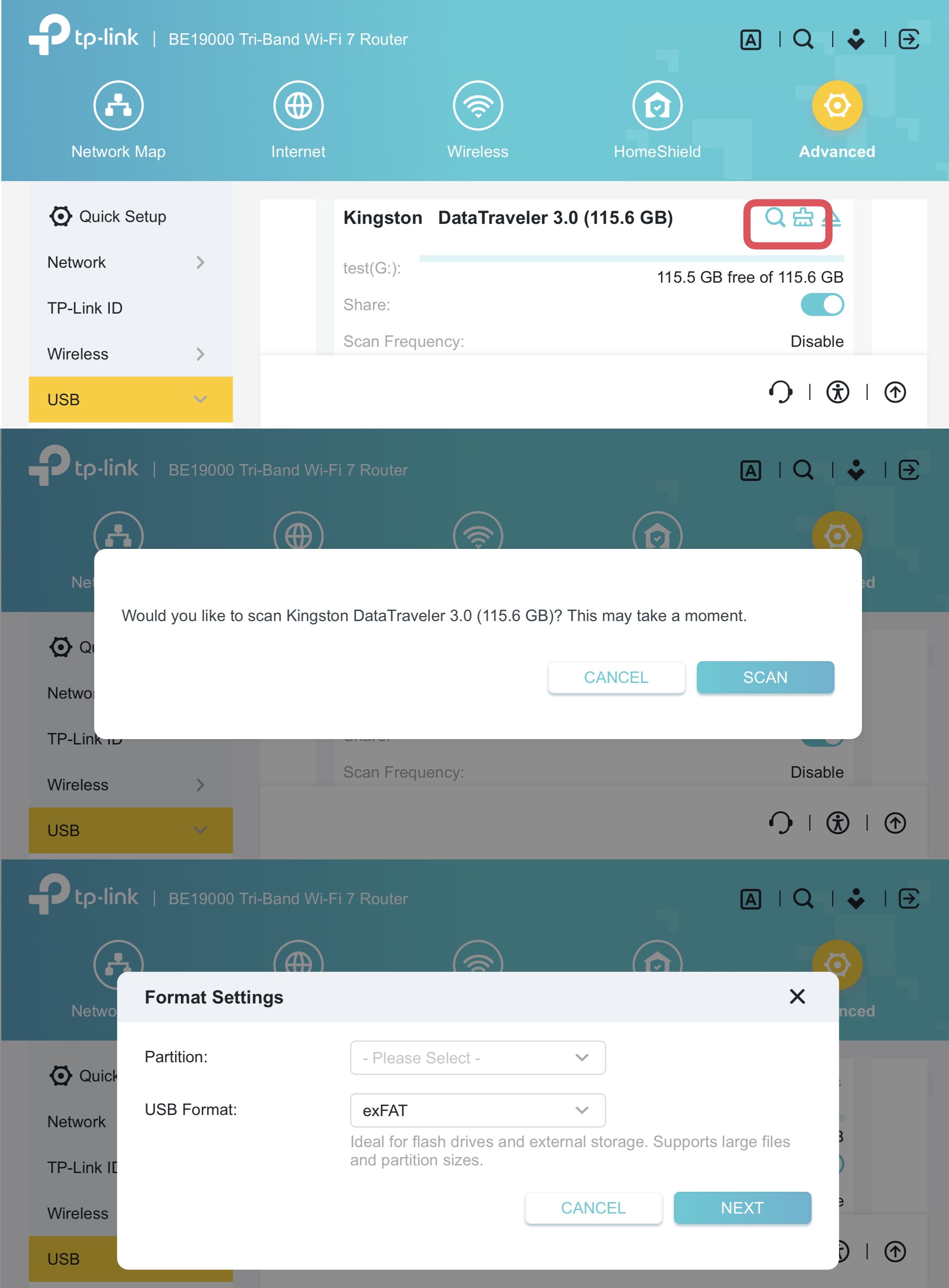
1. USB Health Scan & Format
Added USB drive management functions, including health scanning and reformatting.
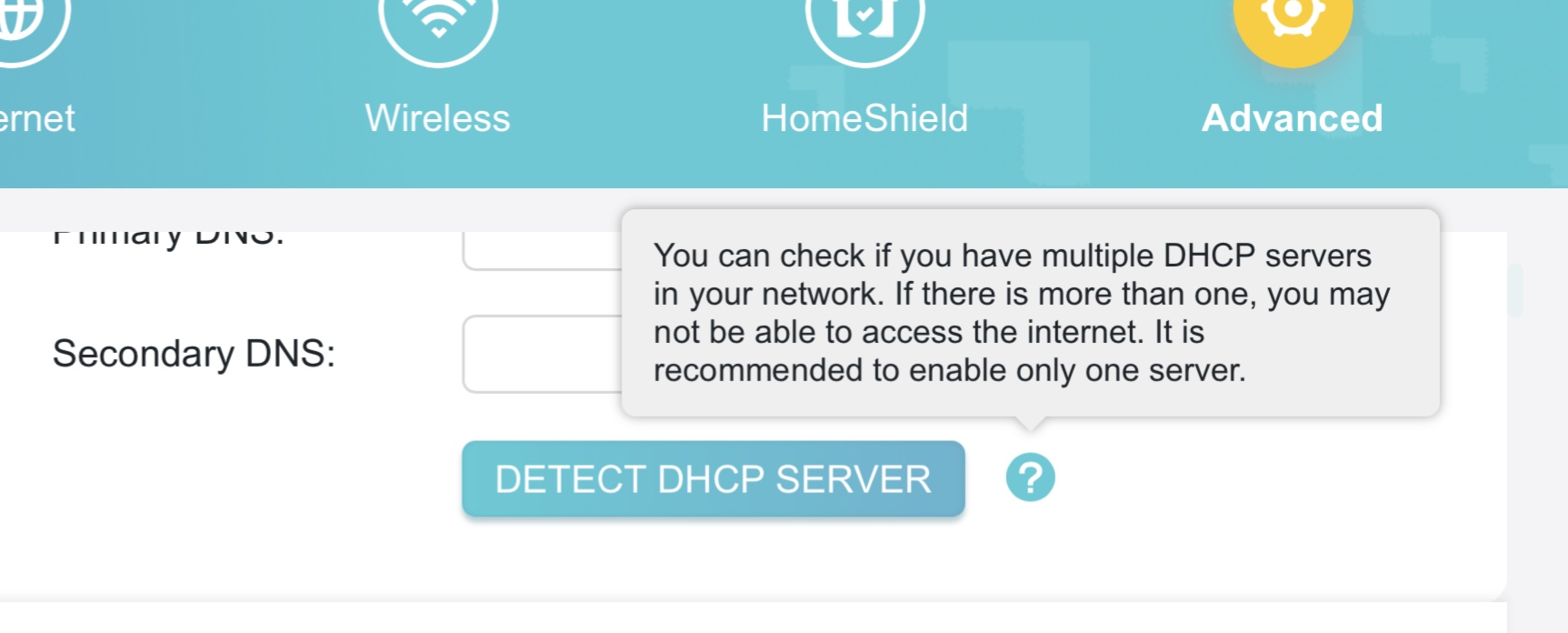
2. DHCP Server Conflict Detection
This feature is designed to identify and resolve issues caused by multiple DHCP servers on the same network, ensuring connection stability.
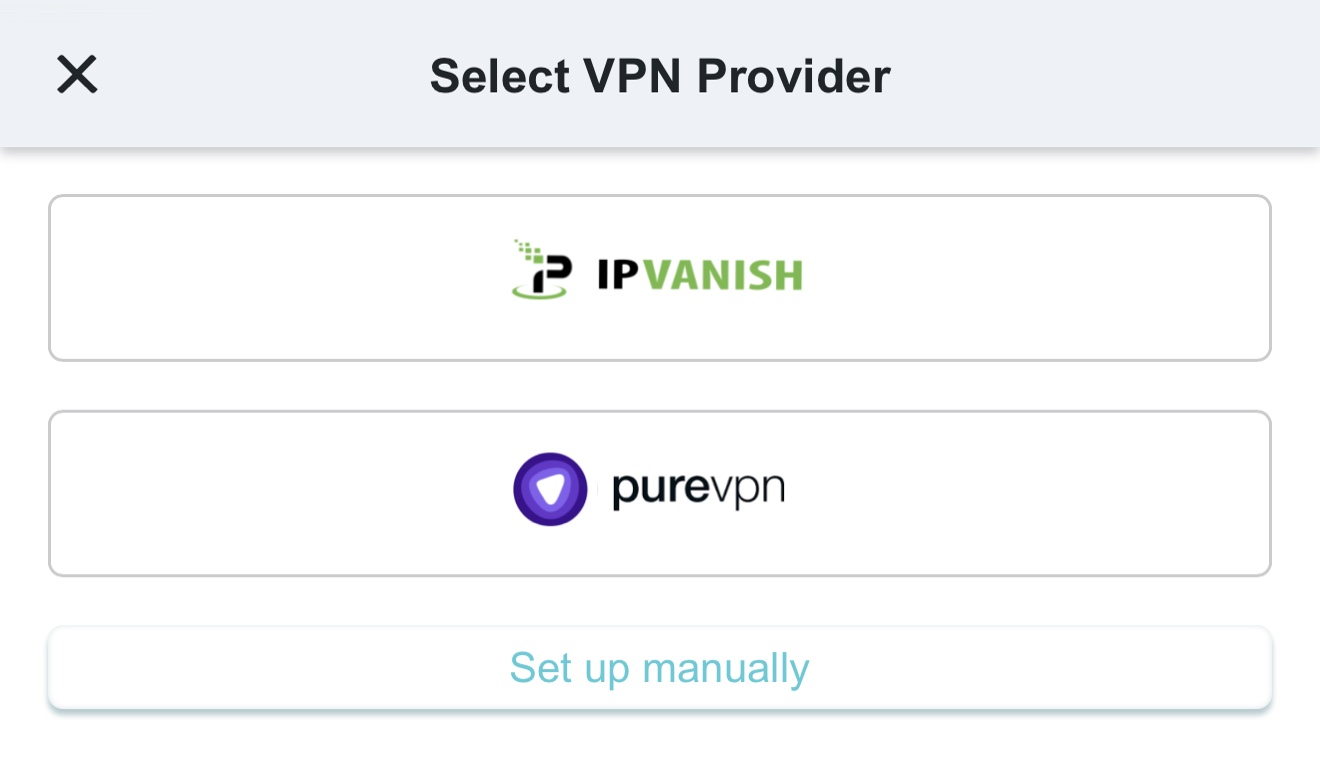
3. Third-Party VPN
Added quick configuration support for third-party VPN providers, such as IPVanish and PureVPN.
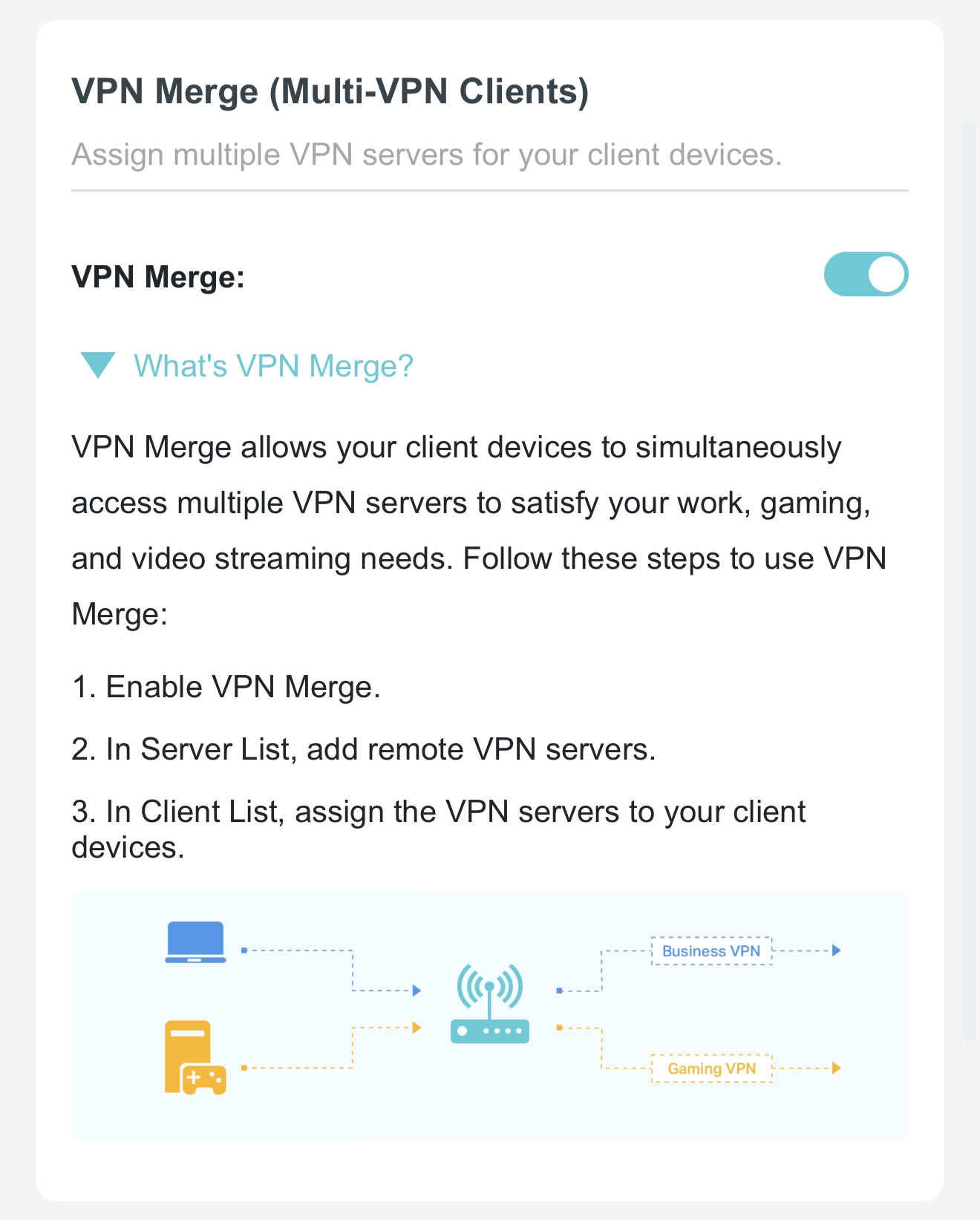
4. VPN Merge
VPN Merge(Multi-VPN Clients) function, allowing designated clients to use the VPN while others remain on the standard network.
5. VPN Kill Switch
Added a VPN Kill Switch function to ensure VPN clients only access the internet through a secure tunnel; internet access will be automatically disabled if the VPN connection fails to prevent data leaks.
6. EasyMesh IoT/Guest Expansion
Added support for EasyMesh to extend IoT and Guest network coverage.
Optimizations:
- Upgraded wireless drivers to enhance overall system security and stability.
- Optimized VPN performance for faster and more reliable connections.
- Optimized HomeShield and Parental Control features for a better user experience.
Bug Fixes:
Fixed an issue where traffic statistics for specific clients appeared abnormal under certain conditions.
Firmware Download:
Before the Upgrade
(1) Please be sure you have read the Beta Test Agreement before upgrading the pre-release firmware!
(2) For the sake of insurance, it's always recommended to save a copy of the router's Backup Config file before upgrading or downgrading.
(3) This pre-release firmware for Archer GE800 V1 is available for all versions.
(4) You may follow the guide to upgrade the firmware of your router. How to Upgrade the Firmware on the TP-Link Wi-Fi Routers.
| Model | Direct Download Link |
| Archer GE800_V1 | Archer GE800_V1_1.3.4 Build 20260618(Pre-Release Firmware) |
Additional Information
As always, we value your feedback. If you encounter any issues during or after the router firmware upgrade, please leave a message below and include the following information. Your feedback helps us continuously improve and provide you with better products and support.
Please provide detailed information, including but not limited to:
- A complete network topology diagram.
- The device's connection method and whether EasyMesh networking is enabled.
- Screenshots of relevant error messages, etc.
Thank you for your continued support and for being a member of our community.
Related Article:
New Firmware for Archer BE800 V1 to Support VPN Merge,Guest/IoT Network Extend in EasyMesh, and More
- Copy Link
- Subscribe
- Bookmark
- Report Inappropriate Content
Hello @Sulooo ,
Thanks for your feedback.
The "Gaming Port" is a specialized port designed to automatically detect connected devices and trigger acceleration functions. Based on your screenshot, your PS5 is connected to this port via a wired connection, and the dedicated acceleration feature has been activated.
Unlike standard ports, devices connected to the Gaming Port are granted priority by default; there is no need to manually add them to the "Gear Acceleration" list.
The AI QoS feature operates based on software-level traffic identification; the "Accelerating Apps" function activates only when traffic is identified as gaming-related.
In contrast, the WTFast feature utilizes GPN acceleration technology (similar to services like UU Accelerator), which operates on a different principle (please refer here for details): How to Setup WTFast® GPN on TP-Link Gaming Router and How can I get the best online game connection with TP-Link Gaming Router and WTFast
Therefore, what you are observing is not a malfunction, but a normal system status indication.
- Copy Link
- Report Inappropriate Content

Thank you for the update. I have successfully installed the new pre-release firmware on my GE800 and I am already testing it out.
The changes in the web interface look great and I noticed several improvements right away. The home page now accurately shows active download and upload traffic at a glance. Additionally, the AI qos menu is much more descriptive now, clearly showing exactly which devices and applications like discord, youtube, or spotify are being accelerated in real time. The new VPN merge options, the network topology redesign, and the overall system layout also feel much more polished. I also noticed the new features for DHCP server conflict detection, native support for 802.11r fast roaming, and the USB health scanning options which are fantastic additions for network management.
However, I want to report a persistent bug with the built-in traffic monitor feature in the menu, which I actually first noticed in the previous firmware version. Every time I try to open the dedicated traffic monitor page under the system settings, the router immediately logs me out of the web interface. This logout loop happens consistently even after upgrading to this new pre-release build. I will keep monitoring the performance, MLO stability, and easymesh coordination over the next few days and will provide more details if any other anomalies pop up.
Thanks again for providing this build.
Best regards,
Vendex
- Copy Link
- Report Inappropriate Content

there is no 11r support
- Copy Link
- Report Inappropriate Content
@ABC_ChoCo according to the official release notes posted by the TP-Link team for this specific pre-release firmware, native support for the IEEE 802.11r Fast BSS Transition protocol has actually been added under point number seven to enhance seamless client roaming across the easymesh network. It is explicitly listed as one of the main new features of this build along with the new roaming bindings.
P.S. I was wrong here, my mistake
- Copy Link
- Report Inappropriate Content
- Copy Link
- Report Inappropriate Content

@Vendex Number seven and number eight under the original post was asked by another user if those were also included. That was not officially by Tp-Link. That was also confirmed by @CacheMode that it has not been implemented
- Copy Link
- Report Inappropriate Content
@LokiLatency thanks for clearing that up and correcting me. I completely misread that part of the thread and thought those points were part of the official changelog from the TP-Link team instead of user questions. My mistake
- Copy Link
- Report Inappropriate Content
CacheMode wrote
MLO roaming still shows noticeable signal drops. Looking forward to improvements in future builds, especially around IoT reliability and client list handling.
@CacheMode I'm curious, I thought that mesh wide fronthaul MLO was not an added feature of this firmware.
If I log into a mesh node using the "manage" option and look at the wireless SSIDs on the node I don't see an MLO SSID.
So what are you looking for with the MLO behaviour since it basically isn't supported between nodes.
The other aspect of this is MLO backhaul. I've seen at least one review that shows fronthaul MLO is not yet mature enough, gives little or no improvement, and can degrade performance at times. But, OTOH, MLO backhaul between mesh nodes often improves throughtput for clients so it would have to be a more important feature than MLO fronthaul.
- Copy Link
- Report Inappropriate Content
Joseph-TP wrote
To help you efficiently, I've forwarded your case to the TP-Link support engineers, who will reach out to you using your registered email address later. Please keep an eye on your email inbox for follow-up.
I will keep an eye out but I get a "lot" of email (I'll not bore you with the detais) so I might not get to it for a while.
Also, because I work from home I can only tolerate limited instability and, unfortunately, this firmware is too disruptive to continue using it so I've had to revert to my previous mesh devices (they're not even TP Link routers).
I will try and answer any questions but I'm afraid I won't be able to be much help.
- Copy Link
- Report Inappropriate Content

To clarify what I meant: I’m aware that mesh-wide MLO (fronthaul propagation to satellites) is not yet supported in this pre-release — I don’t see an MLO SSID on the satellite nodes either.
What I was observing is the MLO performance on the main router itself. Even when roaming within the main router’s coverage area toward Node 2, I still see a noticeable (but brief) drop to 1–2 bars on MLO before it recovers. The signal is generally strong on its own, which is why I’m hopeful that once full MLO propagation is added in a future update, roaming will feel much smoother.
- Copy Link
- Report Inappropriate Content
Information
Helpful: 0
Views: 782
Replies: 25
Voters 0
No one has voted for it yet.