
Tapo C210: Home/Away Mode Shortcut/Automation Support

Let us please toggle Home and Away modes using Shortcuts and thereby Alexa, it isn't very pleasant to always head into the app and navigate into camera settings just to change modes.
- Copy Link
- Subscribe
- Bookmark
- Report Inappropriate Content
@LeonWasTaken @ClaudioGC @Karmo @Kremmen
Please keep the discussion aligned with the original subject. This thread and voting poll is regarding Home/Away Mode Shortcut / Automation only.
Please start another thread if need be. Thank you
- Copy Link
- Report Inappropriate Content
Any update about when Home/Away mode automation functionality will become available in the app?
- Copy Link
- Report Inappropriate Content
@Karmo I dunno. I'm just someone like you who was expecting this basic feature to be available and hope for it to become available ASAP! Make sure you hit the VOTE button to increase our chances and share this post with other group of people you know who are also waiting for this feature and ask them to vote as well.
- Copy Link
- Report Inappropriate Content
My intention was not to detract from the long requested feature of activating Home / Away via TPLink Geofencing but to offer a temporary or permanent solution for those who wanted it, given this request does appear to be unimportant to TPLink
The last post I noticed by them was along the lines of 'why do you want it'
- Copy Link
- Report Inappropriate Content
I have cameras and sensors at home. I'd like to create a small alarm system that notifies me when there's motion in the house and/or when windows or doors are opened.
With the At home/Away buttons in the Cameras menu, I can activate only the cameras but not the sensors.
In the Smart menu, you can create automations/shortcuts, but these only activate/deactivate camera motion. I also need to set other parameters, such as detection sensitivity (since I have pets at home), person detection, and camera tampering detection. All these settings can't be provided via automations/shortcuts.
So, if I want to activate camera notifications when I leave the house, I have to go to the Cameras menu and press the Away home button, which I can use to set all the parameters I need. Then, however, I still need to activate the contact sensors, which I can set via the Smart menu by creating shortcuts.
When I get home, I have to do exactly the opposite, first with the At Home button and then disabling the sensors from the Smart menu shortcuts.
Why do I have to do all this when an Away button that sets both the cameras and the sensors, with all the parameters for each product, and an At Home button that resets the camera settings and disables sensor notifications would be enough?
I find Smarthing and Geofencing quite complicated to use. Also because, absurdly, I don't want to activate the devices if I leave the house, because other people might be home. The solution I propose boils down to simply creating two buttons that set and reset all the devices, or alternatively modifying the Home/Away buttons to include other devices like sensors, not just cameras.
How overkill it would be to install Home Assistant! With Home Assistant, these and other home automation problems are solved. But that would be like trying to kill a fly with a cannon...
- Copy Link
- Report Inappropriate Content
New to Tapo and also can't believe this isn't an option in the app. Arlo has this for ages and works really well (and with 10yr old cameras!).
Voted for this feature request.
For me....
Using geofencing when a phone (or multiple phones) all leave the area selected camera mode enters ‘away’ and hence notifications can be enabled.
When ANY phone in the list returns to the area the cameras revert to ‘home’ mode. Important to note any schedule for notifications is also kept to, for example, my cameras send notifications after 9pm and hence returning after then eg 10pm doesn’t then turn off the notifications!
- Copy Link
- Report Inappropriate Content
- Copy Link
- Report Inappropriate Content
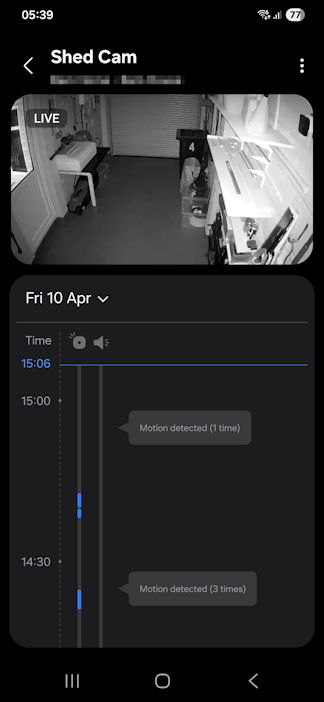
I can further report that my Smartthings 'ploy' is working 100% as per my earlier post
Smartthings geofencing is turning Smartthings notifications on and off for motion detection from all my Tapo cameras and motion sensors
This allows all Tapo devices to be set as required, person, pet, zone, etc, but turn off Tapo notifications but have all required devices active in Tapo as though you'd pressed the away button
As soon as I'm 150 yards from my house all motion detection is on and auto turned off when I'm back withing the 150 yard circle
It means my cameras are viewable all the time whether armed or disarmed which is what I want
If not I'd just use Tapo's privacy mode which is a Tapo geofence option from what I understand
Here is an example from within Smartthings of my garage camera. It has detected motion but because Tapo notifications are off I got no Tapo warnings. And because I was at home Smartthings gave me no warnings, but, if I'd been out and Smartthings geofencing had activated armed mode I would have been pinged :
- Copy Link
- Report Inappropriate Content
Please make this available... it makes most sense if we have geofencing on to automate switch between home and away modes.
- Copy Link
- Report Inappropriate Content
I refuse to believe that Tapo's developers still don't understand the demand for and importance of this feature while continuing to keep it in the "collecting feedback" phase.
At this point, it seems far more likely that there are technical challenges preventing its implementation, and there's no guarantee it will ever be released. Otherwise, they would at least confirm that it's in development or provide some rough timeline or estimate.
The absence of this feature was a dealbreaker for me and ultimately stopped me from buying Tapo cameras. I'm now looking at alternative solutions.
- Copy Link
- Report Inappropriate Content
Information
Helpful: 134
Views: 28780
Replies: 135
Voters 134




























