D235 RTSP Stream corrupted

D235 RTSP Stream corrupted

D235 RTSP Stream corrupted
2025-07-09 18:03:18 - last edited 2025-08-07 02:45:18
Model: Tapo D235  
Hardware Version: V1
Firmware Version: 1.1.19

Hi to everyone,


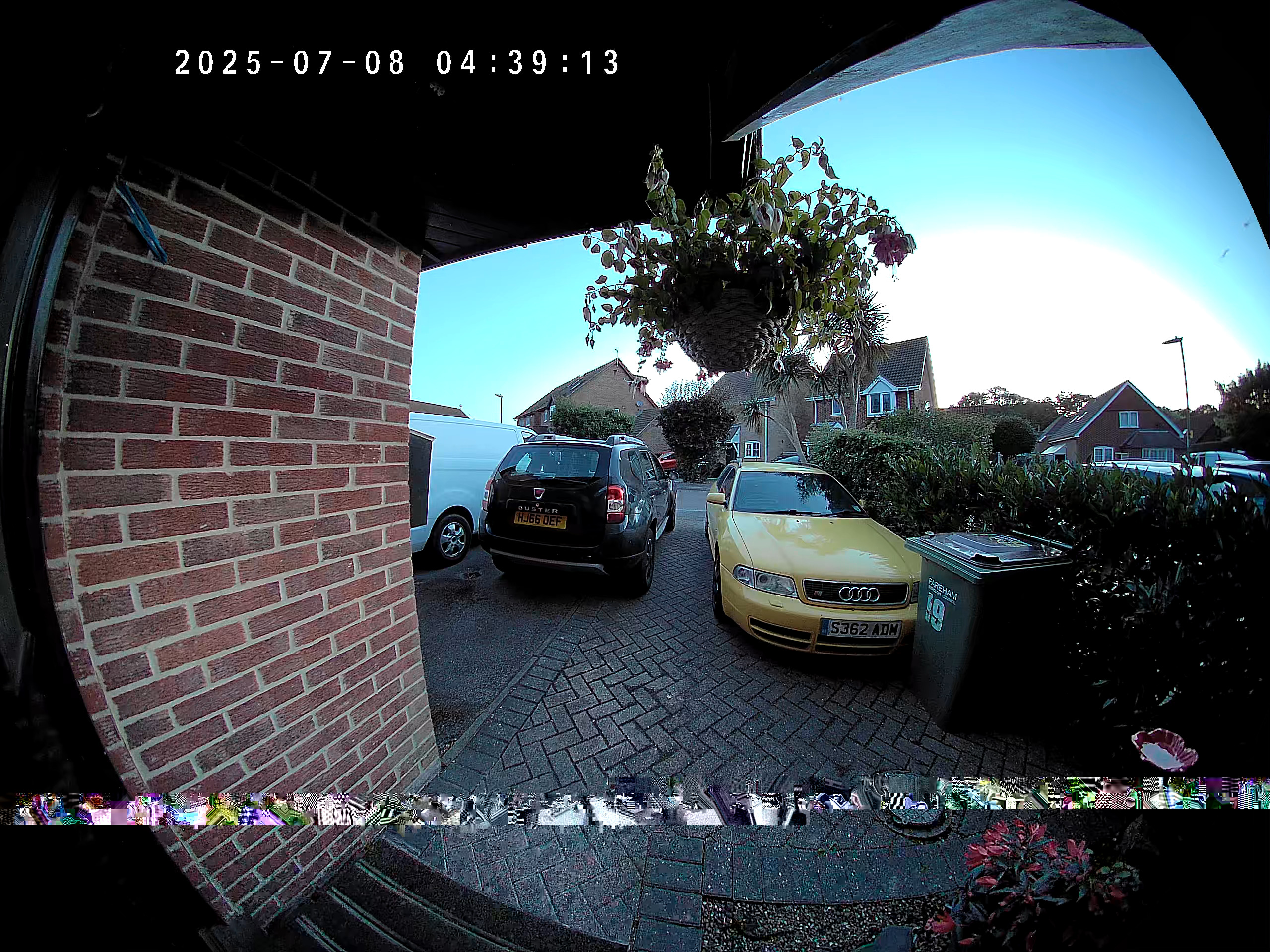
I am having trouble getting an error free stream via RTSP from my D235 Doorbell Camera.


The Doorbell has a 24V 1A DC hardwire supply.  The WIFI signal shows -67(RSSI), however the RTSP stream is corrupted sometimes and sometimes very badly.


I capture the stream with an NVR software Shinobi. No SD Card inserted.


My HDD fills rapidly due to the corruption in the stream. Only the D235 is affected. Other cameras C200, C210, C500 are unaffected.


Corruption in stream happens 5 - 10 times a day.  I only see one time during the night time.

I never see any problem in the Tapo App.  Doorbell camera is new, purchased 01/07/25.


Typical corruption looks like this:
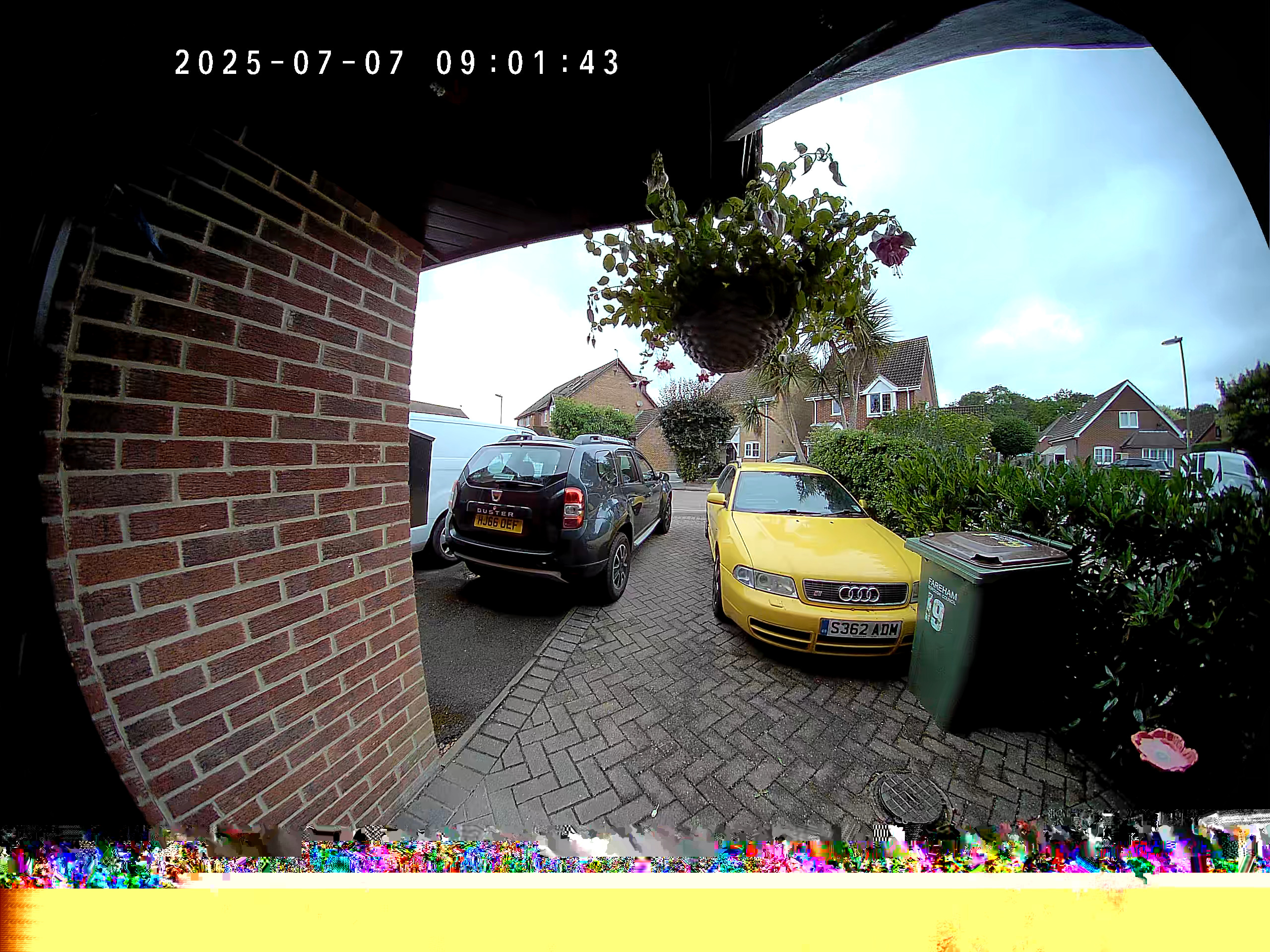
 

But also looks worse sometimes. See videos of RTSP stream here:

https://www.youtube.com/watch?v=m9l6hJFpsNE

https://www.youtube.com/watch?v=J6_JH3woBRM


Sometimes the Doorbell camera stream cannot connect:


admin@CAMERA-PC:~$ ffplay rtsp://admin:fourwordsalluppercase@192.168.1.102:554/stream1
ffplay version 6.1.1-3ubuntu5 Copyright (c) 2003-2023 the FFmpeg developers
  built with gcc 13 (Ubuntu 13.2.0-23ubuntu3)
  configuration: --prefix=/usr --extra-version=3ubuntu5 --toolchain=hardened --libdir=/usr/lib/x86_64-linux-gnu --incdir=/usr/include/x86_64-linux-gnu --arch=amd64 --enable-gpl --disable-stripping --disable-omx --enable-gnutls --enable-libaom --enable-libass --enable-libbs2b --enable-libcaca --enable-libcdio --enable-libcodec2 --enable-libdav1d --enable-libflite --enable-libfontconfig --enable-libfreetype --enable-libfribidi --enable-libglslang --enable-libgme --enable-libgsm --enable-libharfbuzz --enable-libmp3lame --enable-libmysofa --enable-libopenjpeg --enable-libopenmpt --enable-libopus --enable-librubberband --enable-libshine --enable-libsnappy --enable-libsoxr --enable-libspeex --enable-libtheora --enable-libtwolame --enable-libvidstab --enable-libvorbis --enable-libvpx --enable-libwebp --enable-libx265 --enable-libxml2 --enable-libxvid --enable-libzimg --enable-openal --enable-opencl --enable-opengl --disable-sndio --enable-libvpl --disable-libmfx --enable-libdc1394 --enable-libdrm --enable-libiec61883 --enable-chromaprint --enable-frei0r --enable-ladspa --enable-libbluray --enable-libjack --enable-libpulse --enable-librabbitmq --enable-librist --enable-libsrt --enable-libssh --enable-libsvtav1 --enable-libx264 --enable-libzmq --enable-libzvbi --enable-lv2 --enable-sdl2 --enable-libplacebo --enable-librav1e --enable-pocketsphinx --enable-librsvg --enable-libjxl --enable-shared
  libavutil      58. 29.100 / 58. 29.100
  libavcodec     60. 31.102 / 60. 31.102
  libavformat    60. 16.100 / 60. 16.100
  libavdevice    60.  3.100 / 60.  3.100
  libavfilter     9. 12.100 /  9. 12.100
  libswscale      7.  5.100 /  7.  5.100
  libswresample   4. 12.100 /  4. 12.100
  libpostproc    57.  3.100 / 57.  3.100
[tcp @ 0x7288dc003800] Connection to tcp://192.168.1.102:554?timeout=0 failed: No route to host
rtsp://admin:fourwordsalluppercase@192.168.1.102:554/stream1: No route to host


But Tapo App still works OK.


And sometimes the Doorbell camera is like this:


admin@CAMERA-PC:~$ ffplay rtsp://admin:fourwordsalluppercase@192.168.1.102:554/stream1
ffplay version 6.1.1-3ubuntu5 Copyright (c) 2003-2023 the FFmpeg developers
  built with gcc 13 (Ubuntu 13.2.0-23ubuntu3)
  configuration: --prefix=/usr --extra-version=3ubuntu5 --toolchain=hardened --libdir=/usr/lib/x86_64-linux-gnu --incdir=/usr/include/x86_64-linux-gnu --arch=amd64 --enable-gpl --disable-stripping --disable-omx --enable-gnutls --enable-libaom --enable-libass --enable-libbs2b --enable-libcaca --enable-libcdio --enable-libcodec2 --enable-libdav1d --enable-libflite --enable-libfontconfig --enable-libfreetype --enable-libfribidi --enable-libglslang --enable-libgme --enable-libgsm --enable-libharfbuzz --enable-libmp3lame --enable-libmysofa --enable-libopenjpeg --enable-libopenmpt --enable-libopus --enable-librubberband --enable-libshine --enable-libsnappy --enable-libsoxr --enable-libspeex --enable-libtheora --enable-libtwolame --enable-libvidstab --enable-libvorbis --enable-libvpx --enable-libwebp --enable-libx265 --enable-libxml2 --enable-libxvid --enable-libzimg --enable-openal --enable-opencl --enable-opengl --disable-sndio --enable-libvpl --disable-libmfx --enable-libdc1394 --enable-libdrm --enable-libiec61883 --enable-chromaprint --enable-frei0r --enable-ladspa --enable-libbluray --enable-libjack --enable-libpulse --enable-librabbitmq --enable-librist --enable-libsrt --enable-libssh --enable-libsvtav1 --enable-libx264 --enable-libzmq --enable-libzvbi --enable-lv2 --enable-sdl2 --enable-libplacebo --enable-librav1e --enable-pocketsphinx --enable-librsvg --enable-libjxl --enable-shared
  libavutil      58. 29.100 / 58. 29.100
  libavcodec     60. 31.102 / 60. 31.102
  libavformat    60. 16.100 / 60. 16.100
  libavdevice    60.  3.100 / 60.  3.100
  libavfilter     9. 12.100 /  9. 12.100
  libswscale      7.  5.100 /  7.  5.100
  libswresample   4. 12.100 /  4. 12.100
  libpostproc    57.  3.100 / 57.  3.100
rtsp://admin:fourwordsalluppercase@192.168.1.102:554/stream1: Operation not permitted


But Tapo App still works OK.


Hopefully someone can assist to improve it.

Thanks.

  0      
  0      
#1
Options
1 Accepted Solution
Re:D235 RTSP Stream corrupted-Solution
2025-08-14 17:10:04 - last edited 2025-08-25 10:46:45

I am happy to report that these issues have now been resolved. The TP-Link team have been very helpfull in assisting with improving the reliability from the RTSP stream.
The Technical department were able to provide firmware which provided a corruption free stream all be it with a slight loss of image quality.


My NVR system has worked well since but I still occasionally sufferd from the inabillity to view the strean from another device at the same time.
This would occurr randomly but be OK at all other times.


After many hours checking the network activity it was discovered that there was an issue with the WIFI access point that the doorbell connected to.
There have been no further issues since the access point was replaced.


I hope my experience helps others in the future: It could potentially be your network infrastructure that is contributory to whatever issue you may have.
Many thanks to the TP-Link Team for their assistance and dedication.


Moral of the story: When an issue occurrs after adding a device to a network; don't assume that the device added to the network is the cause.


Regards.


Recommended Solution
  0  
  0  
#5
Options
5 Reply
Re:D235 RTSP Stream corrupted
2025-07-10 09:04:15 - last edited 2025-08-25 10:46:51

  @gromit4x4 

Hi,
You can try streaming the Tapo D235 with other programs that support the RTSP/Onvif protocol, such as VLC or iSpy, and then check if the reported phenomenon disappears.
How to view Tapo camera on PC/NAS/NVR through RTSP/Onvif Protocol


Currently, you are streaming the camera via URL "rtsp://admin:fourwordsalluppercase@192.168.1.102:554/stream1", please try streaming it via URL "rtsp://admin:fourwordsalluppercase@192.168.1.102:554/stream2" and check if the reported phenomenon disappears.


Best Regards

  0  
  0  
#2
Options
Re:D235 RTSP Stream corrupted
2025-07-14 18:37:03

@Solla-topee 


Hi Solla-topee,

Thank you for your suggestions.

I stopped NVR Software and attempt to connect to stream1 and stream2 using both ffplay and VLC.
I was not able to connect to either stream althogh NVR Software was able to connect before it was stopped.


Terminal output:
admin@CAMERA-PC:~$ ffplay -v error rtsp://admin:fourwordsalluppercase@192.168.11.102:554/stream1
[tcp @ 0x7208dc003800] Connection to tcp://192.168.11.102:554?timeout=0 failed: No route to host
rtsp://admin:fourwordsalluppercase@192.168.11.102:554/stream1: No route to host


It was possible to connect again after rebooting the Doorbell Camera.


Terminal output:
admin@CAMERA-PC:~$ ffplay  rtsp://admin:fourwordsalluppercase@192.168.11.102:554/stream1
ffplay version 6.1.1-3ubuntu5 Copyright (c) 2003-2023 the FFmpeg developers
Input #0, rtsp, from 'rtsp://admin:fourwordsalluppercase@192.168.11.102:554/stream1':
  Metadata:
    title           : Session streamed by "TP-LINK RTSP Server"
  Duration: N/A, start: 0.000000, bitrate: N/A
  Stream #0:0: Video: hevc (Main), yuv420p(tv, bt709), 2560x1920, 20 fps, 20 tbr, 90k tbn
  Stream #0:1: Audio: pcm_alaw, 8000 Hz, mono, s16, 64 kb/s
   1.73 A-V:  0.015 fd=   0 aq=    3KB vq=   18KB sq=    0B f=0/0


After reboot I view stream2 via ffplay and saw no issues after several hours.
I view stream2 via VLC and saw no issues for several hours either.

With Windows 10 and VLC I saw corruption when viewing stream1 but not with stream2.


In my checking I found that RTSP Server stream1 output was errornously set at 20 fps and stream2 was 15 fps. Tapo app Video Quality was set to 2K 5MP and 15 fps.
It seems that fps setting for RTSP stream1 of Doorbell camera did not correctly set when previously changed for some reason.


After resetting fps and checking fps of both streams to match NVR Software Input fps setting the video stream and corruption was improved and happenes less often but it does still happen.  https://www.youtube.com/watch?v=Vgpug5K5CuI


After extended viewing with ffplay the corruption in stream1 was evident again. Restarting ffplay to clear the buffer and check connection to RTSP streams showed they are both unreachable again.


Terminal output:
admin@CAMERA-PC:~$ ffplay -v error rtsp://admin:fourwordsalluppercase@192.168.11.102:554/stream1
[tcp @ 0x7208dc003800] Connection to tcp://192.168.11.102:554?timeout=0 failed: No route to host
rtsp://admin:fourwordsalluppercase@192.168.11.102:554/stream1: No route to host


Using nmap I checked Doorbell discovery and for open ports.
But Doorbell could not be discovered.


Terminal output:
admin@CAMERA-PC:~$ nmap -p- 192.168.11.102
Starting Nmap 7.94SVN ( https://nmapdotorg ) at 2025-07-12 12:29 BST
Note: Host seems down. If it is really up, but blocking our ping probes, try -Pn
Nmap done: 1 IP address (0 hosts up) scanned in 3.04 seconds


Tapo app still works OK.

Checked Doorbell for open ports as I know it is online.


Terminal output:
admin@CAMERA-PC:~$ nmap -Pn -p- 192.168.11.102
Starting Nmap 7.94SVN ( https://nmapdotorg ) at 2025-07-12 12:30 BST
Nmap scan report for DOORBELL (192.168.11.102)
Host is up (0.067s latency).
All 65535 scanned ports on DOORBELL (192.168.11.102) are in ignored states.
Not shown: 65525 filtered tcp ports (no-response), 10 filtered tcp ports (host-unreach)
Nmap done: 1 IP address (1 host up) scanned in 178.17 seconds


Host remained unreachable.

I repeatedly checked connectivity with the camera with ffplay - without rebooting the Doorbell camera this time.
Eventually connection was possible again for both streams.


Terminal output:
admin@CAMERA-PC:~$ ffplay rtsp://admin:fourwordsalluppercase@192.168.11.102:554/stream1
ffplay version 6.1.1-3ubuntu5 Copyright (c) 2003-2023 the FFmpeg developers
Input #0, rtsp, from 'rtsp://admin:fourwordsalluppercase@192.168.11.102:554/stream1':
  Metadata:
    title           : Session streamed by "TP-LINK RTSP Server"
  Duration: N/A, start: 0.000000, bitrate: N/A
  Stream #0:0: Video: hevc (Main), yuv420p(tv, bt709), 2560x1920, 15 fps, 20 tbr, 90k tbn
  Stream #0:1: Audio: pcm_alaw, 8000 Hz, mono, s16, 64 kb/s
   1.57 A-V:  0.009 fd=   0 aq=    5KB vq=   43KB sq=    0B f=0/0


Rescaned using nmap to checked Doorbell discovery and for open ports.
Doorbell discovery and open ports found.


Terminal output:
admin@CAMERA-PC:~$ nmap -p- 192.168.11.102
Starting Nmap 7.94SVN ( https://nmapdotorg ) at 2025-07-12 12:44 BST
Nmap scan report for DOORBELL (192.168.11.102)
Host is up (0.026s latency).
Not shown: 65531 closed tcp ports (conn-refused)
PORT     STATE SERVICE
443/tcp  open  https
554/tcp  open  rtsp
2020/tcp open  xinupageserver
8800/tcp open  sunwebadmin

Nmap done: 1 IP address (1 host up) scanned in 323.41 seconds


It seems that RTSP Server is not always reachable but Tapo app works OK.

This occurred again this morning.


Terminal output:

admin@CAMERA-PC:~$ nmap -Pn -p- 192.168.11.102
Starting Nmap 7.94SVN ( https://nmapdotorg ) at 2025-07-14 06:13 BST
Nmap scan report for DOORBELL (192.168.11.102)
Host is up (0.059s latency).
All 65535 scanned ports on DOORBELL (192.168.11.102) are in ignored states.
Not shown: 65525 filtered tcp ports (no-response), 10 filtered tcp ports (host-unreach)

Nmap done: 1 IP address (1 host up) scanned in 178.16 seconds


admin@CAMERA-PC:~$ ping 192.168.11.102
PING 192.168.11.102 (192.168.11.102) 56(84) bytes of data.
From 192.168.11.8 icmp_seq=1 Destination Host Unreachable
From 192.168.11.8 icmp_seq=2 Destination Host Unreachable
From 192.168.11.8 icmp_seq=3 Destination Host Unreachable
--- 192.168.11.102 ping statistics ---
4 packets transmitted, 0 received, +3 errors, 100% packet loss, time 3060ms


admin@CAMERA-PC:~$ nmap -Pn -p- 192.168.11.102
Starting Nmap 7.94SVN ( https://nmapdotorg ) at 2025-07-14 06:43 BST
Nmap scan report for DOORBELL (192.168.11.102)
Host is up (0.0033s latency).
Not shown: 65531 closed tcp ports (conn-refused)
PORT     STATE SERVICE
443/tcp  open  https
554/tcp  open  rtsp
2020/tcp open  xinupageserver
8800/tcp open  sunwebadmin

Nmap done: 1 IP address (1 host up) scanned in 295.47 seconds


Thanks in advance for any further suggestions.

  0  
  0  
#3
Options
Re:D235 RTSP Stream corrupted
2025-07-15 06:24:17

  @gromit4x4 

Hi,
Your devices fail to establish the RTSP/Onvif connection may be because the number of devices used to stream the camera's live feed is up to the limitation. If you fail to establish the RTSP/Onvif connection again, please turn off the devices that are streaming the camera's live feed (including the devices that stream the camera via the Tapo app and RTSP/Onvif connection), then check if your device can stream the camera again.


I have escalated your case to our tech team, and they will contact you via email to further assist you. Please wait patiently.


Best Regards

  0  
  0  
#4
Options
Re:D235 RTSP Stream corrupted-Solution
2025-08-14 17:10:04 - last edited 2025-08-25 10:46:45

I am happy to report that these issues have now been resolved. The TP-Link team have been very helpfull in assisting with improving the reliability from the RTSP stream.
The Technical department were able to provide firmware which provided a corruption free stream all be it with a slight loss of image quality.


My NVR system has worked well since but I still occasionally sufferd from the inabillity to view the strean from another device at the same time.
This would occurr randomly but be OK at all other times.


After many hours checking the network activity it was discovered that there was an issue with the WIFI access point that the doorbell connected to.
There have been no further issues since the access point was replaced.


I hope my experience helps others in the future: It could potentially be your network infrastructure that is contributory to whatever issue you may have.
Many thanks to the TP-Link Team for their assistance and dedication.


Moral of the story: When an issue occurrs after adding a device to a network; don't assume that the device added to the network is the cause.


Regards.


Recommended Solution
  0  
  0  
#5
Options
Re:D235 RTSP Stream corrupted
2025-08-15 01:13:03

  @gromit4x4 Thank you for sharing your experience. yes

  0  
  0  
#6
Options