
HomeShield parental control limits never works

HomeShield parental control limits never works

HomeShield parental control limits never works
Ayer
Model: Archer AXE5400  
Hardware Version:
Firmware Version: 1.4.1

We signed up for HomeSheild to limit our kids time on their respective devices. 


I have built profiles, deleted them, rebuilt them, etc, and I can never get the limits to work properly.


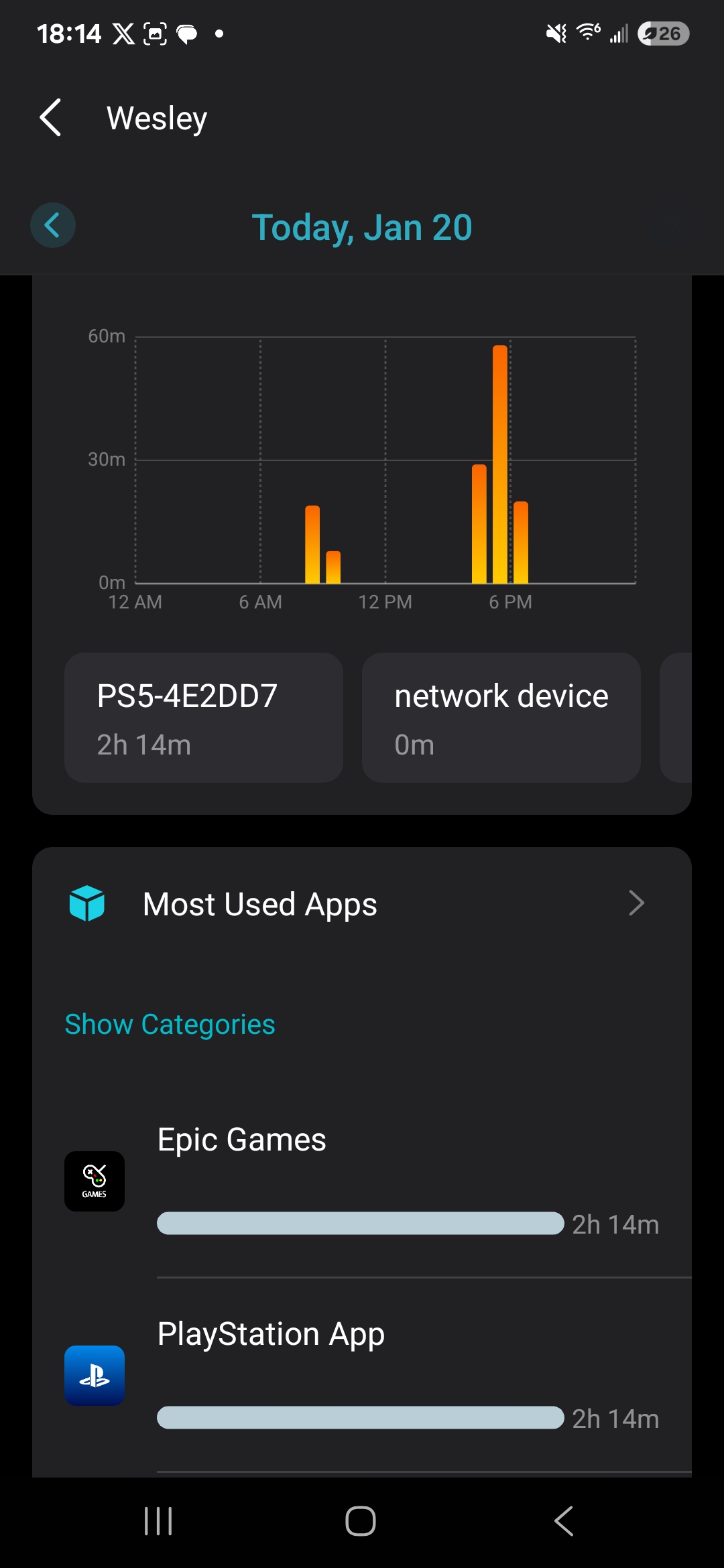
As an example, I have created a 1.5 hr limit for my child.  He has two devices tied to his account, if you click into his account, you can see that 1 of the devices has been online for 1hr 54 minutes, but his time shows as 0 of 1.5 hrs used.


The graph shows time, but it hasn't kicked him off yet even though the console he is using has been well over the limit.

Are my expectations of this app just way off?  We are trying to limit our kids screentime, and for the life of me I can't get this thing to work.


I don't understand how it can show that he has been on for almost 2 hrs, but then also show 0 of 1.5hrs used.  

Any help would be appreciated.  Is this a bug?  Or am I doing something wrong?
 

0?ui=2&ik=9a2cae21e8&attid=07857ef60282a4a389a9bfb25bb3d77ca

  0      
  0      
#1
Options
1 Reply
Re:HomeShield parental control limits never works
Ayer

Hello @stewartn81 ,

Welcome to our community.


Have you set up another file and managed other clients for comparison?

This situation is indeed strange, it is recommended sending an email to forumsupport.usa@tp-link.com  with the following information:

Subject: [Forum Escalation][ID 855522]HomeShield parental control limits never works

Forum Nickname: stewartn81

Thread URL: https://community.tp-link.com/us/home/forum/topic/855522

Model&Version: Archer AXE5400-v1-1.5.1

Description: 


Any Other Relevant Information: Please attach the App system log file for further investigation. How to collect system log of Tether App


Once sent, a ticket will be created in our support system, and a team member will follow up to gather more information or troubleshoot the case.

  0  
  0  
#2
Options
