
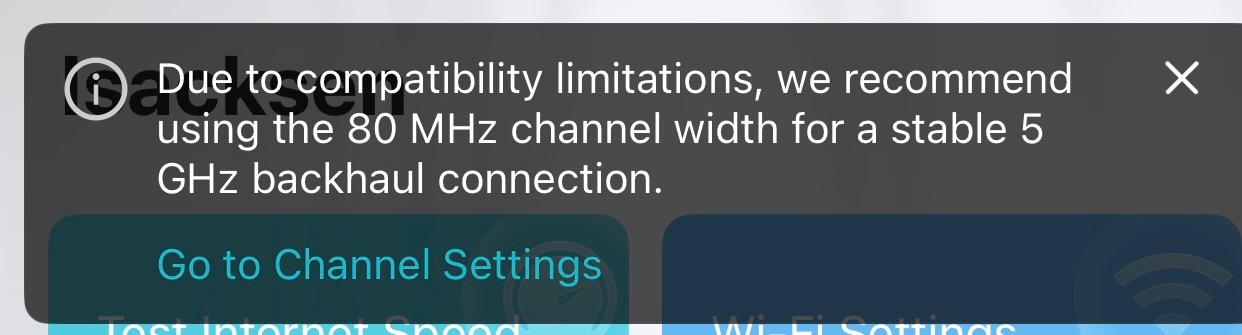
Due to Compatibility Limitations

Why am I getting this message daily?
- Copy Link
- Subscribe
- Bookmark
- Report Inappropriate Content

Any other way around this? I was thinking the only way would be to set the deco in router mode, change the setting, then go back into AP mode but I have no idea if they do this if it will allow them to run the deco in 80 MHz
Please advise,
If that wont work we need to add this to the list of stuff that needs to be fixed.
- Copy Link
- Report Inappropriate Content


Hi, can I have a screenshot of the following page?
Go to More > Wi-Fi Settings > 2.4G & 5G wireless network > Advanced.
In AP mode, Deco App also allows setting the channel width for 5Ghz:
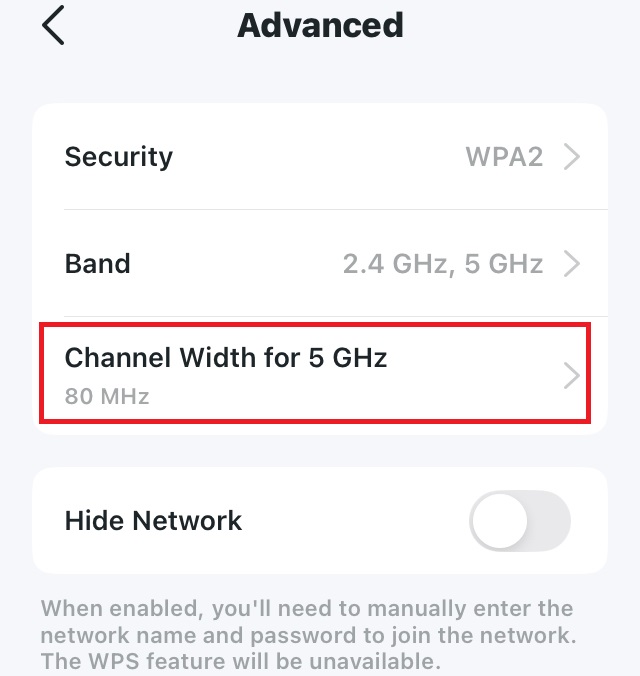
But the error notice here is sort of confusing. Could you please also refer to this link to help me submit the Deco App log:
(Please leave a message here with the support ticket ID after you submit the App log.)
Thank you very much.
Best regards.
- Copy Link
- Report Inappropriate Content
- Copy Link
- Report Inappropriate Content
Thanks for reaching out! I understand you're seeing a message on your Deco recommending the use of 80 MHz channel width instead of a wider bandwidth for a stable 5 GHz backhaul connection, and you'd like to know why this is happening.
This compatibility message can appear for several reasons related to your Deco's backhaul connection:
Regulatory Restrictions: The 160 MHz bandwidth might not be available on the 5 GHz band in some regions/countries due to regulatory restrictions. Your Deco may be detecting that wider bandwidths aren't fully supported in your area.
Channel Width and Stability: While wider channel widths allow more data to be transmitted simultaneously and result in higher data rates, they also consume more of the available spectrum. More importantly, wireless transmissions on wider channels are more susceptible to interference, which can affect the stability of your backhaul connection between Deco units.
Dynamic Frequency Selection (DFS): If your Deco is using DFS channels, it needs to monitor for radar signals. When radar is detected, the device must vacate that channel and switch to an alternate one automatically. This channel switching can be more problematic with wider bandwidths like 160 MHz, potentially causing instability in the backhaul connection.
The system is recommending 80 MHz as a balance between performance and stability to ensure your Deco mesh network maintains a reliable connection between units. Using 80 MHz should still provide good performance while avoiding potential compatibility and stability issues.
- Copy Link
- Report Inappropriate Content
@HelpFixDecoApp thanks for the response; however, where do I change the value as I'm using my BE11000 as access points. All are eithernet connected and not wireless for the backhaul.
- Copy Link
- Report Inappropriate Content
Since your running in Access you "may" not be able to change this but the directions are listed below, Let me know if the deco app lets you change the setting.
How to Change Channel Width
If your Deco app has defaulted to 80 MHz or you wish to set it manually:
- Open the Deco app.
- Go to More > Wi-Fi Settings > 2.4G & 5G wireless network > Advanced.
- Set the Channel Width for 5 GHz to 80 MHz.
- Copy Link
- Report Inappropriate Content
@HelpFixDecoApp cannot changed when running in access point mode
- Copy Link
- Report Inappropriate Content
Any other way around this? I was thinking the only way would be to set the deco in router mode, change the setting, then go back into AP mode but I have no idea if they do this if it will allow them to run the deco in 80 MHz
Please advise,
If that wont work we need to add this to the list of stuff that needs to be fixed.
- Copy Link
- Report Inappropriate Content
Hi, can I have a screenshot of the following page?
Go to More > Wi-Fi Settings > 2.4G & 5G wireless network > Advanced.
In AP mode, Deco App also allows setting the channel width for 5Ghz:
But the error notice here is sort of confusing. Could you please also refer to this link to help me submit the Deco App log:
(Please leave a message here with the support ticket ID after you submit the App log.)
Thank you very much.
Best regards.
- Copy Link
- Report Inappropriate Content
@pisacksen notification disappeared with no action on iPadOS and iOS. How could that be?
- Copy Link
- Report Inappropriate Content
@pisacksen finally resolved with a technical support chat. Rebooted the BE1100 set and channel setting appeared.
- Copy Link
- Report Inappropriate Content
Information
Helpful: 1
Views: 1617
Replies: 9
Voters 1