
Port forwarding switches subnet from .1 to .0

Some time ago port forwarding was working. It stopped working and I couldn't determine why. Recently I found the Port Forwarding IP addresses for all the devices were 192.168.0.x instead of their address of 192.168.1.x. I have edited and recreated each, but after leaving Prot Forwaring section and come back or waiting for a minute the subnet changes to .0. CHAT has not been able to help.
- Copy Link
- Subscribe
- Bookmark
- Report Inappropriate Content
@smahurin On the QNAP server, I had not maintained the security list. I changed to allow all and now port Forwarding is working for those servers.
THANK YOU !!
The original problem was the LAN IP subnet mask needed to be set to 255.255.255.0.
- Copy Link
- Report Inappropriate Content


Hi,
Please confirm the following information about the reported phenomenon for analysis.
1. Please send us a screenshot of the Deco app > More > Advanced > LAN IP page.
2. When you configure the Port Forwarding feature in the Deco app, have you selected "Use Client IP address" or "Use Custom IP Address" on the Internal IP option?
How to Set Up Port Forwarding on Your Deco
3. If you see the client device's IP address change to 192.168.0.x in the Port Forwarding entry, is the IP address on the actual device still 192.168.1.x?
Best Regards
- Copy Link
- Report Inappropriate Content
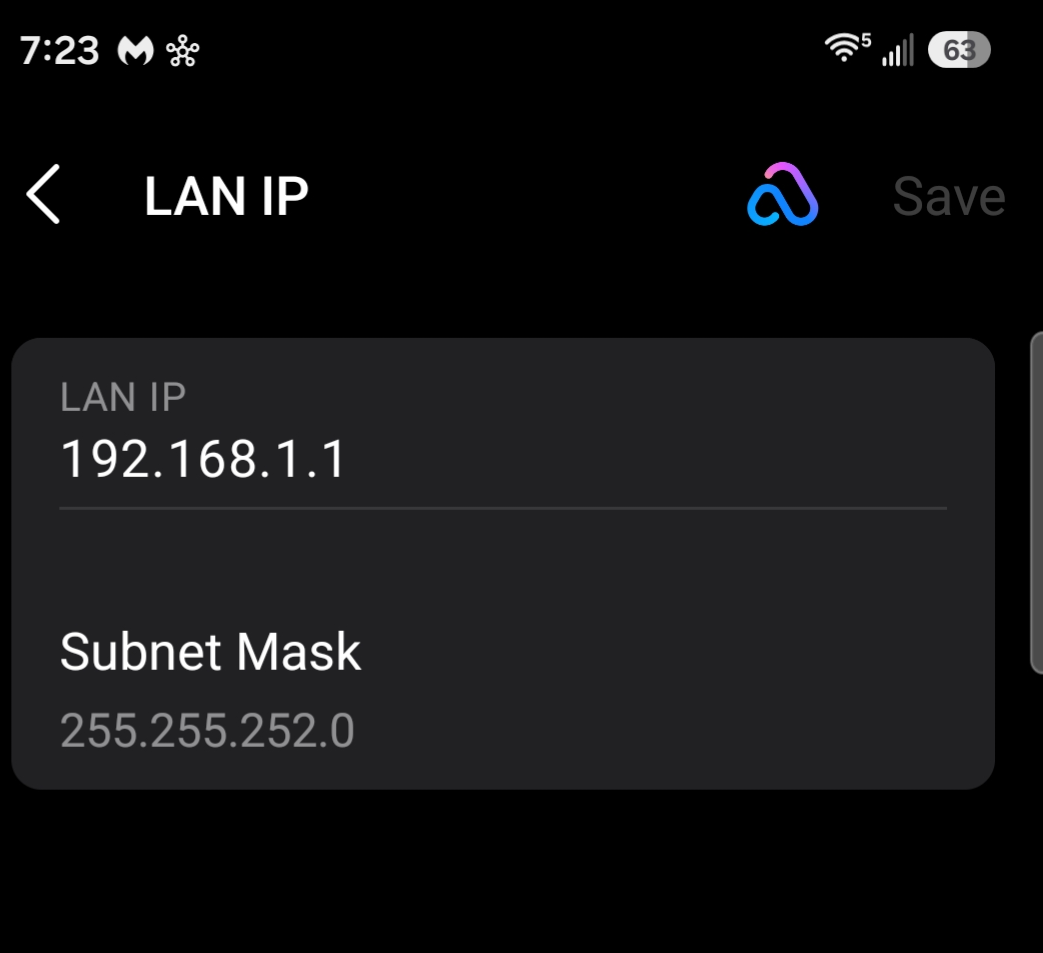
- Copy Link
- Report Inappropriate Content
@smahurin I changed the mask to 255.255.255.0 and the Port forwarding addresses changed to the correct subnet (.1).
I tested accessing one of the devices with both DDNS name and the current WAN IP of the router (with the port). It didn't work.
I recreated the entry for the device I was testing and it still didn't work.
- Copy Link
- Report Inappropriate Content
Hi,
If the port forwarding feature does not work on your Deco, you can refer to the instructions below to troubleshoot.
TP-Link Port Forwarding Not Working on Router or Deco? Here's How to Fix It
Please confirm the following information if the same phenomenon persists.
1. Please list the troubleshooting you did and the results.
2. What's the IP address on the Deco app > More > Internet Connection > IPv4 page?
Best Regards
- Copy Link
- Report Inappropriate Content
@smahurin On the QNAP server, I had not maintained the security list. I changed to allow all and now port Forwarding is working for those servers.
THANK YOU !!
The original problem was the LAN IP subnet mask needed to be set to 255.255.255.0.
- Copy Link
- Report Inappropriate Content
Information
Helpful: 0
Views: 145
Replies: 5
Voters 0
No one has voted for it yet.