
Early Access Deco X50/X55_V1.3_1.3.1 Introduced Channel Selection, WiFi Access Control and WireGuard VPN
 This thread has been locked for further replies. You can start a new thread to share your ideas or ask questions.

Update on Feb 2nd, 2026:
The official version for Deco X50/X55_V1.30, 1.3.1 Build 20251122, has been released publicly.
Deco firmware release is gradually rolled out. Users might detect this new firmware at various times. Please pay attention to the Deco App new firmware notification as well as local official websites.
We will manually lock this post to better focus on discussions regarding the new firmware. If you have any further questions, please start a new thread to provide feedback.
--------------------------------------------------------------------------------
This Article Applies to:
Deco X50(US/KR) / Deco X55(US/CA)_V1.30/V1.33
Modifications and Enhancements:
New Features
- Supported Channel Selection.
- Supported Internet Backup via Hotspot Backup and Hybrid-Mesh Backup Mode.
- Added DoH/DoT under Deco APP>More>Advanced.
- Supported 20MHz/40MHz automatic bandwidth selection to enhanced 2.4GHz WiFi performance.
- Supported WireGuard VPN Server/Client.
- Supported built-in easy configuration of NordVPN/Surfshark VPN.
***In compliance with local regulations, the Third-party VPN feature may be restricted to specific regions.
- Added client speed limit under clients' detailed setting page.
- Supported Fixing the WAN port under Deco APP>More>Advanced>WAN Port.
- Added Scene Priority under QOS.
- Added Client MAC Identification to improve the accuracy of device detection.
- Added Firmware Auto Update.
- Supported Matter
- Advanced Parental Control subscription added APP block/App Time Limits feature, which supports 2000+ applications.
- Added Camera Security
- Added Whitelist/ Wi-Fi Access Control
- Added notification for Ethernet connection speed.
- Supported Captive Portal for Guest Network
Enhancements
- Optimized the collaboration with Tapo smart devices.
- Updated HomeShield Parental Control service.
- Improved network stability and system security.
Firmware Download Link
Deco X50/X55_V1.30/V1.33 |
1.3.1_build_20251122_Beta |
Update Notice:
- Please be sure you have read the Beta Test Agreement before upgrading the Pre-release firmware!
- Please make sure the Deco APP is up-to-date.
- This firmware can’t be degraded directly to the previous 1.2.10 version.
- How to manually update the firmware via web UI.
As always, we value your feedback. If you happen to encounter any concerns during or after the firmware upgrade, please feel free to comment below with the following information. Your input helps us continue to improve and provide the best possible products and support.
- Provide a detailed network layout, including how the devices are connected.
- Include a detailed description of the issue and as much information as possible regarding the specific conditions that seem to trigger the behavior.
Thank you for your continued support and for being part of our community.
- Copy Link
- Subscribe
- Bookmark
- Report Inappropriate Content

I'm located in the Caribbean. If it's indeed correct I cannot purchase Homeshield then I would think I have been misled. Because no where in all my searches to a solution to this have I seen Homeshield is not available in certain locations. It's not posted on the tplink website or anywhere and that is not right. I bought my device from Amazon and nowhere did it say such either.
- Copy Link
- Report Inappropriate Content

- Copy Link
- Report Inappropriate Content
@David-TP I have a TP-Link Deco X50 (V1.30) with Firmware Version: 1.3.1 Build 20252211 Rel.36074. I also have a TP-Link Archer C6 V4 router.
Even when using the same ISP and at the same distance, there is a significant performance difference between the two devices.
The 2.4GHz speed on the Deco X50 is very low (around 500 KB/s to 2 MB/s, sometimes even lower),
while the Archer C6 V4 provides around 12 MB/s (≈ 96 Mbps) on 2.4GHz.
- Copy Link
- Report Inappropriate Content

@David-TP My brother is using one Deco X50 unit. For example, I have a router with the model TP-Link Archer C6, version v4. On that router’s 2.4 GHz network, even at the very edge of the coverage range, Facebook, YouTube, IMO, and WhatsApp work very smoothly without any buffering. Even if my mobile connection speed is only 7 Mbps, everything still works properly without any buffering.
However, when a mobile phone is connected to the Deco X50, once I go to the edge of the range on 2.4 GHz, Facebook, YouTube, IMO, and WhatsApp do not work at all, even though the mobile connection speed is 7 Mbps. I thought that a firmware update might fix the issue, but even after updating to Firmware version 1.3.1 Build 20252211 Rel.36074 (taken from this group), the same problem remains—nothing has improved.
Another issue is that some useful options have been added, but many of them do not function properly. For example, speed limiting cannot be applied, which is a very important feature. Another important feature mentioned is:
Client traffic statistics have been added, and real-time information display has been optimized, including wireless encryption, bandwidth, and connection duration.
I sincerely and humbly request you to please fix the 2.4 GHz network, so that I can use it like the TP-Link Archer C6 v4. That is all I ask for—nothing more. Brother, I am under a lot of stress and tension because of this issue, and I am not even able to eat properly.
- Copy Link
- Report Inappropriate Content
@David-TP I have one unit, and I see that on it the 2.4GHz speed is only 500 KB, sometimes it drops to just 13 KB, and the connection keeps dropping. The 2.4GHz network keeps disconnecting whenever I move a little farther.
If I give examples from your other devices like the TP-Link Archer series or TP-Link ACX3000, the network doesn’t drop on those.
Why does the network drop only on this Deco X50 model? I have installed the beta version from this group, 1.3.1 build 20251122rel36074. Now I see more problems: the 2.4GHz has almost no speed, and if I move a little farther, social apps don’t work. On mobile, if the Wi-Fi signal shows only two bars, nothing works.
Please fix this issue quickly.
- Copy Link
- Report Inappropriate Content

@Emon121 Why are you using different accounts and sharing same issue? Keep using your same account RAKIB.
- Copy Link
- Report Inappropriate Content

@David-TP I am using one unit of Deco X50. When I move a little far away, the 2.4 GHz network stops working / disconnects. Because of this problem, I updated the firmware to beta version 1.3.1 Build 20251122 Rel.36074 from this group, but there has been no improvement. The problem is exactly the same—when I go farther, the internet disconnects.
I request you to please provide a fast solution to this problem.
Also, I kindly request you to add this option:
> Client traffic statistics have been added, and real-time information display has been optimized, including wireless encryption, bandwidth, and connection duration.
- Copy Link
- Report Inappropriate Content

After update X50/X55_V1.3_1.3.1 my 2nd DECO x50 don't get ipv6 IP (picture in attachment). But before update it's assign & get ipv6 IP. Default gateway new section display mentioned at attachment picture. Maybe it's main issue for get ipv6 IP. Before update my some 2.4ghz devices thoughtput 150mbps but After update 86mbps.
*My main unit deco M5 & 2nd unit deco X50.
After update my previous heating issue solved maybe. But overall performance range dropped.
How get back previous version? Maybe somewhere you mentioned process but that link showing deco X50 V1 or V2 specific firmware. Where is v1.30/1.33 ?
Thanks in advance ☺️

- Copy Link
- Report Inappropriate Content
Hi, it is not recommended to downgrade to the previous version, as the official version will also be released soon.
Did you set Deco into "Access Point" mode?
Can you also add a screenshot of the IPv6 settings on the main Deco M5?
Wait for your reply.
Best regards.
- Copy Link
- Report Inappropriate Content
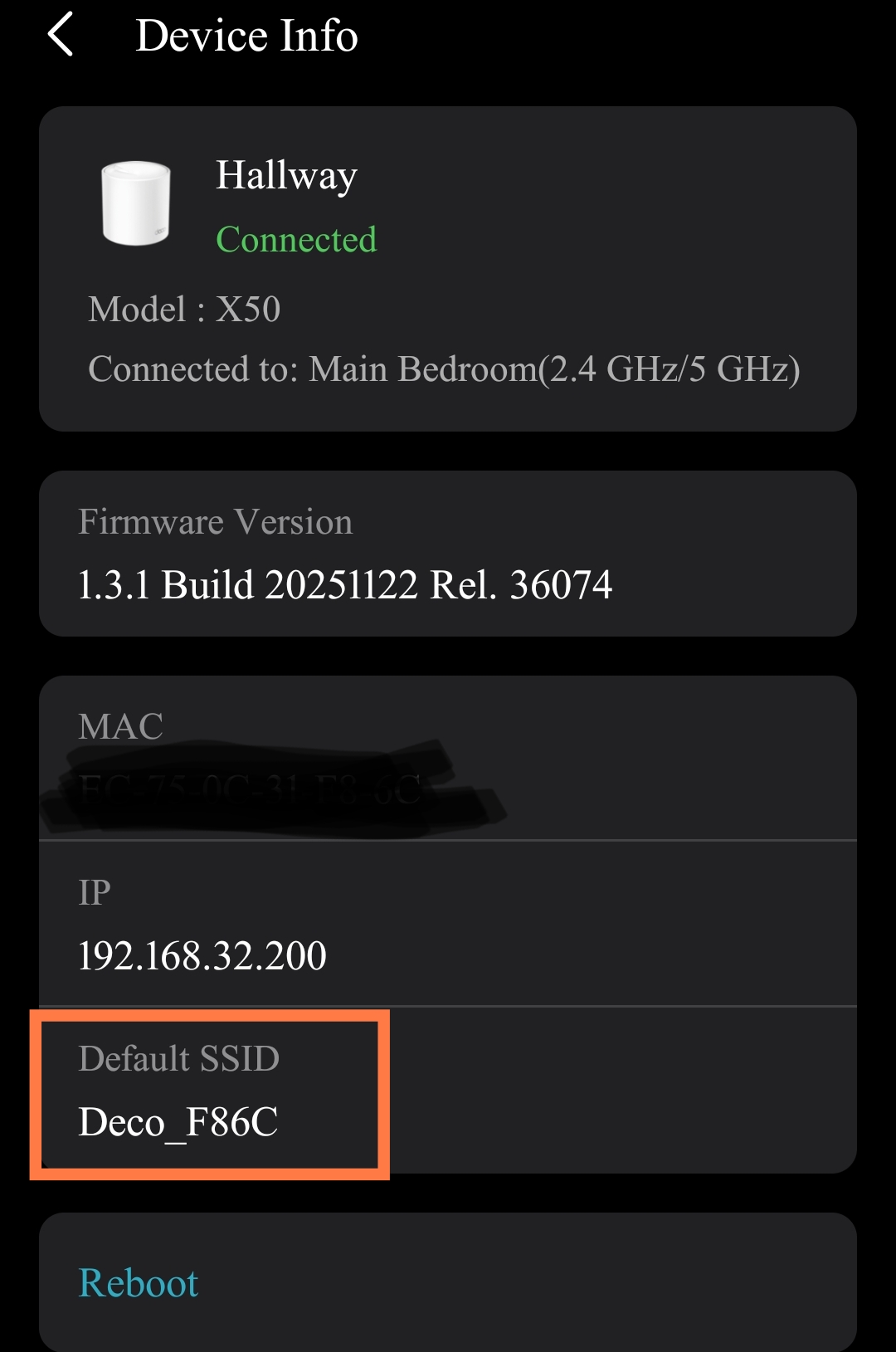
Default SSID new section display mentioned at attachment picture. Maybe it's reasonable for 2nd unit ipv6 IP issue. Also maybe fast roaming function not working properly. Because unit to unit switching properly noticeable.singnal drop & gain . But before update I can't notice which unit currently using my device without login DECO app .
- Copy Link
- Report Inappropriate Content
Information
Helpful: 11
Views: 27152
Replies: 132
Voters 3


