
Beta Software Firmware 1.4.0 for Deco XE75/XE5300/XE75 Pro_V2/V3 Added Wi-Fi Access Control, WireGuard VPN & More


This Article Applies to:
Deco XE75(US/EU/AU/CA)_V2/V3
Deco XE5300(US)V2/V3
Deco WE10800(US)V2/V3
Deco XE75 Pro(US/EU/AU/CA)_V2/V3
Deco XE70 Pro(US)_V3
Vx.0=Vx.6(eg:V2.0=V2.6)
Firmware Modifications:
- Added WiFi Network Mode to enhance the overall performance of the 2.4GHz band.
- Added Camera Security.
- Added Whitelist/ Wi-Fi Access Control to support Allow List and Block List
- Supported Captive Portal for Guest Network.
- Supported Firmware Auto Update.
- Supported ECO Mode 1.0 to save power.
- Supported WireGuard VPN.
- Integrated third-party VPN services.
- Supported limiting client speeds.
- Supported fixing a specific port as the WAN port.
- Optimize client type recognition.
- Support managing new Kasa and Tapo product categories (including light strips, multi-port outlets, etc.).
Bug Fixes:
- Fixed the issue where Samsung devices could connect to the Deco WiFi but had near-zero network speeds.
Download Links
| Deco XE75/XE5300/WE10800_V2/V3 | 1.4.999_Build_20260319_rel_57690_Beta (updated 2026.3.19) |
| Deco XE75 Pro/XE70 Pro_V2/V3 | 1.4.999_Build_20260319_rel_57838__Beta (updated 2026.3.19) |
Update Notice:
- Please be sure you have read the Beta Test Agreement before upgrading the Pre-release firmware!
- Please make sure the Deco APP is up-to-date.
- The Beta firmware versions can’t be degraded directly to the previous 1.3.1/1.2.9, etc. versions.
- How to manually update the firmware via web UI.
As always, we value your feedback. If you happen to encounter any concerns during or after the firmware upgrade, please feel free to comment below with the following information. Your input helps us continue to improve and provide the best possible products and support.
- Provide a detailed network layout, including how the devices are connected.
- Include a detailed description of the issue and as much information as possible regarding the specific conditions that seem to trigger the behavior.
Thank you for your continued support and for being part of our community.
- Copy Link
- Subscribe
- Bookmark
- Report Inappropriate Content

Hi,
Do you have two Deco XE75 Pro V2 with the v1.4.999 beta installed? What are the Deco X20's firmware and hardware versions? Which features or aspects of the X20 or XE75 do you concern about?
If you encounter any issues when using the beta firmware, please feel free to reply.
Best Regards
- Copy Link
- Report Inappropriate Content
@David-TP This release, when finished, will be very close to what many of us need. It uses the non-overlapping technique, and disabled the 2.4ghz backhaul, but the one thing it is missing that will mean this release will possibly FAIL to resolve the 2.4ghz issues for many people, is the 2.4ghz will still be 40Mhz.The trick the beta many of us are running that solves the 2.4ghz issues used was that it uses 20mhz channels. The 40mhz channels here in densly popualted europe mean you have neighbours all around you and very little clean airspace. With 2/3 people all overlapping, it just does not work well. I will wait (hopefully) for another release, as I know for me at least, 40Mhz 2.4ghz is just unreliable for my iot devices, etc. I saw on the firmware roadmap, that it was a minor bump to add 2.4ghz chandiwdth selection, so I hope it comes next, if not in the next release. Pretty sure many of us will need to wait until then, to be able to get off the 'beta'.
- Copy Link
- Report Inappropriate Content

Hi all,
I think there may also be a wording issue in the Deco app.
In my Deco XE75 V2 setup, all 3 Deco units are connected through Ethernet backhaul. Under Wireless Network Mode, the app says:
“The device only supports Stable Mode currently.”
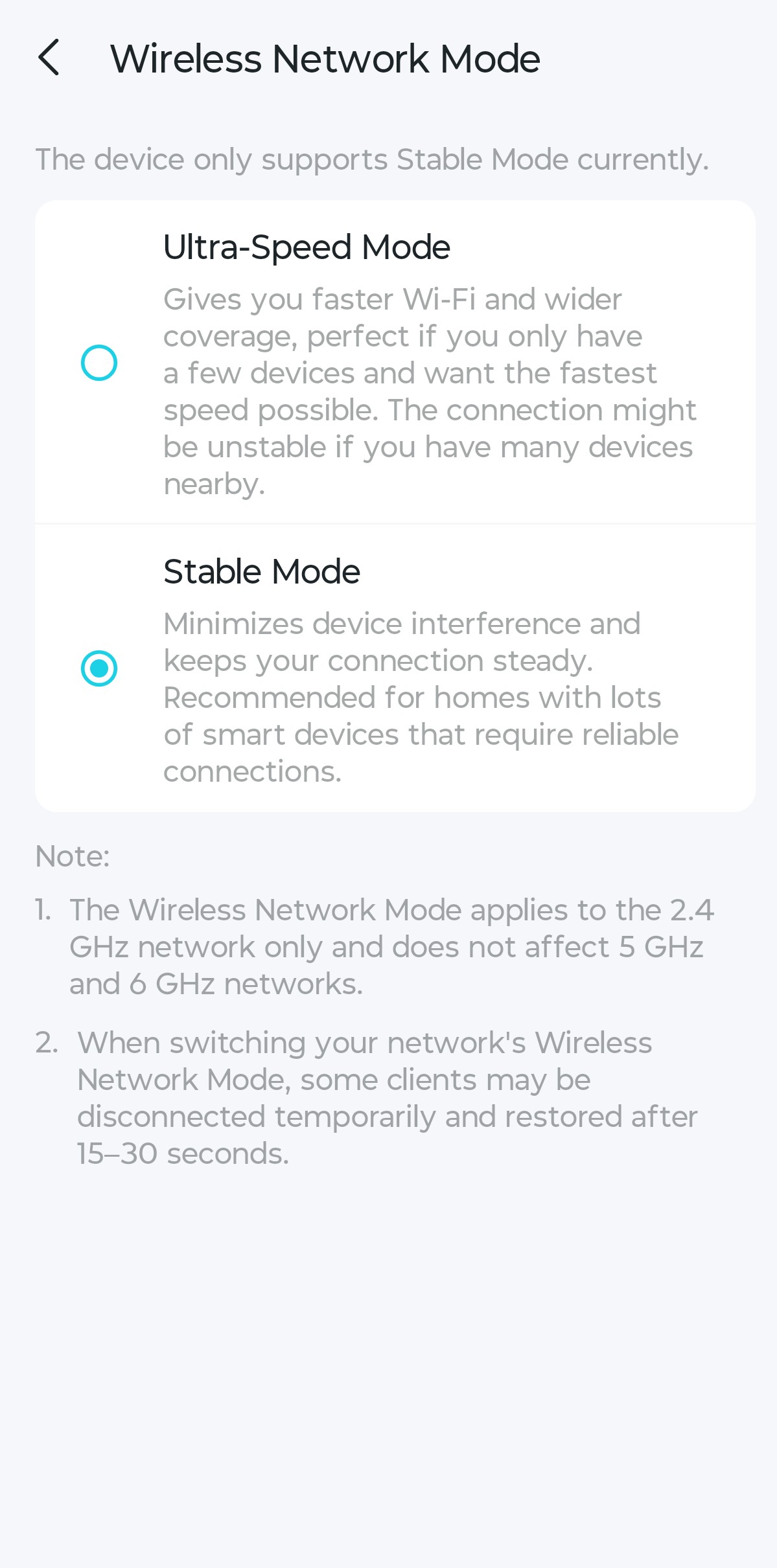
This wording is confusing because it sounds like the XE75 V2 hardware or firmware does not support Ultra-Speed Mode at all.
However, if Ultra-Speed Mode is only relevant when 2.4 GHz wireless backhaul is being used, and my Deco units are connected through Ethernet backhaul, then maybe Stable Mode is being forced because Ultra-Speed Mode simply does not apply in this topology.
Could you please confirm if this is expected behavior?
If yes, I think the app message could be clearer:
“Ultra-Speed Mode is unavailable while Ethernet backhaul is active.”
or something like:
“Wireless Network Mode only affects 2.4 GHz wireless backhaul. Since your Deco units are connected via Ethernet backhaul, Stable Mode is used automatically.”
That would avoid confusion between a real device limitation and a mode that is not applicable because the Deco units are wired.
Thanks.
- Copy Link
- Report Inappropriate Content
Hi,
When the Ethernet backhaul takes effect, Stable Mode is used automatically. The mode displayed on the Wireless Network Mode page is expected.
Thank you for the feedback here. I'll log it and forward it to the relevant team for evaluation.
Best Regards
- Copy Link
- Report Inappropriate Content

@Solla-topee any plans on releasing this to V1 XE75s, given they suffer from the exact same issues with 2.4 devices. I'm absolutely sick of my Nest devices constantly dropping.
- Copy Link
- Report Inappropriate Content

- Copy Link
- Report Inappropriate Content
Hi,
We do not have information on when the official firmware will be released. However, I'll update this post if the new firmware is available.
Best Regards
- Copy Link
- Report Inappropriate Content
Hi,
Your reported drop phenomenon is not the focus of this post. It's recommended to start a new thread here for further assistance.
Best Regards
- Copy Link
- Report Inappropriate Content

Is there any solution or fix for Decos V1.6? The 2.4GHz Network in my house is totally useless at this point, all my devices are completely off.
- Copy Link
- Report Inappropriate Content
Euscady wrote
Is there any solution or fix for Decos V1.6? The 2.4GHz Network in my house is totally useless at this point, all my devices are completely off.
Hi,
It's recommended to start a new thread here with the following information for further assistance.
1. Deco's model number, hardware, and firmware versions.
2. Describe your usage scenario and questions in detail.
Best Regards
- Copy Link
- Report Inappropriate Content
Information
Helpful: 6
Views: 32181
Replies: 122
Voters 2

