
Early Access Deco X50/X55_V1.3_1.8.2 Expanded the Client Connection Detail and Added ECO Mode, VPN Kill Switch


Hey Everyone,
We’re excited to introduce a new firmware update for the Deco X50/X55_V1.30/V1.33, packed with powerful new features and enhancements designed to elevate your Deco Mesh Home Networking experience.
This Article Applies to:
Deco X50(US/KR) / Deco X55(US/CA)_V1.30/V1.33
Modifications and Enhancements:
- Streamlined TP-Link Simple Setup process.
- Added Traffic Usage for online clients and optimized real-time information display on the Deco App, including wireless standard/bandwidth/encryption and online time.
- Added ECO Mode
- Added the VPN Kill Switch
- Optimized the Configuration Backup feature for a smoother device migration operation
- Improved 2.4GHz mesh performance and overall networking experience.
- Improved Overall System Security & Stability
- Correct the Deco node's Online Time.
Firmware Download Link:
Deco X50/X55_V1.30/V1.33 |
1.8.2_build_20260421_rel_45251_Beta |
Update Notice:
- This beta firmware version number, as well as the future official version, has been adjusted to 1.8.x to align and streamline software release management with Deco X50/X55_V1.0/V1.6 going forward.
- Please be sure you have read the Beta Test Agreement before upgrading the Pre-release firmware!
- Please make sure the Deco APP is up-to-date.
- This firmware can’t be degraded directly to the previous version. A firmware recovery is required to revert to the official 1.3.1 version.
- How to manually update the firmware via web UI.
As always, we value your feedback. If you happen to encounter any concerns during or after the firmware upgrade, please feel free to comment below with the following information. Your input helps us continue to improve and provide the best possible products and support.
- Provide a detailed network layout, including how the devices are connected.
- Include a detailed description of the issue and as much information as possible regarding the specific conditions that seem to trigger the behavior.
Thank you for your continued support and for being part of our community.
Update Log
Apr 24th, 2026
- Update the pre-release firmware.
- Add a release note: Correct the Deco node's Online Time.
- Copy Link
- Subscribe
- Bookmark
- Report Inappropriate Content

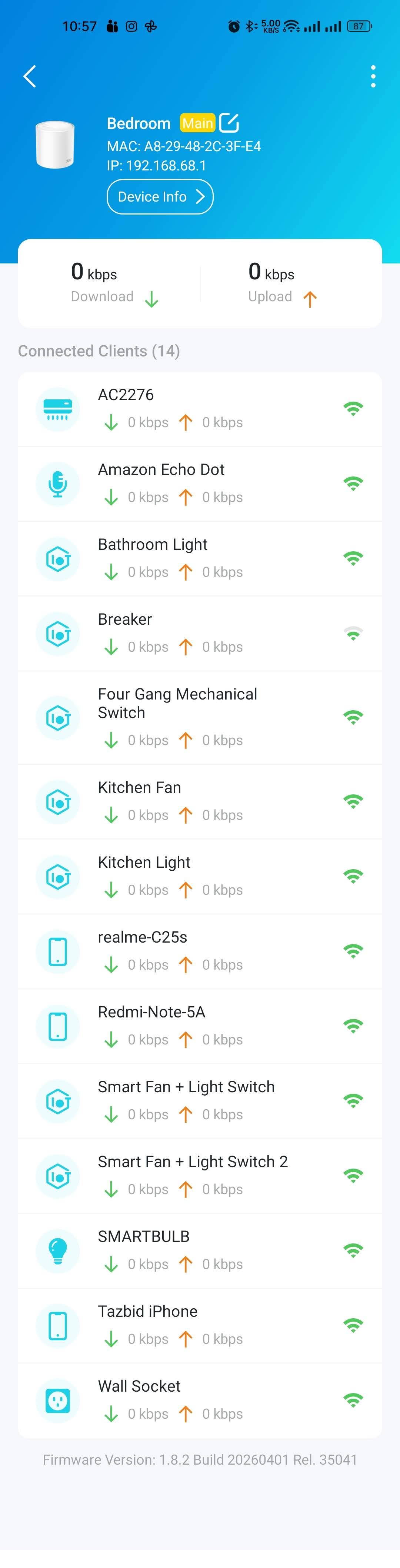
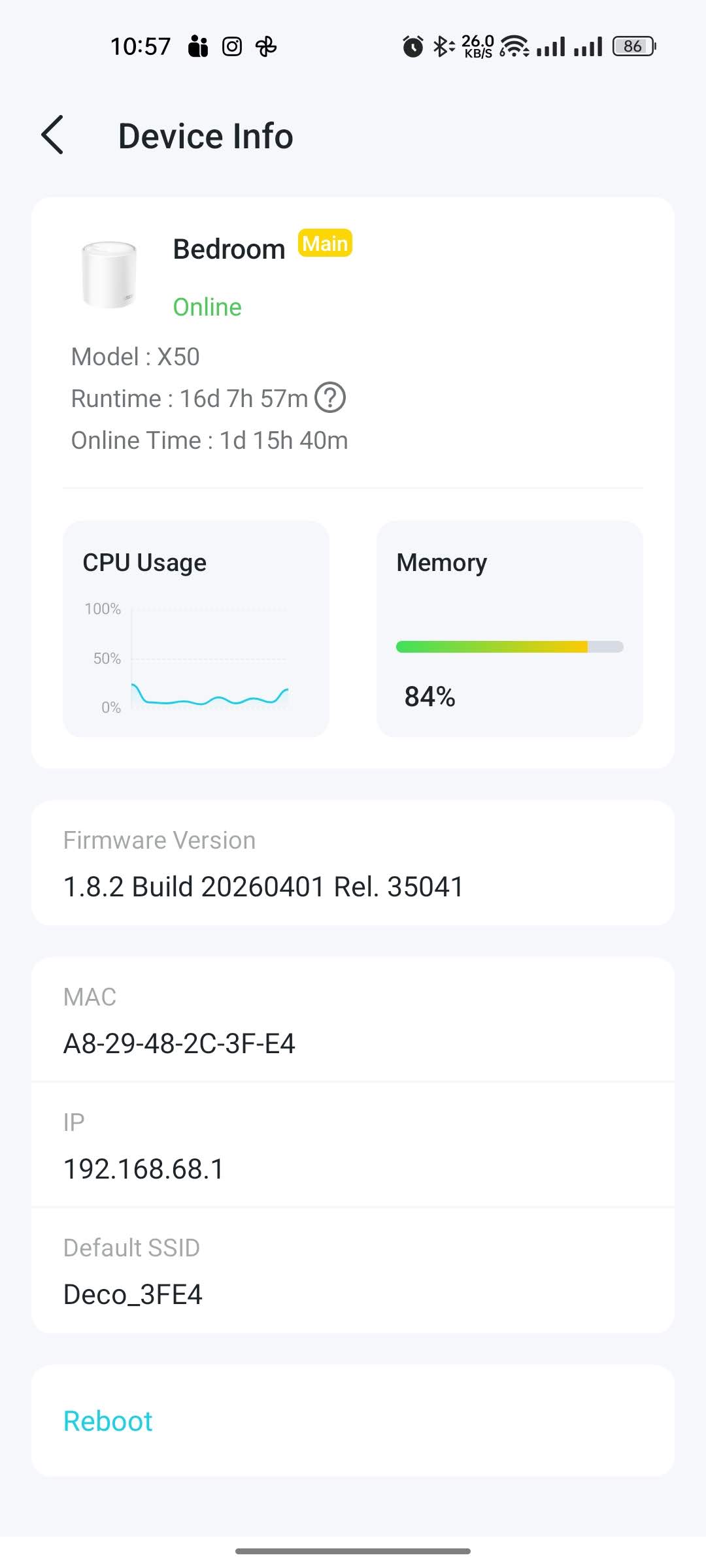
I am using Firmware Version 1.8.2 Build 20260401 Rel. 35041 (Hardware Version 1.30) on Deco X50 for last 2 weeks now. Performance wise, it is much better that than the previous firmware release I have used on my router. All of my devices (i.e.: smartphone, laptops and smart devices) operates smoothly now. Though memory is showing over 80% all of the time. I do not know if it is relevant to the performance or not.
- Copy Link
- Report Inappropriate Content

@shuvo17 “I think updating to this version will solve your problem.”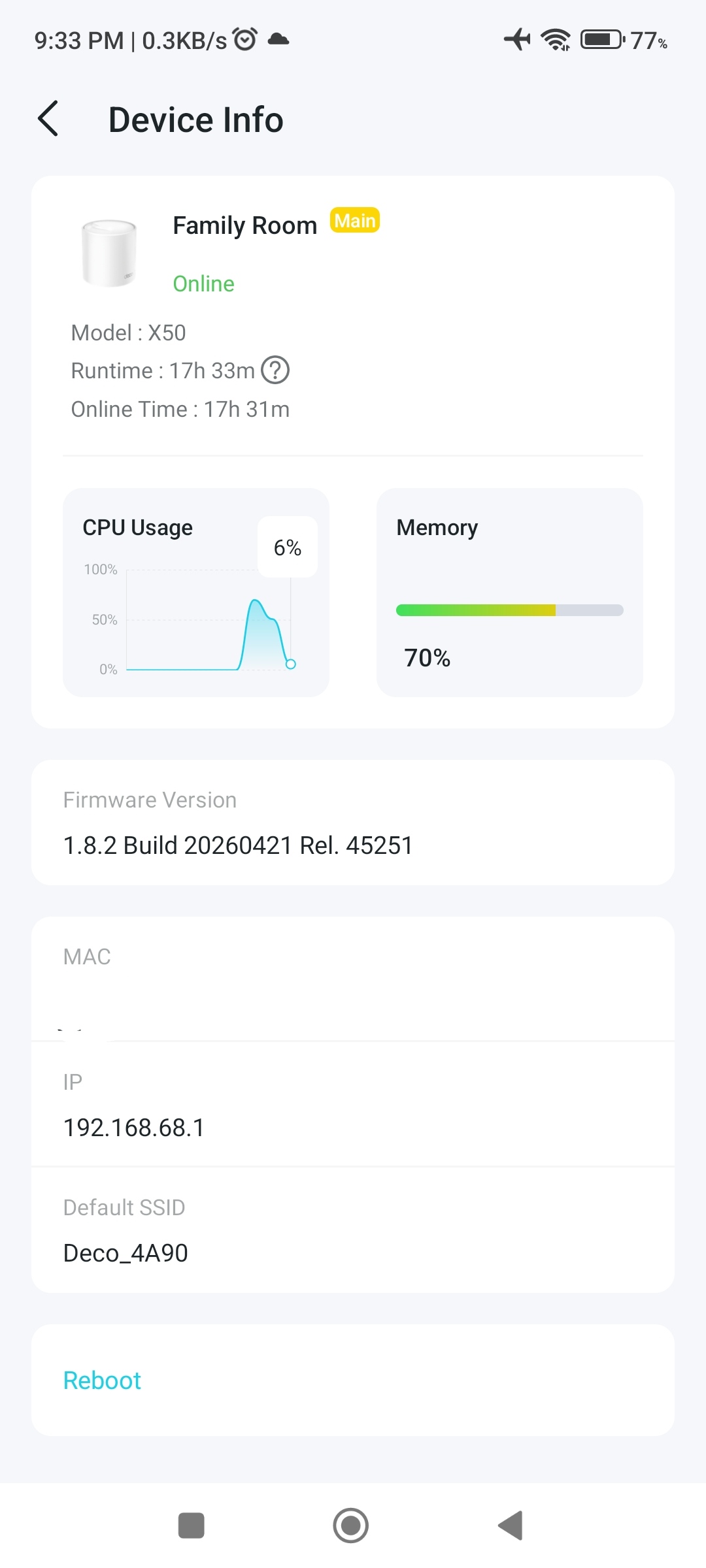
- Copy Link
- Report Inappropriate Content

Hi @Solla-topee,
- Could "ECO Mode" have the capitalisation fixed to "Eco Mode"? I believe it is short for economy mode, and typically when all capital letters are used, each letter usually stands for a separate word (ie. E.C.O).
- Support for English (United Kingdom) or en_GB would be appreciated, as I am in Australia and notice the spelling of words are based on English (United States) or en_US. Similarly, this support could also be brought over to the Web UI as well.
- The additional visual stats for Device Info is wonderful, thank you for adding that.
- For whatever reason, Auto Backup was disabled after upgrading, and I needed to manually re-enable it. That would be a concern for casual owners of Deco who will upgrade firmware and not actually check backup settings, as they will no longer have their backups made. Could the Auto Backup stay enabled if it was already enabled prior to the firmware upgrade?
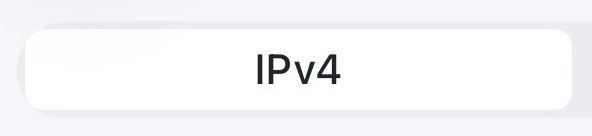
- I noticed a small visual UI issue in More > Internet Connection on iOS, where the IPv4 or IPv6 tab does not have the correct rounded corners, which is clipping through the main tab bar itself.
- Under More > WPS, could we have the ability to disable WPS completely via a toggle?
- Under More > Advanced > Wireless Network Mode, could I have a more visual indication that my device only supports Stable Mode? Something like having Ultra-Speed Mode grayed out. The only thing that tells the user that they can't select it is a small gray line of text that has the same visual importance as the Notes.
- Could I please have the ability to sort my client list in Address Reservation? It looks like at the moment it is automatically sorted by A-Z, but as I organise devices by IP address, this makes it harder for me to quickly compare my documentation with what it shown in the app, as it isn't sorted by 192.168.68.50-192.168.71.250.
- I noticed in the Web UI (in particular System > Firmware Upgrade) that if the Deco device name uses an ampersand (&), and it is Offline, the name isn't parsed properly and the user sees '&'. Only for when Offline, as when it is Online, the ampersand is correctly parsed. e.g "John & Sandy's Room" turns into "John & Sandy's Room (Offline)".
- In the Web UI under Status, could we also please see IPv6 Internet and LAN information alongside the current IPv4 information?
- In the Web UI under Network Map > Internet, could we also please see the IPv6 Internet IP address?
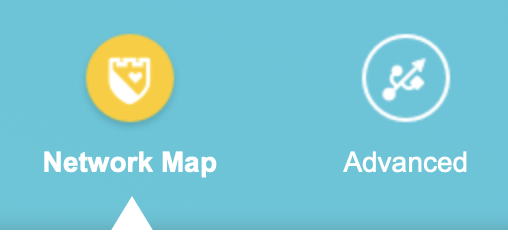
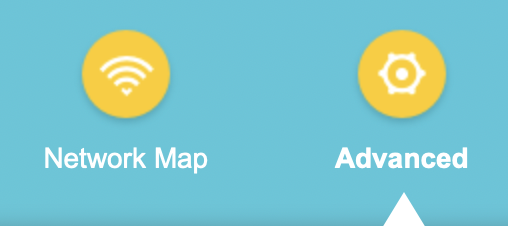
- In the Web UI, the "Network Map" and "Advanced" buttons are not correctly coded at the moment. The Network Map icon is of a shield by default, and the Advanced icon is of a USB. When Advanced is selected, the Network Map icon changes to a Wi-Fi icon and stays yellow and active, but when hovered, changes to the shield icon again.
- In the Web Ui, I would suggest changing the Log Out icon from a yellow tick to something more relevant, like a lock icon, or an exit icon.

- In the Web UI, I would suggest changing the Back to Top icon from a blue tick to something more relevant, like an up arrow.

- In the Web UI for System Log (thank you for letting us jump to the end of the log!), I would suggest changing the Jump to Start and Jump to End icons to something more recognisable instead of up and down, which are the double left and double right arrows (« »). I would also suggest changing the Clear All icon from a blue down arrow to a red trash can, or cross. I accidentally thought the blue arrow was related to the blue refresh text and deleted the log.


- Copy Link
- Report Inappropriate Content
Hi,
Thank you for your suggestions and feedback. I'll log them and forward them to the relevant team for evaluation.
Btw, the status of the Auto Backup feature will generally remain the same before and after the upgrade. You can check the status of this feature before the next firmware update. If it still changes before and after the upgrade, please feel free to let us know.
Best regards
- Copy Link
- Report Inappropriate Content
Thank you @Solla-topee, I appreciate it.
Just noticed something else. In the Security tab, if I tap on Camera Security, add my TP-Link Tapo camera to Home Mode, then skip without adding rules, then go back and tap on Block Upon Arrival, and Add mobile phones, I can see all mobile phones (and clients) in the list, except for the device I am using the Deco app on.
Is this intentional? I wanted to add my own mobile phone to the list, but can't.
- Copy Link
- Report Inappropriate Content
Current Firmware Version:
v1.30_1.8.2 Build 20260421 Rel 45251
While using this new firmware version, I noticed that some important and useful features from previous versions are either missing or no longer working properly. I also believe that adding a few additional improvements would greatly enhance the user experience.
1. Request to Improve the Speed Limit Feature
In many families, children spend excessive time watching cartoons or videos on mobile phones, televisions, or laptops. In such situations, it is not always easy for parents to immediately take the device away from them.
If the Internet Speed Limit feature works effectively, children usually think there is a temporary internet problem and naturally stop using the device by themselves.
For example, my own child watches cartoons on a mobile phone while eating and before going to sleep. When I reduce the internet speed using the Speed Limit feature, the child simply leaves the phone aside and falls asleep peacefully.
I truly believe this feature would be extremely helpful for many families if it works properly and reliably.
Previous Version:
V1.30_1.2.10 Build 20241105
2. Request to Restore/Fix the 2.4GHz & 5GHz Manual Switching Feature
In the previous firmware version V1.30_1.2.10 Build 20241105, users could easily move or control many mobile devices between the 2.4GHz and 5GHz bands according to their preference.
However, in the current firmware version v1.30_1.8.2 Build 20260421 Rel 45251, this feature is no longer functioning properly.
Please restore or fix this feature as it was before, because many users depend on it for better network management and device compatibility.
3. Request to Add Monthly Traffic Usage Option
Currently, the Traffic Usage section only shows Day and Week usage statistics.
It would be very helpful if a Monthly Traffic Usage option could also be added, so users can easily monitor and track their monthly internet usage.
This would be a very useful and important feature for customers.
I kindly request the TP-Link engineers and management team to consider these important suggestions and restore/improve these three features.
Thank you very much to the entire TP-L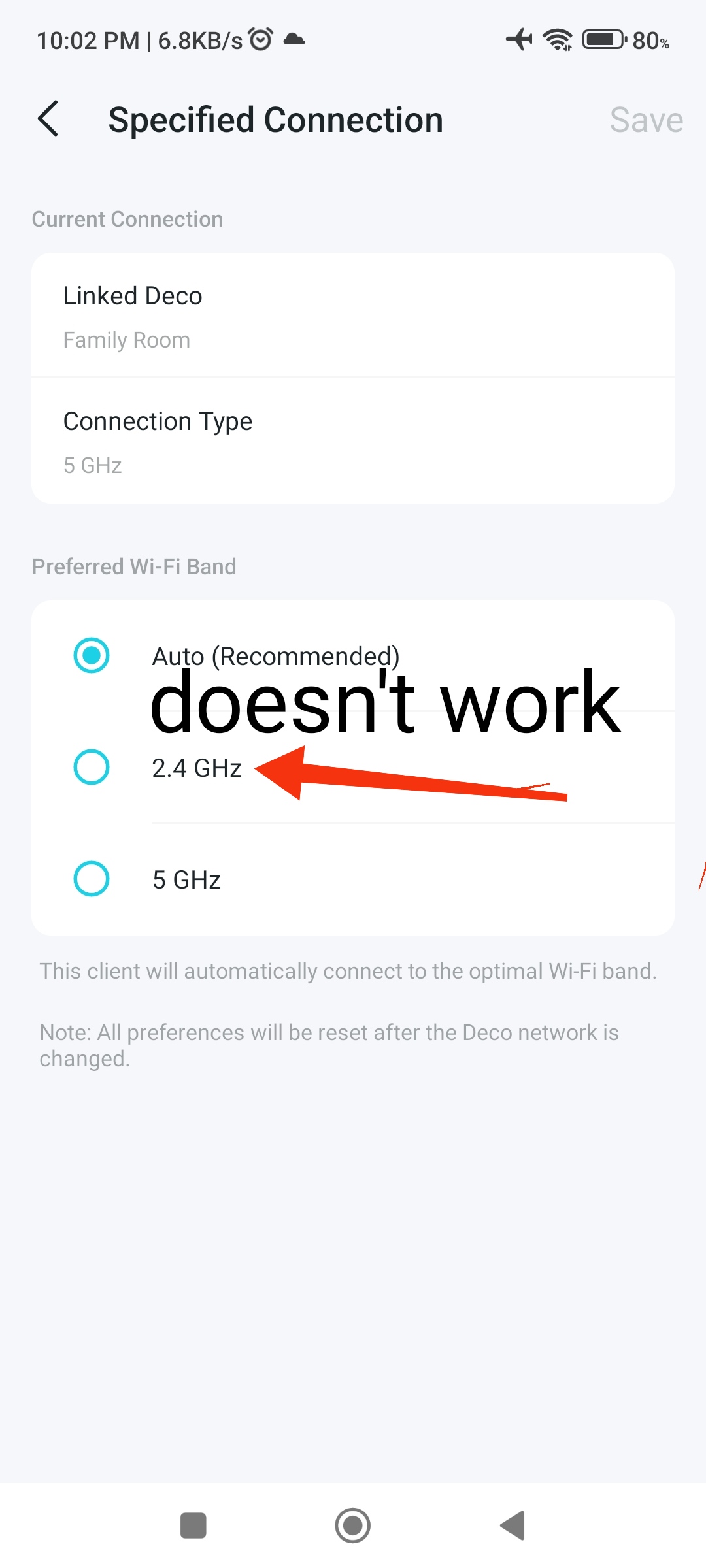 ink team.
From Bangladesh,
Rakib
- Copy Link
- Report Inappropriate Content
Hi @Solla-topee,
We're noticing that with Eco Mode enabled, the LED light on one of our units is staying on, even though we have it set to Always Off network wide.
It was working perfectly fine before the firmware upgrade, and now with Eco Mode also offering the LED light setting, perhaps there is some sort of conflict when you have the LED's always off before Eco mode, and then also set the LED's always off within Eco mode and enable that mode as well.
I've just tried changing the LED Control from Set for All to Set Individually, to see if that makes a difference (although I shouldn't need to do this).
Thanks.
- Copy Link
- Report Inappropriate Content
Hi,
Please go to the Deco's Web UI > Advanced > System > Firmware Update page to see whether your firmware is the one in this post (1.8.2_build_20260421_rel_45251_Beta). If not, you may try the firmware here.
How to Log In to Your TP-Link Deco Web Management Page
How to Update TP-Link Deco Firmware
Best Regards
- Copy Link
- Report Inappropriate Content
Hi, thank you for your test and feedback.
1. Regarding the Speed Limit feature, we did test and confirmed it works fine on the firmware 1.8.2 Build 20260421 Rel 45251. If this feature does not work well in your situation, please provide the following information for further analysis.
1) Whether all your Deco nodes are Deco X50_V1.3_1.8.2? Please describe your network diagram in detail.
2) What client device have you configured the Speed Limit feature for? Please ensure the random MAC address function of your device is disabled.
3) How do you test whether the Speed Limit feature works? Please send us the pictures of the test results if possible.
2. Here are the instructions to configure the connection preference feature on the Deco app. If this feature does not work for you, please ensure your settings are correct first.
Connection Preference on the Deco App: Set Your Signal Source
What device won't connect to the preferred Deco and band? Please provide screenshots showing the device's specific settings, as well as the Deco and band it is actually connected to.
3. For the feature request to add the Monthly Traffic Usage option, I'll log it and forward it to the relevant team for evaluation.
Best Regards
- Copy Link
- Report Inappropriate Content
Thanks @Solla-topee.
Since my last post, I am trying to resolve an IPv6 connectivity issue with the R&D team at the moment, and it seems that I am currently on a newer firmware version at this time: 1.8.3 Build 26040913 Rel. 20760.
I will wait for a newer firmware update from the version number above, and then revisit this LED issue.
- Copy Link
- Report Inappropriate Content
Information
Helpful: 1
Views: 5848
Replies: 83
Voters 1
