
Early Access Deco X50/X55_V1.3_1.8.2 Expanded the Client Connection Detail and Added ECO Mode, VPN Kill Switch


Hey Everyone,
We’re excited to introduce a new firmware update for the Deco X50/X55_V1.30/V1.33, packed with powerful new features and enhancements designed to elevate your Deco Mesh Home Networking experience.
This Article Applies to:
Deco X50(US/KR) / Deco X55(US/CA)_V1.30/V1.33
Modifications and Enhancements:
- Streamlined TP-Link Simple Setup process.
- Added Traffic Usage for online clients and optimized real-time information display on the Deco App, including wireless standard/bandwidth/encryption and online time.
- Added ECO Mode
- Added the VPN Kill Switch
- Optimized the Configuration Backup feature for a smoother device migration operation
- Improved 2.4GHz mesh performance and overall networking experience.
- Improved Overall System Security & Stability
- Correct the Deco node's Online Time.
Firmware Download Link:
Deco X50/X55_V1.30/V1.33 |
1.8.2_build_20260421_rel_45251_Beta |
Update Notice:
- This beta firmware version number, as well as the future official version, has been adjusted to 1.8.x to align and streamline software release management with Deco X50/X55_V1.0/V1.6 going forward.
- Please be sure you have read the Beta Test Agreement before upgrading the Pre-release firmware!
- Please make sure the Deco APP is up-to-date.
- This firmware can’t be degraded directly to the previous version. A firmware recovery is required to revert to the official 1.3.1 version.
- How to manually update the firmware via web UI.
As always, we value your feedback. If you happen to encounter any concerns during or after the firmware upgrade, please feel free to comment below with the following information. Your input helps us continue to improve and provide the best possible products and support.
- Provide a detailed network layout, including how the devices are connected.
- Include a detailed description of the issue and as much information as possible regarding the specific conditions that seem to trigger the behavior.
Thank you for your continued support and for being part of our community.
Update Log
Apr 24th, 2026
- Update the pre-release firmware.
- Add a release note: Correct the Deco node's Online Time.
- Copy Link
- Subscribe
- Bookmark
- Report Inappropriate Content

From where you get this version (1.8.3 Build 26040913 ) ? Can you please provide me the link?
Thanks in advance 😃
- Copy Link
- Report Inappropriate Content

@Solla-topee I am using a TP-Link Deco X50
Firmware Version: 1.8.2 Build 20260421 Rel 45251
Specified Connection
If I manually select 2.4GHz or 5GHz, it does not work now.
This feature worked in the previous version.
Please work on this issue.
Also, even though many mobile devices support 2×2 MIMO, they still connect as 1×1 MIMO.
Please check this issue as well.
Feature Request
Please add a Monthly Traffic Usage option.
Speed Limit Issue
Firmware speed limit does not work properly.
I am listing where the speed limits do not work properly:
YouTube
Play Store
Online watch / FTP movie services
The speed limits do not work on these platforms.
I will attach a screenshot below.
I use device MAC selection, and I also use Netw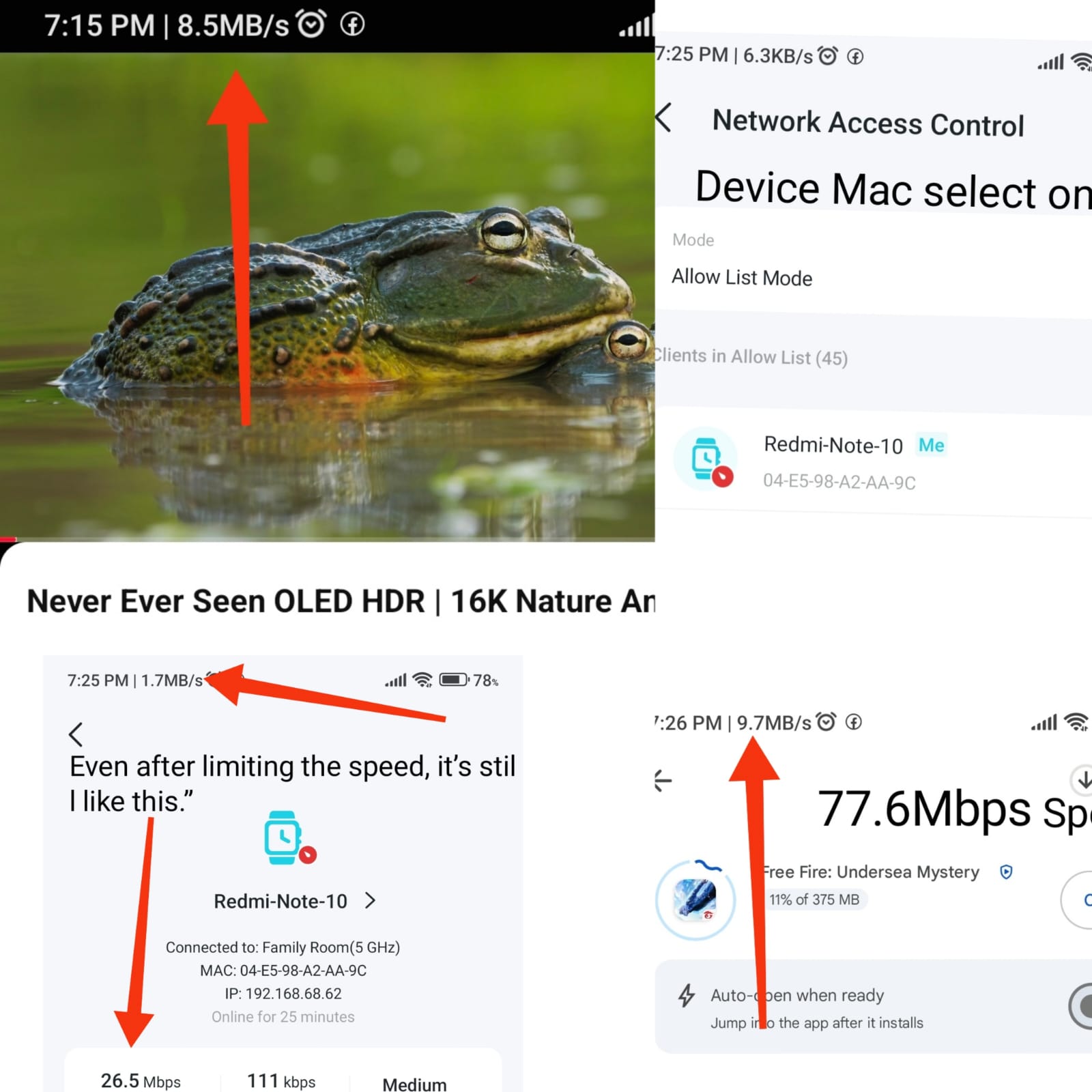 ork Access Control.
- Copy Link
- Report Inappropriate Content

- Copy Link
- Report Inappropriate Content
dotext wrote
I've just tried changing the LED Control from Set for All to Set Individually, to see if that makes a difference (although I shouldn't need to do this).
For now, changing the LED Control to 'Set Individually' has resolved the issue. Will try switching back to 'Set for All' once I am on a different firmware version.
- Copy Link
- Report Inappropriate Content
Hi,
Thank you for your update. In your situation, if you need any further assistance, please feel free to start a new thread here or reply to our technical team via email.
Best Regards
- Copy Link
- Report Inappropriate Content
Hi,
I have escalated your case to our tech team, and they will contact you via email to assist you further. Please wait patiently.
Best Regards
- Copy Link
- Report Inappropriate Content

I’m also checking Facebook, YouTube, and the Play Store. The speed limit is not working. I agree with Rakib brother  as well — if those problems are fixed, everything will be okay.
I’m sending you a picture, please see how my baby is watching the mobile phone.
If the speed limit worked on Facebook and YouTube too, then my child would put the phone down. They would say the internet isn’t working, get upset, and then go to sleep. I hope you will look into this matter
- Copy Link
- Report Inappropriate Content

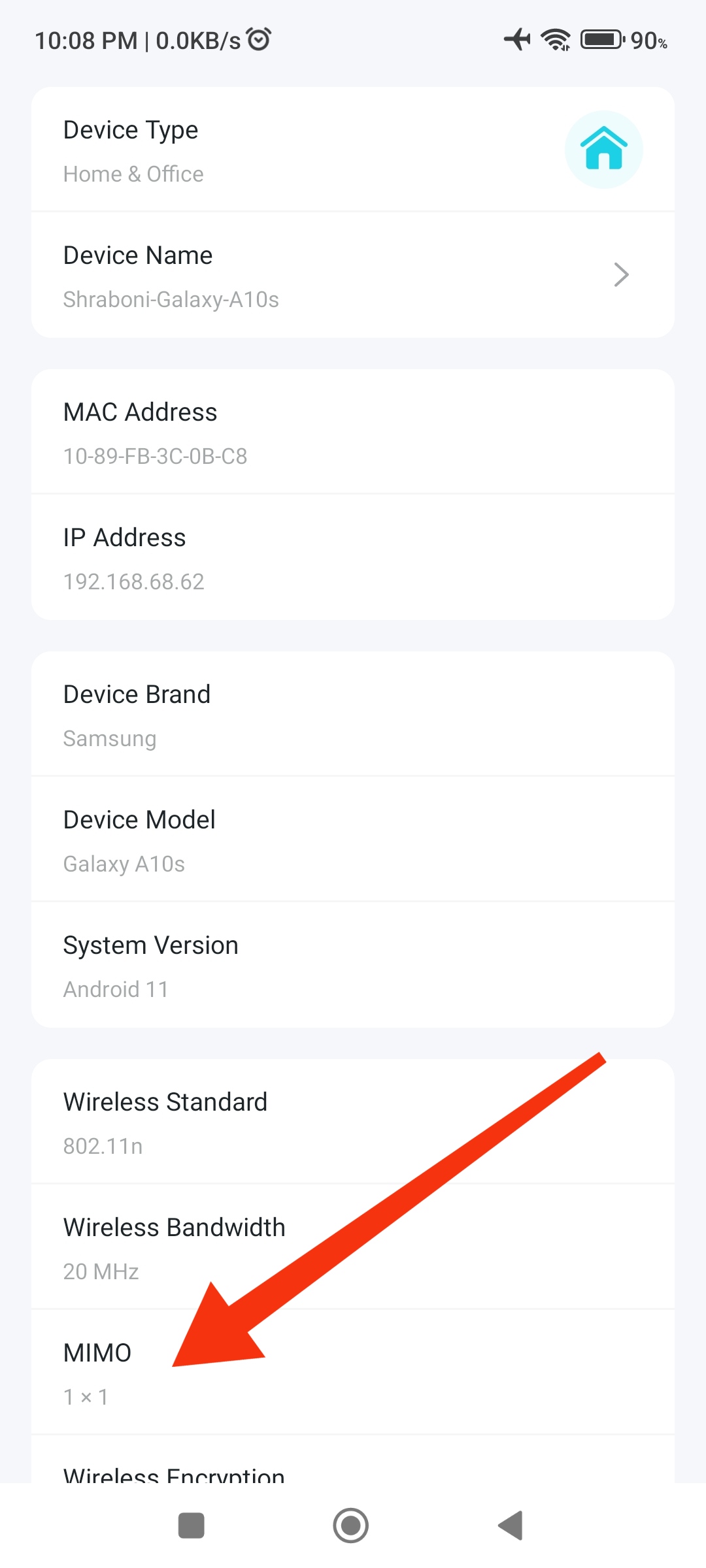 @Solla-topee On TP-Link Deco X50, only 1×1 MIMO is supported.
- Copy Link
- Report Inappropriate Content
Dear Solla-topee,
Dexo X50 hardware version 1.30
1.8.2 Build20260421 Rel 45251
I would like to inform you that the speed limit is not working properly on the 5 platforms listed below. I have already reported this issue by email before.
However, the speed limit works correctly on the following services:
Ookla Speed Test
Fast.com
GFiber Internet Speed Test
TikTok APK and many other websites and applications. I personally tested them myself.
The speed limit issue only happens on these 5 platforms:
1. Facebook
2. YouTube
3. Play Store
4. Imo APK
5. What'sapp 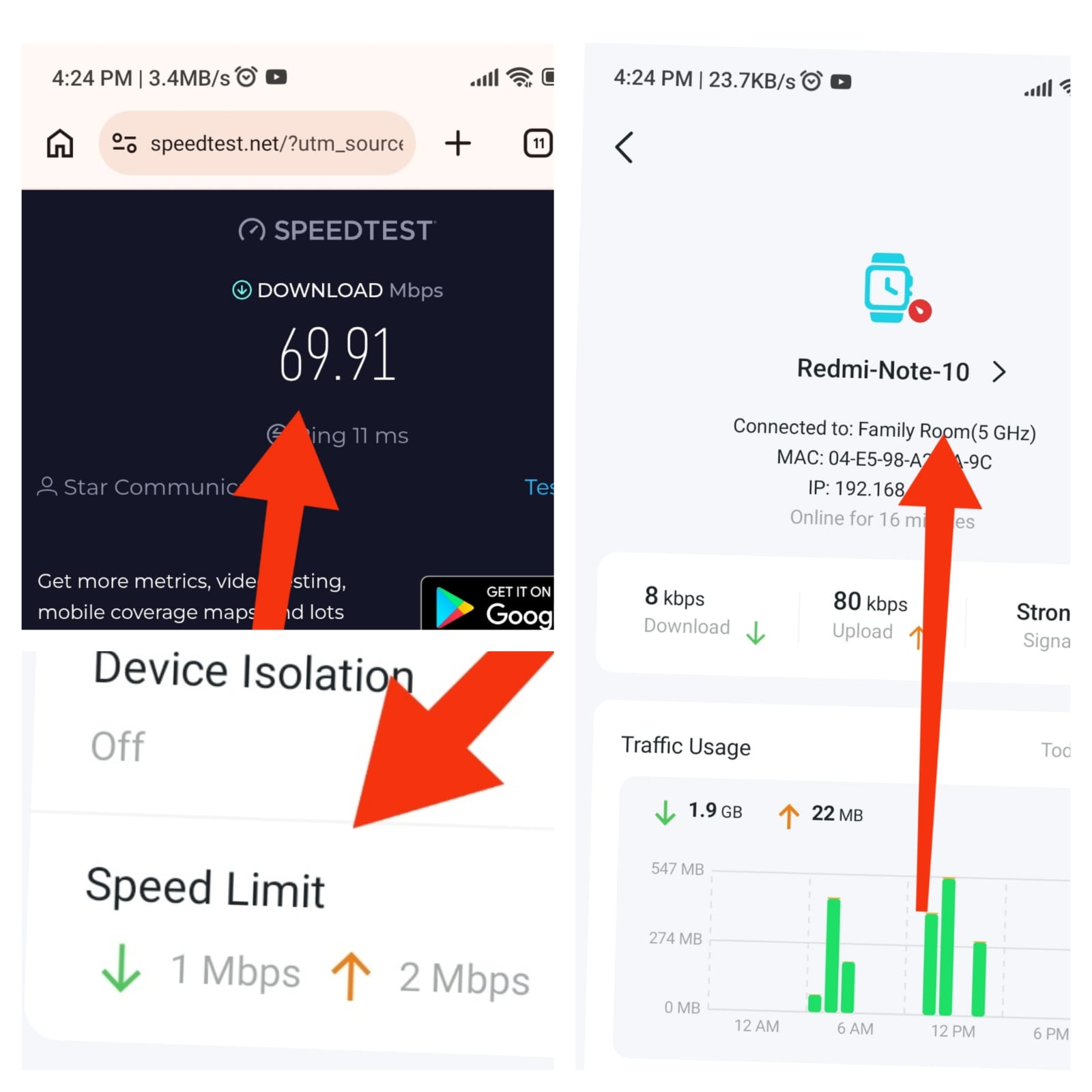 APK
APK
In my opinion, this firmware version is about 90% okay.
From a humanitarian point of view, I would like to say something, sir: Every family has children, and they spend a lot of time looking at mobile screens. We all know that excessive mobile usage can cause eye problems and other health issues.
Therefore, I kindly request you to make sure that the speed limit also works properly on these 5 platforms.
Please add traffic usage Monthly
Thank you.@Solla-topee.@Solla-topee
- Copy Link
- Report Inappropriate Content

@Emon121 On 20 MHz all devices support 1x1 MIMO not 2x2 if you select 40 MHz then devices will use 2x2 MIMO.
- Copy Link
- Report Inappropriate Content
Information
Helpful: 1
Views: 5842
Replies: 83
Voters 1
