
New Release EasyMesh Is Available When Wi-Fi Routers Work in AP Mode as A Controller


Exciting news!
We're thrilled to announce the rollout of new official firmware rolling out for multiple routers, including the BE, AX, and AC series, which introduces EasyMesh in AP Mode as a Controller. We invite you to upgrade and install this latest firmware version to try it out.
This Article Applies to:
Model & Hardware & Firmware |
Update Date |
|---|---|
Wi-Fi 7 Routers (BE Series) |
|
| Archer GE800_V1_1.2.1 Build 20250610 and newer firmware versions | Jul 17, 2025 |
| Archer GE550_V1_1.1.1 Build 20250610 and newer firmware versions | Jul 17, 2025 |
| Archer GE650_V1/V1.6_1.1.0 Build 20250430 and newer firmware versions | Jul 17, 2025 |
| Archer BE11000 Pro(US)_V1.6_1.1.0 Build 20240730 and newer firmware versions | Sep 2, 2024 |
| Archer BE900_V2/V2.6_1.3.1 Build 20260208 and newer firmware versions | Jun 24, 2026 |
| Archer BE900_V1_1.2.1 Build 20250917 (Pre-release version) | Jan 21, 2026 |
| Archer BE805_V1.0/V1.60_1.1.2 Build 20241210 and newer firmware versions | Dec 3, 2024 |
| Archer BE800_V1_1.2.1 Build 20250108 and newer firmware versions | Mar 26, 2025 |
| Archer BE700 Pro(US)_V1.6_1.1.0 Build 20240730 and newer firmware versions | Sep 2, 2024 |
| Archer BE700_V1&V1.6_1.1.0 Build 20240926 and newer firmware versions | Nov 18, 2024 |
| Archer BE550 Pro_V1&V1.6_1.1.0 Build 20240730 and newer firmware versions | Sep 2, 2024 |
| Archer BE550_V1&V1.6_1.1.1 Build 20241230 and newer firmware versions | Jan 16, 2025 |
| Archer BE400_V1&V1.6_1.0.2 Build 20240710 and newer firmware versions | Dec 10, 2024 |
| Archer BE3600_V1_1.1.0 Build 20240729 and newer firmware versions | Sep 2, 2024 |
| Archer BE230_V1&V1.6_1.1.0 Build 20240729 and newer firmware versions | Sep 2, 2024 |
| Archer BE220_V1/V2_Latest Official firmware version | Aug 18, 2025 |
Wi-Fi 6E/6 Routers (AX Series) |
|
| Archer AX80_V1&V1.6_1.3.2 Build 20250812 and newer firmware versions | Nov 4, 2025 |
| Archer AX72(US)_V2.0_1.3.1 Build 20241119 and newer firmware versions | Mar 27, 2025 |
| Archer AX55(EN)_V1_1.3.3 Build 20240628 and newer firmware versions | Sep 2, 2024 |
| Archer AX55(US/CA/TW)_V1_1.3.2 Build 20240325 and newer firmware versions | Sep 2, 2024 |
| Archer AX53_V1_1.4.3 Build 20250314 and newer firmware versions | Jun 5, 2025 |
| Archer AX58_V1_1.4.3 Build 20250314 and newer firmware versions | Feb 26, 2026 |
| Archer AX12_V1_1.4.1 Build 20260410 and newer firmware versions | Jun 24, 2026 |
Wi-Fi 5 Routers (AC Series) |
|
| Archer C88_V2.20_1.14.30 Build 250729 and newer firmware versions | Dec 3, 2025 |
| Archer C80_V2.0/V2.6/V2.20/V2.26_1.14.30 Build 250729 and newer firmware versions | Sep 2, 2024 |
| Archer C80_V1_1.14.30 Build 250729 and newer firmware versions | Feb 26, 2026 |
| Archer C86_V1_1.14.0 Build 240617 and newer firmware versions | Sep 2, 2024 |
| Archer A8_V2.0/V2.6/V2.20/V2.26_1.14.30 Build 250729 and newer firmware versions | Sep 2, 2024 |
| Archer A8_V1_1.14.30 Build 250729 and newer firmware versions | Feb 26, 2026 |
| Archer C6_V4/V4.6_1.14.0 Build 240617 and newer firmware versions | Sep 2, 2024 |
| Archer C64_V1_1.14.3 Build 241025 and newer firmware versions | Jan 8, 2025 |
Some Customized Models & Hardware for the Local Market |
|
| Archer AX3000(JP)_V1_1.2.2 Build 20241118 | For Japanese Market |
Moderator Note:
1. The availability of EasyMesh in AP Mode may vary by region even for the same model. Please check your local website for more information.
2. The above list might not include all models and hardware versions. It is recommended to keep watching the firmware releases for your router, as all the newly supported features will be listed in the patch notes if/when it is added to your version.
User Scenarios:
Some users would prefer to, or are limited by their devices to, have their main modem router acting as the gateway and DHCP server in the network, which requires using the TP-Link Wi-Fi router in AP (Access Point) Mode to avoid the double-NAT issue. However, they also wish to utilize the EasyMesh feature of the TP-Link Wi-Fi router to create a mesh network with other EasyMesh routers or extenders.
The topology is roughly as follows (Topo 1):

Or as this one (Topo 2):

Note: In this topo, both the EasyMesh Wi-Fi router and the satellite router/extender must support EasyMesh Ethernet Backhaul.
You may also connect the EasyMesh Wi-Fi routers like below, it will also work (Topo 3):

Note: In this topo, the EasyMesh Wi-Fi router and the satellite router/extender must also support EasyMesh Ethernet Backhaul.
Comment below if you have any feedback or run into any issues — we’re here to help.
Related Articles:
[Wi-Fi Routers] AP Mode supports EasyMesh
- Copy Link
- Subscribe
- Bookmark
- Report Inappropriate Content

- Copy Link
- Report Inappropriate Content

just to add some info regarding the use of Easymesh in AP mode as a controller.
In the first post, it was announced that BE400 v1&v1.6 already support this feature.
I can confirm that BE400 v1.2 supports that feature as well.
Interestingly enough, I've managed to use a C64 v1 as a controller with the BE400 as a satellite, but not until I've updated the BE400 v1.2 to 1.2.3 Build 20260107 rel.48335(4555) FW release.
- Copy Link
- Report Inappropriate Content
terziyski wrote
just to add some info regarding the use of Easymesh in AP mode as a controller.
In the first post, it was announced that BE400 v1&v1.6 already support this feature.
I can confirm that BE400 v1.2 supports that feature as well.
@terziyski Thank you so much for your kind reminder.
I will soon check and update my post to include any new models or versions.
terziyski wrote
Interestingly enough, I've managed to use a C64 v1 as a controller with the BE400 as a satellite, but not until I've updated the BE400 v1.2 to 1.2.3 Build 20260107 rel.48335(4555) FW release.
That's not normal. BE400 should support EasyMesh a long time ago, maybe in 2024. I will keep an eye on similar feedback and report such abnormalities to the development team
- Copy Link
- Report Inappropriate Content
This is not the usual scenario when you use this feature, because it is advised to use (as a controller) your most powerful router (BE400 in this case).
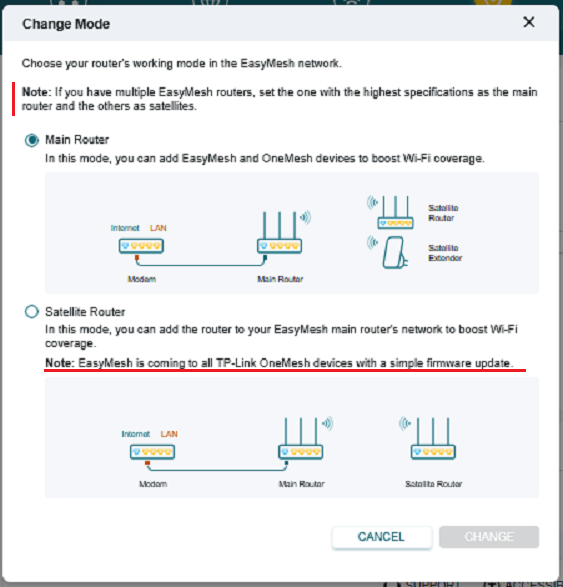
Nevertheless, I decided to try the other way round and that was the result. For info, C64 v1 is with FW release 1.15.0 Build 250729 Rel.63489n(4555).
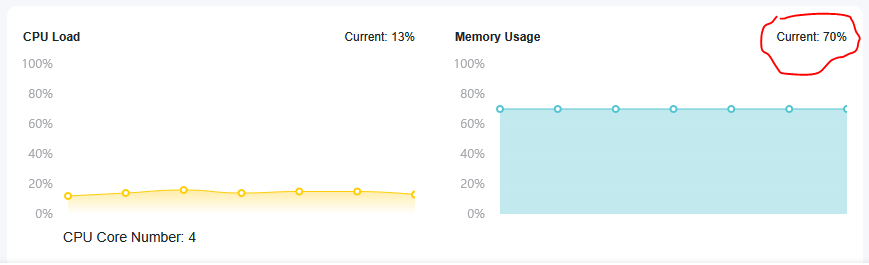
The other thing that I noticed, is that on the freshly configured BE400 in AP mode, without any network activity (no connected devices), the router RAM was utilized at 70%:
- Copy Link
- Report Inappropriate Content

any plans for the AX73 v1.0, please? I bought an er605 for dual wan and I was disappointed to see that EasyMesh is not available in AP Mode :( I got a pack of RE550 which now I cannot really use with easymesh. In the past it might have been an effort to maintain older models, but now you have Claude to help. Can this be solved, please?
- Copy Link
- Report Inappropriate Content
terziyski wrote
This is not the usual scenario when you use this feature, because it is advised to use (as a controller) your most powerful router (BE400 in this case).
That is correct. We generally use the most powerful router as the EasyMesh controller, but not as an agent.
terziyski wrote
The other thing that I noticed, is that on the freshly configured BE400 in AP mode, without any network activity (no connected devices), the router RAM was utilized at 70%:
What is the detailed network topo in this scenario? Is it BE400 (controller) --- C64 v1 (agent)?
- Copy Link
- Report Inappropriate Content
Hi Kevin,
I've tested BE400 as an agent only, but this Memory usage was measured before even enabling the Easymesh, i.e. BE400 was in plain AP mode connected to a third party router.
- Copy Link
- Report Inappropriate Content
Information
Helpful: 5
Views: 81195
Replies: 197
Voters 3

