
Solution Why can't you access the camera's live feed on the Google Home App?


This Article Applies To:
All Tapo Cameras that connected to Google Home.
Phenomenon Description:
You are unable to view the live feed from your Tapo camera on the Google Home App. Instead, you may see an error message or image like below on the Google Home App.

Why can't you access the camera's live feed on the Google Home App?
The Public Preview in Google Home offers currently in-development features for users who opt into the program.
The features added through this program will often have limited compatibility, require further updates before they are officially supported, or may break due to changes in the feature's implementation during development.
Learn More on Google's Official Support Page: Public Preview for Google Home app - Google Nest Help
The "Access live streams for Works with Google cameras" feature is under the Public Preview program. It's still under development by Google and is not available for all cameras and brands.
Our teams are aware that the feature is currently not available for Tapo Cameras and are in close communication with Google regarding future compatibility.
We appreciate your patience as we await future updates from Google.
More Articles:
What to do if the Tapo app does not show thumbnails of detected events on the SD card video page
How can I store the Tapo camera video recordings on a microSD card
What should I do if I can't view the Tapo camera?
- Copy Link
- Subscribe
- Bookmark
- Report Inappropriate Content
Hi,
If you are willing to continue troubleshooting, you may turn off the "Voice Notifications" feature and add an automation entry in the Google Home app by following the steps below, then check if this meets your needs.
1. Go to the Google Home app > Automations page, tap the "+" icon at the top right corner.
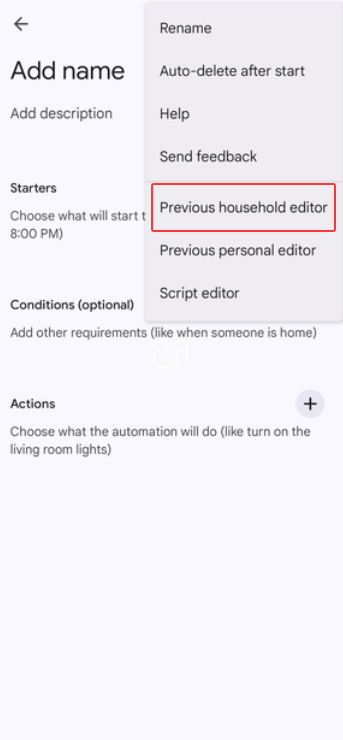
2. Tap Automation, click the "three-dots" icon at the top right corner, and go to the Previous household editor.
3. Tap Add starter > When a device does something > select your doorbell camera > Doorbell Rings
4. Tap Add action, click Communicate and announce, and configure the action settings.
5. Customize a routine name and save the settings.
You can refer to the instructions below to learn why you can't view the camera's live feed continuously on your Google display.
Why can't I view the live stream of the Tapo camera continuously?
Best Regards
- Copy Link
- Report Inappropriate Content

@Solla-topee I have tried to create an automation as you described, however when I select starter and select the doorbell, there is no option for 'Doorbell Rings' as a starter this is the problem so I can't create an automation as a work around.
I have also referred to your link regarding the contnuous live feed and it says that tapo limit the remote access duration on google home hub so it is no a problem of troubleshooting, your link says tapo limit it.
Therefore I do not believe that Tapo should be putting 'works with google' on the packaging because although you can technically connect it to google, none of the features work correctly!
- Copy Link
- Report Inappropriate Content
Hi,
Have you tapped the "three-dots" icon in the top-right corner, then go to the Previous household editor page on the Automation page? Usually, you can set the Doorbell Rings as a starter after entering the Previous household editor page.
Best Regards
- Copy Link
- Report Inappropriate Content
@Solla-topee We're about to celebrate the one-year anniversary of my Tapo no longer showing up in Google Home, and it's just unbelievable. At this point, I don't think it will ever be fixed.
- Copy Link
- Report Inappropriate Content

@Solla-topee does google still not stream to google anymore? When will this be fixed? Been 12 months and nothing? Worth returning and removing all tplink devices? Huge safety issue if streaming doesn't come back
- Copy Link
- Report Inappropriate Content
@Solla-topee Another month has passed, and no fix. I think it's safe to say by now that there is no interest in resolving this issue
- Copy Link
- Report Inappropriate Content
- Copy Link
- Report Inappropriate Content
After two months of testing, I have finally found a potential solution. To be clear: the issue does not lie with TP-Link, but indeed with Google. To open the live stream via the "Google Home app", follow these steps:
On Android:
1) Go to the home screen of your Android phone or tablet.
2) Create a new widget (press and hold the home screen for two seconds and select 'Widgets').
3) From the list of widgets, select Home and then choose Favorites.
4) Once you have placed the widget, select the Custom option.
5) Select the camera(s) or doorbell(s) you want to see the live feed for.
6) Tap Save.
You can now view the desired live feed in the Google Home app via this widget by chosing your specific live feed in this widget.
- Copy Link
- Report Inappropriate Content
@MrAdventure2001 I can't believe it, doing it this way I can actually see the camera in the Home app. And this makes me even more frustrated because it means a fix is totally doable, yet a year has passed and they haven't offered a solution or even a reply anymore. Of course, when I open the Home app and select the camera, it still gives me the exact same error
- Copy Link
- Report Inappropriate Content
Bonjour
Merci pour cette solution mais le problème n est pas réglé au niveau de Google home
- Copy Link
- Report Inappropriate Content
Information
Helpful: 5
Views: 20487
Replies: 54
Voters 2

