Tapo C225 v1 - Access issues after firmware update

Tapo C225 v1 - Access issues after firmware update

Tapo C225 v1 - Access issues after firmware update
2025-06-11 21:26:38 - last edited 2025-07-11 03:58:45
Model: Tapo C225  
Hardware Version: V1
Firmware Version: 1.1.1 Build 250430 Rel.60810n

Hi,


I have a Tapo C225 v1, has been working fine since July 2023.


I access it via iPad on LAN, and also use RTSP stream to record to NVR. No other people have access to it.


I have always been able to access it without an issue via both iPad and have it recording to NVR 24/7 simultaneously. So 2 concurrent 'users' maximum.

I am aware there is some kind of hard limit of approx 3 or 5 simultaneous viewers of the stream.


Since the last firmware update to 1.1.1 Build 250430 Rel.60810n, the camera has been dropping out, my recordings to NVR are being cut off entirely, and my access in the Tapo app freezes every few minutes. This outage occurs for approx 1-3 seconds, and then image returns.


No changes have been made to the camera settings.

I am recording 24/7 to the SD card, and via RTSP to local server on LAN.

I am not using the PTZ functions.

Camera is always set to 'Day mode', so there is no switching between night/IR LEDs.


The connectivity issue is usually more prevelant in the evening just before dusk I have noticed and through the night. And sometimes in the daytime, but less so.

There is no heavy network usage on my network by anyone else or another new device.


The camera is not near to any electrical interference, it has always been in the same position since setup.

I know when I use a microwave oven the image becomes blurry/pixelated and video stream/connection retains itself, but this issue is making the entire image to go blank and lose connection entirely momentarily.


There is no WiFi connection loss when checking my router logs, or a DHCP renewal attempt when this happens.


Please help

Thank you

  0      
  0      
#1
Options
1 Accepted Solution
Re:Tapo C225 v1 - Access issues after firmware update-Solution
2025-06-18 22:21:27 - last edited 2025-07-11 03:58:45

Tapo team were fast to react and kindly rolled back my firmware or did something behind the scenes to bring back old firmware, which was v1.0.30.


Issue no longer presents itself, camera access is flawless and NVR recordings are all good!


Thank you Tapo!

Hope a longer term fix is released soon.

Recommended Solution
  1  
  1  
#8
Options
8 Reply
Re:Tapo C225 v1 - Access issues after firmware update
2025-06-11 22:02:21

Please let me know how I can attached a log file. I get Error: Failed to Upload.


It is a small text file.

Thank you

  0  
  0  
#2
Options
Re:Tapo C225 v1 - Access issues after firmware update
2025-06-12 01:13:41

Here is a small snippet of the error log:


<4>2025-06-11 22:41:30[HTTP]http client(local-0) send buffer is full!
<4>2025-06-11 22:41:30[RTSP]CloseSession called, 0th in 2
<4>2025-06-11 22:41:30[HTTP]Delete a minor stream, current minor stream preview client count is 0
<4>2025-06-11 22:41:30[RTSP][rtsp] session state: playing -> idle
<4>2025-06-11 22:41:30[RTSP]CloseSession called, 1th in 1
<4>2025-06-11 22:41:30[HTTP]Delete a main stream, current main stream preview client count is 1
<4>2025-06-11 22:41:30[RTSP][rtsp] session state: playing -> idle
<4>2025-06-11 22:41:31[HTTP]http client(local-0) send buffer is full!
<4>2025-06-11 22:41:32[HTTP]http client(local-0) send buffer is full!
<4>2025-06-11 22:41:33[HTTP]http client(local-0) send buffer is full!
<4>2025-06-11 22:41:33[HTTP]stop preview
<4>2025-06-11 22:41:33[HTTP]stream is sending, pending reply!
<4>2025-06-11 22:41:33[Transmit]avdm unit attached(1). deinit stream(preview) stream_id(0)
<4>2025-06-11 22:41:33[Transmit]avdm unit attached(1). deinit stream(preview) stream_id(3)
<4>2025-06-11 22:41:33[HTTP]Delete a main stream, current main stream preview client count is 0
<4>2025-06-11 22:41:33[HTTP][62855.096] http client(local-0) state: playing -> idle
<4>2025-06-11 22:41:33[HTTP]http client(local-0) send buffer is full!
<4>2025-06-11 22:41:33[HTTP]replay left_len(525) err(-5)
<4>2025-06-11 22:41:33[HTTP]http client(local-0) send buffer is full!
<4>2025-06-11 22:41:33[HTTP]replay left_len(525) err(-5)
<4>2025-06-11 22:41:33[HTTP]http client(local-0) send buffer is full!
<4>2025-06-11 22:41:33[HTTP]replay left_len(525) err(-5)
<4>2025-06-11 22:41:33[HTTP]http client(local-0) send buffer is full!
<4>2025-06-11 22:41:33[HTTP]replay left_len(525) err(-5)
<4>2025-06-11 22:41:33[HTTP]http client(local-0) send buffer is full!


  0  
  0  
#3
Options
Re:Tapo C225 v1 - Access issues after firmware update
2025-06-12 08:21:22

  @CamNerd 

Hi,
Please confirm the following information for the reported issue.


  1. Please uninstall the Tapo app from your iPad and reinstall it. Ensure the Tapo app is up to date, and then check if you still experience the same freeze issue. If so, does any error message appear on the Tapo app when the issue occurs? Is the live view page blank?


  2. What's the LED status on the camera?


  3. Please describe your network diagram in detail. Does your router have an internet connection but block the internet for the camera?


  4. What's the IP address of your camera? Can the NVR successfully ping the camera's IP address?


Best Regards

  0  
  0  
#4
Options
Re:Tapo C225 v1 - Access issues after firmware update
2025-06-12 14:55:13

  @Solla-topee 

Hi,


For reference, I have 2 other cameras, Tapo C120 and C125 all working fine, latest firmware. Both able to record to NVR 24/7 fine with no interuption and view in Tapo app (on iPad and Android mobile) simultaneously in grid view.


I have uninstalled Tapo app on iPad and reinstalled. Same issue. No error just 'grey image with reload circle icon' on the camera feed. This is same on Android Tapo app.

I have LED turned off so not checking this but have not seen it flashing or anything.


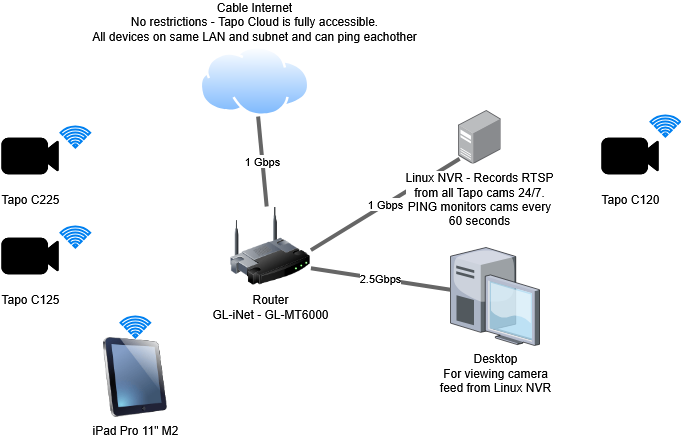
This is network diagram - All on same LAN 192.168.8.x, same subnet. No restrictions. Tapo Cloud is accessible as I use it when I am away.

Both Tapo C225 and C125 are in same physical location. Distance to router is approx 5 meters for all cams.

All cams set to auto reboot at 05:00.


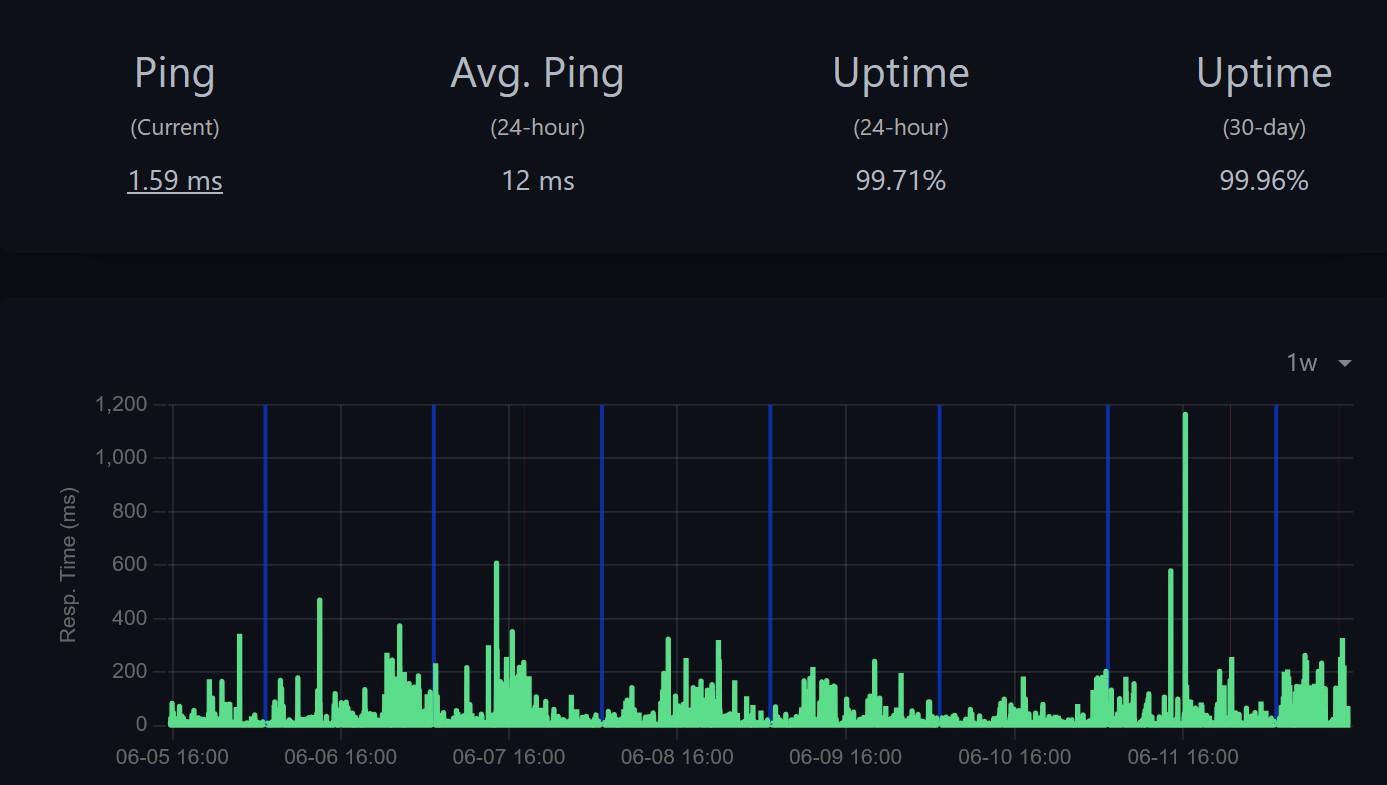
This is 1 week PING monitor every 60 seconds from local NVR.

Blue line is PING monitor paused during cam reboot window.
Red line is device unreachable.

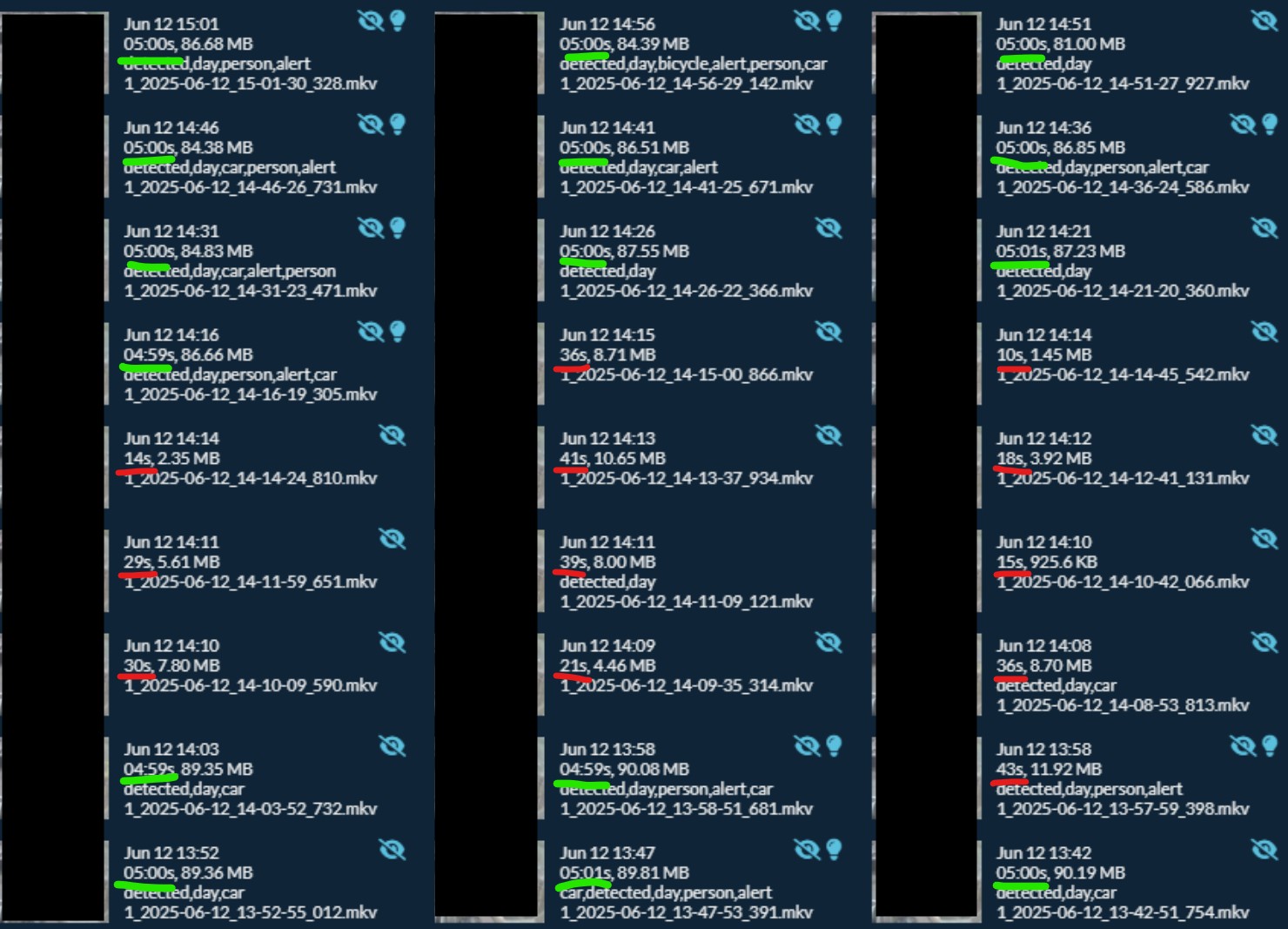
The C225 only goes down for 5-10 seconds it seems, not long enough to show on my monitor right now. Sometimes this is every 30-40 seconds, as my NVR is set to record in 5min periods, these are cut short when this issue occurs.

C225 IP address is local 192.168.8.x which is static assigned by router DHCP.


Here is view from my NVR, green files marked are ok. Red marked is where recording time is cut short by issue, and recorder attempts to create new file as connection is lost.


Thank you

  0  
  0  
#5
Options
Re:Tapo C225 v1 - Access issues after firmware update
2025-06-13 07:55:03

  @CamNerd 

Hi,

I have escalated your case to our tech team, and they will contact you via email to further assist you. Please wait patiently.

Best Regards

  1  
  1  
#6
Options
Re:Tapo C225 v1 - Access issues after firmware update
2025-06-13 10:24:47
If your recording to the SD card 24/7 if might be worth a format being something might have changed on the firmware update or indeed replace the SD card. Looks like you could have done that anyway looking at the detail you provided.
  0  
  0  
#7
Options
Re:Tapo C225 v1 - Access issues after firmware update-Solution
2025-06-18 22:21:27 - last edited 2025-07-11 03:58:45

Tapo team were fast to react and kindly rolled back my firmware or did something behind the scenes to bring back old firmware, which was v1.0.30.


Issue no longer presents itself, camera access is flawless and NVR recordings are all good!


Thank you Tapo!

Hope a longer term fix is released soon.

Recommended Solution
  1  
  1  
#8
Options
Re:Tapo C225 v1 - Access issues after firmware update
2025-06-19 07:16:34

  @CamNerd  Hi, thank you for sharing your experience, and we will keep improving our product.

  0  
  0  
#9
Options