
New Firm Renders BE550 Access Point Unusable
 This thread has been locked for further replies. You can start a new thread to share your ideas or ask questions.
New Firm Renders BE550 Access Point Unusable
This thread has been locked for further replies. You can start a new thread to share your ideas or ask questions.
Having gotten a notification that there was new firmware for my router, I naturally updated it.
Big mistake.
The firmware update itself went fine: no errors. The problem arose when trying to connect my iPhone 16 Pro Max and/or M4 iPad Pro to it as a wireless access point. It had been working flawlessly in that capacity prior to the update, but after the update I kept getting disconnected and when it was connected, it couldn't reach the Internet. Which maybe shouldn't be that surprising considering that my devices were getting assigned IP addresses that had nothing to do with my LAN's IP range.
My network is probably a bit unusual insofar as I'm using this router as a mere access point… my main router is an AXE300 which acts as the DHCP server, so the access point's DHCP server is off.
Downloading and reverting to firmware 1.1.2 fixed me back up… but not until I spent hours trying to debug the issue with the 1.1.3 firmware.
- Copy Link
- Subscribe
- Bookmark
- Report Inappropriate Content

Can you share me 1.1.3 changelog?
- Copy Link
- Report Inappropriate Content
- Copy Link
- Report Inappropriate Content
@Malacandra Oh. I want this. Thx:)
- Copy Link
- Report Inappropriate Content

Hello@Malacandra ,
Thanks for contacting our community.
So you have upgraded the firmware to 1.1.3 again, and the router works normally, right?
- Copy Link
- Report Inappropriate Content
@Joseph-TP No: my router works properly after reverting back to 1.1.2.
My experience with 1.1.3 was nothing but frustration.
- Copy Link
- Report Inappropriate Content

I'm having the same issue. My BE550 is running 1.1
3 im Access Point mode. My android devices fail at the Obtaining IP address phase.
- Copy Link
- Report Inappropriate Content

Controller-M wrote
I'm having the same issue. My BE550 is running 1.1
3 im Access Point mode. My android devices fail at the Obtaining IP address phase.
@Controller-M Can you please share your network topology for reference?
How did you change the BE550 to AP Mode? Method 1 or 2 according to this FAQ?
Except for these Android devices, are other devices connected to the AP correctly?
- Copy Link
- Report Inappropriate Content

Hello @Malacandra ,
Thanks for getting back to me.
For your case, we recommend sending an email to forumsupport.usa@tp-link.com with the following information:
Subject: [Forum Escalation][ID 836938] New firmware for the BE550 access point causes network drops
Forum Nickname: Malacandra
Thread URL: https://community.tp-link.com/us/home/forum/topic/836938
Model&Version: Archer BE550_V1_1.1.3
Description:
After updating to firmware 1.1.3, the BE550 experienced network disconnection when operating in AP mode.
- Clients: iPhone 16 Pro Max and/or iPad Pro M4.
- Error message: connected but no internet.
- Network topology: AXE300(DHCP Server)+BE550(AP mode)
Any Other Relevant Information: Please attach the configuration file of the BE550 for further investigation. Saving the backup files can refer to: How to create and restore from a backup file.
Once sent, a ticket will be created in our support system, and a member of the team will follow up to gather more information or troubleshoot the case.
- Copy Link
- Report Inappropriate Content
My be550 is connected to my cable modem/router using an Ethernet cable. I put it in AP mode using the web interface. It's been running fine on previous firmware.
I have a Windows 11 laptop that can connect. My android devices fall back to the cable routers ssid.
I can still "see" the be550 using the tether app, and it usually shows no wireless clients.
- Copy Link
- Report Inappropriate Content
Hi@Malacandra ,
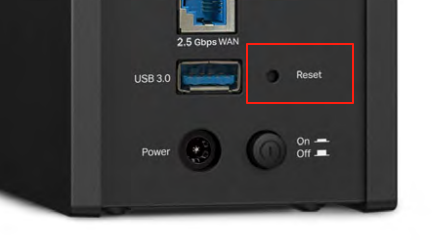
Can you please try resetting your Archer BE550 to see if the router works properly?
How to reset: Press and hold the button until the LED blinks to reset the router to its factory default settings.
- Copy Link
- Report Inappropriate Content
Information
Helpful: 1
Views: 1810
Replies: 14
Voters 0
No one has voted for it yet.