Firmware 1.3.5 for Archer BE220 V1/BE230 V2/BE3600 V2 Improves System Stability

Firmware 1.3.5 for Archer BE220 V1/BE230 V2/BE3600 V2 Improves System Stability

Firmware 1.3.5 for Archer BE220 V1/BE230 V2/BE3600 V2 Improves System Stability
2026-08-06 15:03:14 - last edited 2026-09-17 20:43:25
Hardware Version:
Firmware Version: 1.3.5 Build 20260812 Pre-Release Version

Update - 9/17/2026: Official Firmware 1.3.5 is now available for the models listed in this article. If you are experiencing 2.4 GHz Wi-Fi anomalies, please download and install the official firmware update at your earliest convenience.


――――――――――――――――――――――――――――――――――――


Hey Everyone,

A pre-release firmware for the Archer BE220 V1/BE230 V2/BE3600 V2 is now available, which significantly improves the stability of the 2.4GHz wireless network.

Please upgrade to this firmware version and share your feedback by replying to this post. This will help us gather everyone's input in a more comprehensive and centralized manner. Your valuable feedback is crucial for our continuous product improvement and may help accelerate the official release!


Applies to:

Archer BE220_V1

Archer BE230_V2/2.20

Archer BE3600_V2/2.20

Archer BE3600 Pro _V1


Optimizations: 

  • Improved the stability of the 2.4GHz wireless network in certain scenarios.
  • Improved the user experience of third-party VPN clients in certain scenarios.
  • Enhanced system security and overall stability.


Firmware Download:

Before Upgrading

  1. Pre-release and Beta firmware should be used at your own discretion. We cannot guarantee the functionality of features or technical support for Pre-Release or Beta Firmware.
  2. It is always recommended to save a copy of the router's Backup Config file before upgrading or downgrading firmware.
  3. This pre-release firmware is available for all regions.
  4. For instructions on how to upgrade your router's firmware, please see: How to Upgrade the Firmware on TP-Link Wi-Fi Routers
  5. There will be an official firmware release in the future. If you are not comfortable using beta firmware, please wait for the official release or contact our support teams for assistance.
  6. After updating to this firmware version, you can still revert to the previous version if needed.


Model Direct Download Link

Archer BE220_V1

Archer BE230_V2/2.20

Archer BE3600_V2/2.20

Archer BE3600 Pro _V1

1.3.5 Build 20260812(Pre-Release Firmware)


Additional Information

As always, we value your feedback. If you encounter any problems during or after the router firmware upgrade, please leave a message below and include the following information. Your feedback helps us continuously improve and provide you with better products and support.


Please provide detailed information, including but not limited to:

  • A complete network topology diagram.
  • The number, types, and specific models of 2.4 GHz clients connected to your network
  • Screenshots of relevant error messages, etc.


Thank you for your continued support and for being a member of our community!


Update Log: 

Updated link to 1.3.5 Build 20260812 Pre-Release Firmware (Aug 14th).

  2      
2
#1
Options
25 Reply
Re:New Firmware 1.3.4 for Archer BE220 V1/BE230 V2/BE3600 V2 Improved System Stability
2026-08-12 09:14:30
I updated my router to that firmware version and im still having problems with 2.4g going out after 1 to 2 days.
  3  
3
#2
Options
Re:New Firmware 1.3.4 for Archer BE220 V1/BE230 V2/BE3600 V2 Improved System Stability
2026-08-12 14:12:18

  @Mikeygames 


Thank you for trying the firmware and sharing your experience.


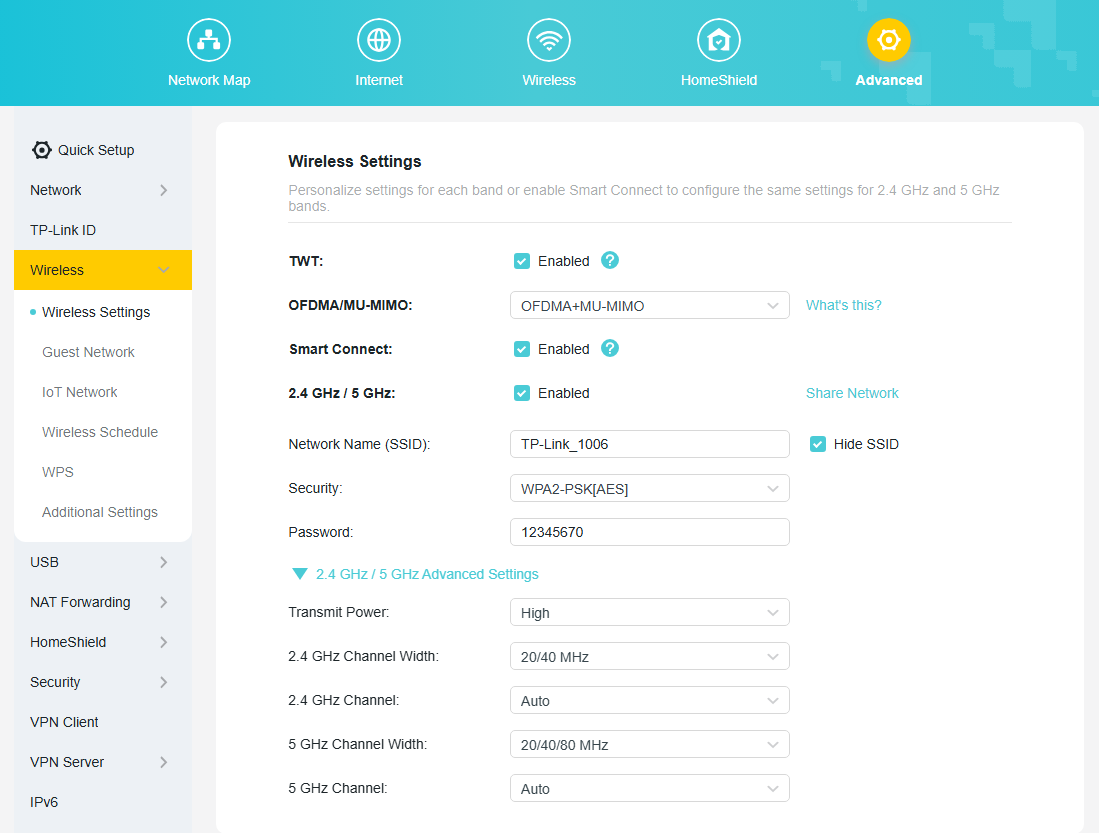
If the behavior persists after installing the beta firmware, could you please try changing the 2.4 GHz channel width to 20 MHz? Some users have confirmed that changing this setting can serve as a temporary solution.


The Channel Width Setting can be adjusted in the router's web UI by navigating to Advanced > Wireless > Wireless Settings > 2.4 GHz / 5 GHz Advanced Settings, as shown in the example below:


d04a1b0e61724ade979ec05fbb83eda2

  1  
1
#3
Options
Re:New Firmware 1.3.4 for Archer BE220 V1/BE230 V2/BE3600 V2 Improved System Stability
2026-08-13 04:33:50

  @Ryan ok I will try this out and let you know if it works after a day or two thank you!

  1  
1
#5
Options
Re:New Firmware 1.3.4 for Archer BE220 V1/BE230 V2/BE3600 V2 Improved System Stability
2026-08-14 06:54:49

@Mikeygames 


Could you please provide the model number and hardware version of your router? Is it BE220, BE230, or BE3600?

Nice to Meet You in Our TP-Link Community. Check Out the Latest Posts: Join TP-Link's WiFi 8 Launch Event | Ask Your Questions Here New 1.4.1 Firmware for BE550 V2 Enhancing EasyMesh Support with Extended Guest/IoT/MLO Networking Connect TP-Link Archer Routers to Germany's DS-Lite (Dual Stack Lite) Internet via WAN If you found a post or response helpful, please click Helpful (arrow pointing upward icon). If you are the author of a topic, remember to mark a helpful reply as the "Recommended Solution" (star icon) so that others can benefit from it.
  0  
0
#6
Options
Re:New Firmware 1.3.4 for Archer BE220 V1/BE230 V2/BE3600 V2 Improved System Stability
2026-08-14 10:32:11
Subject: Web GUI Localization Bug (Arabic Language) - Archer BE220 (EU) V1 (Firmware v1.3.3) Dear TP-Link Firmware & UI Engineering Team, I am writing to report a specific UI localization bug observed in the latest firmware release for the Archer BE220 router. * Device Model: Archer BE220 (EU) V1 * Firmware Version: v1.3.3 Issue Description: When attempting to switch the Web GUI language to Arabic, the interface fails to apply the localization package and automatically reverts (falls back) to English. This issue is isolated exclusively to the Arabic language selection; all other available languages switch and render properly without issues. Troubleshooting Actions Taken: 1. Cross-Platform Testing: Verified the issue on both mobile and desktop views. 2. Cross-Browser Testing: Tried multiple browsers to rule out client-side caching or rendering issues. 3. Factory Reset: Performed a full hard factory reset, but the bug persists. The root cause appears to be an unhandled exception or missing language asset handling within the i18n logic of this firmware version. Please review the frontend codebase for this release and incorporate a hotfix in the next deployment cycle. Best regards,
  2  
2
#7
Options
Re:New Firmware 1.3.4 for Archer BE220 V1/BE230 V2/BE3600 V2 Improved System Stability
2026-08-14 10:37:24
Issue 2: Elevated Baseline RAM Consumption Post-Update Technical Description: Following the firmware upgrade of the Archer BE220 (EU) V1 to version 1.3.3, a sudden increase in the baseline RAM utilization was observed, jumping from an average of 33% up to a steady 43%. Analysis & Insights: 1. Identical Environment: The network load, traffic patterns, and the number of connected client devices remained completely unchanged. 2. Feature Disabling: Most non-essential and advanced features were disabled, yet the RAM usage failed to drop back to its previous baseline, holding at 43%. 3. Dynamic Stability: The memory usage remains stable at this elevated percentage without continuous scaling. This indicates that while there is no progressive memory leak, the new firmware likely introduces higher static memory allocation for system daemons, kernel overhead, or inefficient resource/garbage collection in this specific build. We request the kernel/embedded OS team to profile the background processes of this release to optimize memory footprints and free up unutilized resources.
  3  
3
#8
Options
Re:New Firmware 1.3.4 for Archer BE220 V1/BE230 V2/BE3600 V2 Improved System Stability
2026-08-14 10:43:46
Issue 3: Intermittent Micro-disconnections for Wi-Fi 6 Clients on the 2.4GHz Band Technical Description: The router exhibits transient wireless drops (disconnects for ~1 second and immediately reconnects) on the 2.4GHz band. This issue isolatedly impacts Wi-Fi 6 (802.11ax) capable devices (e.g., iPhone 15 Pro Max and Wi-Fi 6 Android flagships). Conversely, legacy Wi-Fi 5 (802.11ac) devices operating on the exact same 2.4GHz network maintain a perfectly stable connection without any drops. Advanced Troubleshooting Executed: 1. Channel Width Lockdown: Configured the 2.4GHz radio to a strict 20MHz to eliminate co-channel interference, but the micro-drops persisted. 2. Channel Rotation: Manually assigned clean, non-overlapping channels to rule out environmental RF noise; no behavior modification was observed. 3. Power Saving Mechanism Ruled Out: Completely disabled wireless power-saving features (such as TWT / WMM Power Save), yet the transient drops remained unaffected. 4. Ecosystem Hard Reset: Performed comprehensive factory resets on both the router and the iOS/Android client devices, which failed to resolve the symptom. Engineering Analysis & Root Cause Suggestion: Since the symptom is strictly limited to Wi-Fi 6 clients on the 2.4GHz band, and having successfully ruled out power-saving protocols and RF overlapping, this strongly points toward a lower-level interoperability or driver bug. It is highly likely tied to a wireless chipset driver mismatch or an unhandled exception during WPA handshake/key-rotation frame retries within the 802.11ax stack introduced in firmware v1.3.3.
  3  
3
#9
Options
Re:New Firmware 1.3.5 for Archer BE220 V1/BE230 V2/BE3600 V2 Improves System Stability
2026-08-14 13:25:02

Hey all,


We've updated the firmware to version 1.3.5 Build 20260812 (Pre-Release Firmware) . Feel free to download this newer build and share your experience!

  1  
1
#10
Options
Re:New Firmware 1.3.5 for Archer BE220 V1/BE230 V2/BE3600 V2 Improves System Stability
2026-08-15 11:14:08
When will the stable version be released? We're tired of waiting.
  3  
3
#11
Options
Re:New Firmware 1.3.4 for Archer BE220 V1/BE230 V2/BE3600 V2 Improved System Stability
2026-08-15 17:45:08
Im most likely going to return it to the store thank you.
  0  
0
#12
Options