long awaited 1.7.1 didn't help my collision/noise/meltdown problems with a wireless X20s

long awaited 1.7.1 didn't help my collision/noise/meltdown problems with a wireless X20s

long awaited 1.7.1 didn't help my collision/noise/meltdown problems with a wireless X20s
Yesterday
Model: Deco X20  
Hardware Version: V4
Firmware Version: 1.7.1 Build 25102213 Rel. 43970

I have a mixed network:  a set of three X55 v1.6 (1 of which is the router) and a set of three X20 v4 -- all six operating together as one LAN.


All of the X55 and 1 of the X20 are on ethernet backhaul. One of the X20 is wirelessly repeating the wifi mesh with whatever signal it can get in an adjacent building, and the other wireless X20 is in the main building, simplu extending reach into a poorly covered corner where I don't happen to have an ethernet jack.


The longstanding problem is that since update the X20s to 1.5.5, the LAN frequently experiences a lossy noisy meltdown -- lots of packet loss both for intra-lan communications and out to the internet. Everything becomes slow and any realtime services start getting errors or going offline. 


When this meltdown / packet storm happens, my solution used to be to restart the whole LAN, but that would only improve things for a short time, until the next meltdown. Eventually I figured out that the problem has always been JUST the one X20 in the building that's not on backhaul which needs to be restarted. Every time.


Yes, it's repeatable and certain now: The noisy lossy LAN and internet is 100% being caused by chatter between a wireless X20 and the rest; never a unit on ethernet backhaul or an X55.


The crashes got so bad and frequent that I started leaving that one non-backhauled unit powered off, and haven't had any network meltdowns for a month or two.


I've waited a long time for new firmware to come out, and was excited when 1.7.1 dropped the other day. I updated (all three) and withing less than a day, I had another meltdown. Same solution: unplugged the wireless X20, and everything went quiet. So that unit is staying unplugged again.


Hoping TP-Link can get this problem solved properly and soon.

  1      
  1      
#1
Options
2 Reply
Re:long awaited 1.7.1 didn't help my collision/noise/meltdown problems with a wireless X20s
15 hours ago

  @MountainDeco 


First please access the Deco web UI by entering "tplinkdeco.net" in your browser. Navigate to Advanced > System > System Log, select "ALL" in the log type, and save the file to your local computer. Then follow the steps below making sure to attach the logs to the email.


I recommend sending an email to forumsupport.usa@tp-link.com with the following information:


Subject: [Forum Escalation][ID 859040long awaited 1.7.1 didn't help my collision/noise/meltdown problems with a wireless X20s

Forum Nickname: [User Provided]

Thread URL: https://community.tp-link.com/us/home/forum/topic/859040?moduleId=2424

Model&Version: [User Provided]

Description: [User Provided]

Any Other Relevant Information (Logs, Config Files, Images, etc.): [User Provided]


In the template above please fill in the areas that say [User Provided].  This will open a case with our engineering team, and they will work with you via email. 

Need help with the Deco app, setup, Ethernet backhaul, network switch or rolling back firmware? Router or AP mode? https://community.tp-link.com/us/home/forum/topic/699816?page=1
  1  
  1  
#2
Options
Re:long awaited 1.7.1 didn't help my collision/noise/meltdown problems with a wireless X20s
13 hours ago

  @MountainDeco 

Hi, thank you very much for the feedback.

Did you run into the issue on both wireless Backhaul Deco X20 units?

"One of the X20 is wirelessly repeating the wifi mesh with whatever signal it can get in an adjacent building,

and the other wireless X20 is in the main building, simply extending reach into a poorly covered corner."


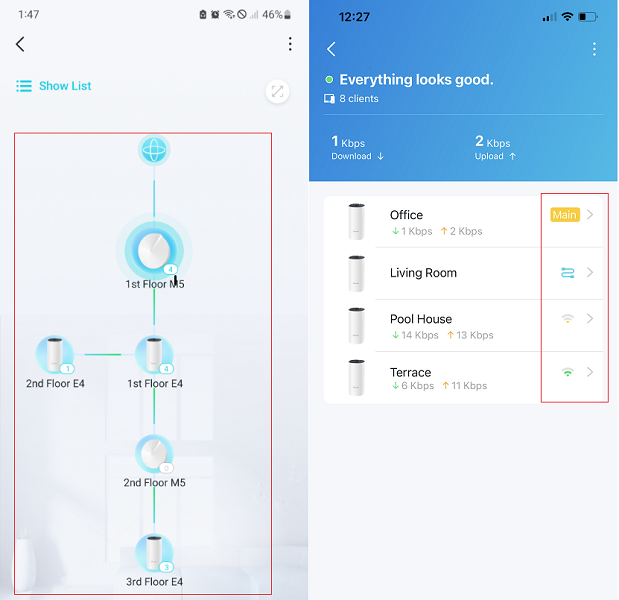
Can you share some screenshots of the network maps on the Deco App, such as

-By the way, how about the distance from each satellite X20 to the nearest Ethernet Backhaul Deco?

20f704b398af4438aa32c273d2a05f12

As satellite Mesh units work the same, have you tried to swap the locations of the two wireless Deco X20s with the wired satellite Deco X50s to see if the disconnection starts happening to the Deco X50?


Thank you very much.

Best regards.


  0  
  0  
#3
Options