
Early Access Deco X50/X55_V1.3_1.8.2 Expanded the Client Connection Detail and Added ECO Mode, VPN Kill Switch


Hey Everyone,
We’re excited to introduce a new firmware update for the Deco X50/X55_V1.30/V1.33, packed with powerful new features and enhancements designed to elevate your Deco Mesh Home Networking experience.
This Article Applies to:
Deco X50(US/KR) / Deco X55(US/CA)_V1.30/V1.33
Modifications and Enhancements:
- Streamlined TP-Link Simple Setup process.
- Added Traffic Usage for online clients and optimized real-time information display on the Deco App, including wireless standard/bandwidth/encryption and online time.
- Added ECO Mode
- Added the VPN Kill Switch
- Optimized the Configuration Backup feature for a smoother device migration operation
- Improved 2.4GHz mesh performance and overall networking experience.
- Improved Overall System Security & Stability
- Correct the Deco node's Online Time.
Firmware Download Link:
Deco X50/X55_V1.30/V1.33 |
1.8.2_build_20260421_rel_45251_Beta |
Update Notice:
- This beta firmware version number, as well as the future official version, has been adjusted to 1.8.x to align and streamline software release management with Deco X50/X55_V1.0/V1.6 going forward.
- Please be sure you have read the Beta Test Agreement before upgrading the Pre-release firmware!
- Please make sure the Deco APP is up-to-date.
- This firmware can’t be degraded directly to the previous version. A firmware recovery is required to revert to the official 1.3.1 version.
- How to manually update the firmware via web UI.
As always, we value your feedback. If you happen to encounter any concerns during or after the firmware upgrade, please feel free to comment below with the following information. Your input helps us continue to improve and provide the best possible products and support.
- Provide a detailed network layout, including how the devices are connected.
- Include a detailed description of the issue and as much information as possible regarding the specific conditions that seem to trigger the behavior.
Thank you for your continued support and for being part of our community.
Update Log
Apr 24th, 2026
- Update the pre-release firmware.
- Add a release note: Correct the Deco node's Online Time.
- Copy Link
- Subscribe
- Bookmark
- Report Inappropriate Content

Hello TP-LINK !!
I have Deco X50 and Deco M4 and when i use Deco M4 beside Deco X50 so im getting better signals on Deco M4 as compared to Deco X50 if i far away from my Deco system. Can you please fix the low range issue on Deco X50. Please and ThankYou !!
- Copy Link
- Report Inappropriate Content
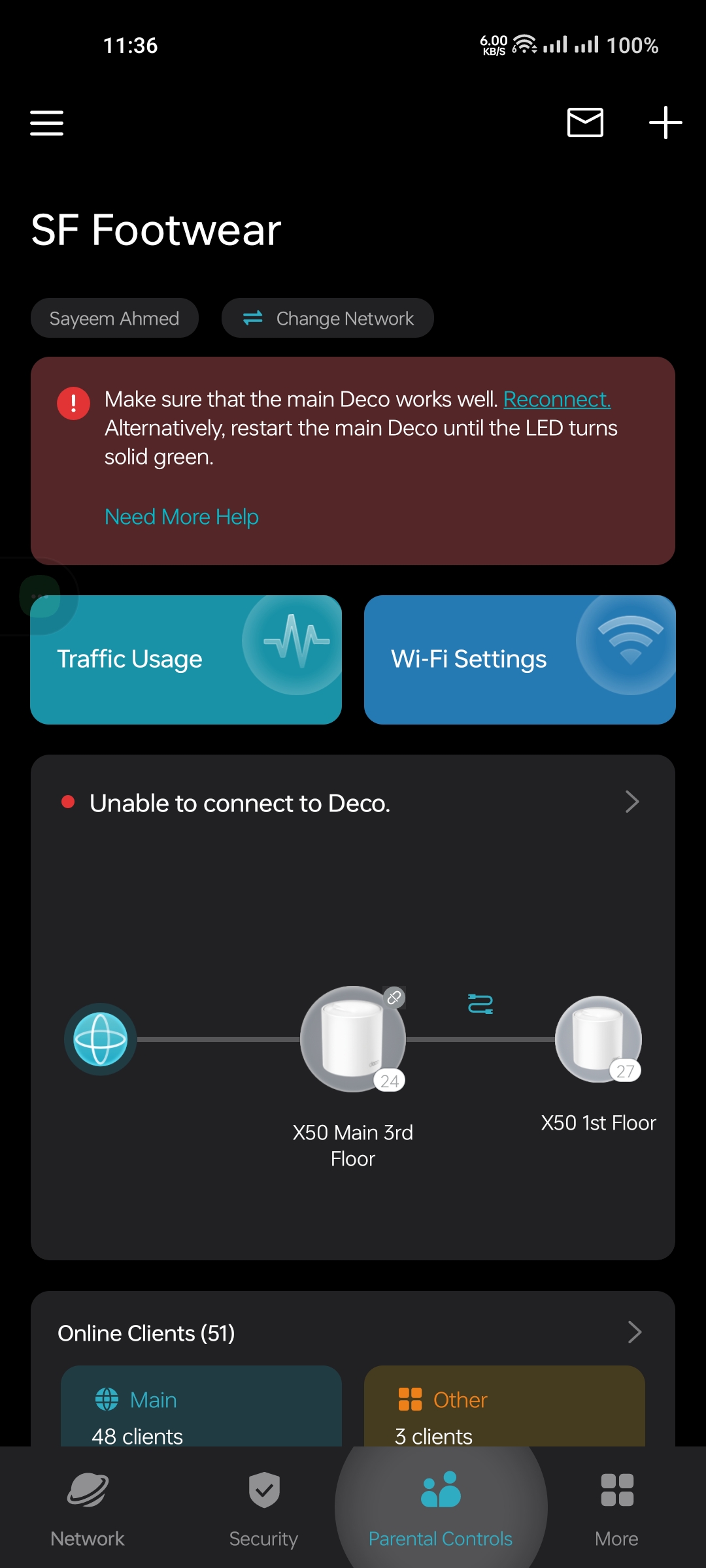
@Solla-topee I have never seen such a bad firmware in my life. Whoever or what engineer is working on this needs to be fined because it is a very bad beta firmware. It is not possible to roll back from it. Sometimes it shows no internet. Deco App works slowly and shows everything offline. I am unable to go back to the previous firmware because I cannot access the web browser.

- Copy Link
- Report Inappropriate Content
Hi,
1. When the Deco shows offline in the Deco app, what's the LED status on the main Deco and the satellite Deco? Do you have internet when connected to the modem directly?
2. If you want to revert to the previous official firmware, you can try factory resetting the Deco X50 nodes and reconfiguring them. When they are working, you can log in to the Deco's web UI and follow the instructions below to downgrade the firmware.
How to Fix a Bricked TP-Link Deco Using Firmware Recovery
3. When you test the Wi-Fi range of the Deco X50 and M4, is the wireless device connected to the 2.4 GHz Wi-Fi from both the X50 and the M4, rather than being connected to the M4's 2.4 GHz and the X50's 5 GHz Wi-Fi? Generally speaking, 2.4 GHz Wi-Fi has a longer transmission range and provides a stronger signal compared to 5 GHz.
How do you check the wireless signal strength on your wireless device?
Best Regards
- Copy Link
- Report Inappropriate Content

Solla-topee wrote
Hey Everyone,
We’re excited to introduce a new firmware update for the Deco X50/X55_V1.30/V1.33, packed with powerful new features and enhancements designed to elevate your Deco Mesh Home Networking experience.
This Article Applies to:Deco X50(US/KR) / Deco X55(US/CA)_V1.30/V1.33
Modifications and Enhancements:
- Streamlined TP-Link Simple Setup process.
- Added Traffic Usage for online clients and optimized real-time information display on the Deco App, including wireless standard/bandwidth/encryption and online time.
- Added ECO Mode
- Added the VPN Kill Switch
- Optimized the Configuration Backup feature for a smoother device migration operation
- Improved 2.4GHz mesh performance and overall networking experience.
- Improved Overall System Security & Stability
- Correct the Deco node's Online Time.
Firmware Download Link:
Deco X50/X55_V1.30/V1.33
1.8.2_build_20260421_rel_45251_Beta
Update Notice:
- This beta firmware version number, as well as the future official version, has been adjusted to 1.8.x to align and streamline software release management with Deco X50/X55_V1.0/V1.6 going forward.
- Please be sure you have read the Beta Test Agreement before upgrading the Pre-release firmware!
- Please make sure the Deco APP is up-to-date.
- This firmware can’t be degraded directly to the previous version. A firmware recovery is required to revert to the official 1.3.1 version.
- How to manually update the firmware via web UI.
As always, we value your feedback. If you happen to encounter any concerns during or after the firmware upgrade, please feel free to comment below with the following information. Your input helps us continue to improve and provide the best possible products and support.
- Provide a detailed network layout, including how the devices are connected.
- Include a detailed description of the issue and as much information as possible regarding the specific conditions that seem to trigger the behavior.
Thank you for your continued support and for being part of our community.
Update Log
Apr 24th, 2026
- Update the pre-release firmware.
- Add a release note: Correct the Deco node's Online Time.
Thanks for the update 1.8.2_build_20260421_rel_45251_Beta. it's slightly better than previous version. Overall good update still have. But confidential only for test watermark present which not available previous 1.8.2 build.
Thanks again 👍
- Copy Link
- Report Inappropriate Content

I’m facing two issues:
📍Client speed limit is not working properly. Even after setting limits (e.g., 1 Mbps / 200 kbps), devices can still use higher speeds.
📍Some connected clients do not show the Wi-Fi icon in the device list.
Firmware: 1.8.2 Build 20260421 Rel. 45251
- Copy Link
- Report Inappropriate Content

Here are some comments and suggestions regarding Dexo X50 V1.30—
In my opinion, the previous firmware version 1.8.2 Build 20260401 Rel 35041 was much better and more stable. In particular, the Speed Limit feature worked properly, and there were no sudden offline issues in that version. I believe this version could be considered for final release.
I have noticed some issues in the current firmware version 1.8.2 Build 20260421 Rel 45251—
• The Speed Limit feature is currently not working.
• Sometimes the Deco X50 device suddenly shows offline, although it returns to normal after refreshing.
• These issues did not occur in the previous version.
I also have a feature request—
Adding Monthly Traffic Usage Total (monthly total data usage summary) would be very useful. I am attaching a screenshot as an e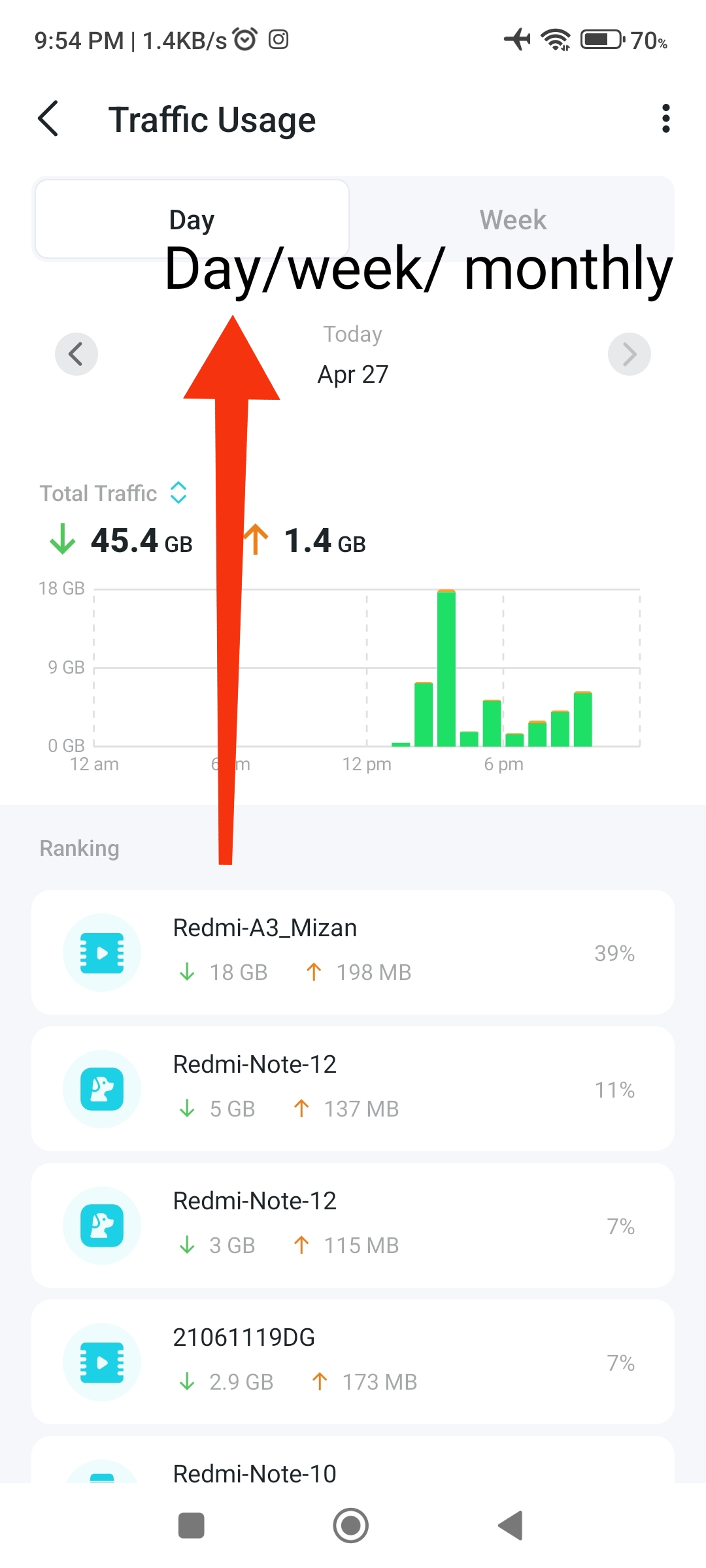 xample.
- Copy Link
- Report Inappropriate Content
@rakib_5056802 In the previous version (1.8.2 Build 20260401), the client speed limit did not work. The offline issue was present before and still exists. Additionally, some connected clients do not show the Wi-Fi icon in the device list. This issue was in the previous version and remains in the latest version as well.
- Copy Link
- Report Inappropriate Content
 @Solla-topee
@MehediMac I personally checked 6 Deco X50 units (Hardware Version 1.30). Firmware Version 1.8.2 Build 20260401 Rel 3504 — everything appears to be fine, and the customer also reported no complaints.
In my opinion, the system is currently about 90% okay from the network side.
If a monthly traffic usage option is added, there is room for further improvement.
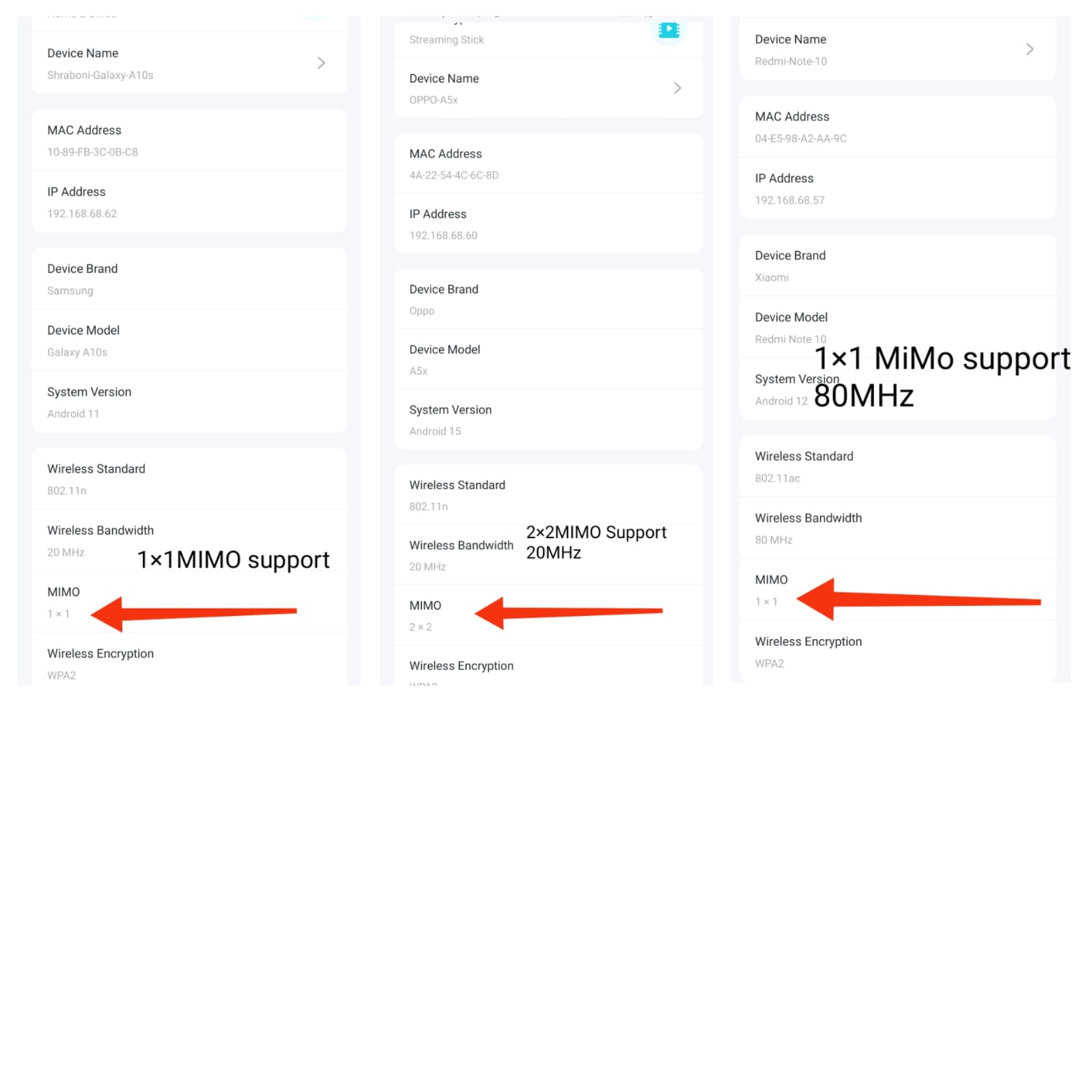
The remaining part depends largely on client devices — especially if all mobile devices support 2×2 MIMO, performance would be even better.
In reality, there are some users who try to identify or point out major issues even when everything is working properly. So based on practical experience, I believe the network side can be considered 90% okay.
@Solla-topee
- Copy Link
- Report Inappropriate Content
Hi,
Thank you for your testing and explanation. Is your Deco X50 still running firmware version 1.8.2 Build 20260401 Rel 3504? If you prefer to continue using this version, you are welcome to do so. If you are testing the new firmware and the issue you reported here can be consistently reproduced, please kindly provide the following information.
1. What speed limit have you configured for your client device? How did you confirm this feature does not work?
2. Does your Deco X50 have a solid green light but suddenly show offline in the Deco app? Please describe your network diagram. Does this phenomenon occur only when reopening the app after a period of inactivity?
3. Please refer to the instructions below to send us the Deco app log. After that, please attach your reference number (such as email TKIDXXX) to the thread, or let us know if you have already sent the log.
How to collect the system log of the Deco app
Thank you very much for your feedback about the Traffic Usage feature. I'll log it and forward it to the relevant team for evaluation.
Best Regards
- Copy Link
- Report Inappropriate Content
Hi,
Please provide more details about the reported phenomenon for further analysis.
1. What speed limit have you configured for your client device? For how many devices have you set a speed limit?
Are you testing the download and upload speeds on the client device at www.speedtest.net and finding that the actual speeds are higher than the limited speed? If so, what is the actual speed of the client device?
2. Please send us a picture of the client list page on the Deco app. Then, please refer to the instructions below to send us the Deco app log. After that, please attach your reference number (such as email TKIDXXX) to the thread, or let us know if you have already sent the log.
How to collect the system log of the Deco app
Best Regards
- Copy Link
- Report Inappropriate Content
Information
Helpful: 1
Views: 10039
Replies: 94
Voters 1
