
Tapo C210: Home/Away Mode Shortcut/Automation Support

Let us please toggle Home and Away modes using Shortcuts and thereby Alexa, it isn't very pleasant to always head into the app and navigate into camera settings just to change modes.
- Copy Link
- Subscribe
- Bookmark
- Report Inappropriate Content


ClaudioGC wrote
With Home/Away we can set up cameras but not motion sensors/door and window opening sensors. We need a shortcut that does all these things automatically !
Hi,
Usually, you can go to the Tapo app > Smart page to set the Automation or Shortcut entry directly for the motion sensor, contact sensors, etc. If you want your sensor devices to support more triggers or actions, please describe the triggers and actions you want to add, along with detailed use cases for evaluation.
Best Regards
- Copy Link
- Report Inappropriate Content
I've got SmartThings Geofencing successfully turning my Tapo sensors notifications on and off via a routine, works well
It's just the cameras that I want to be linked to Geofencing to mimic Home / Away as Privacy Mode is not needed when I'm at home as 2 of them are monitoring my outdoors
- Copy Link
- Report Inappropriate Content
I have found an answer to using all my Tapo cameras under Geofencing and have them notify me on motion detection without having to faff with Tapo Home / Away
My solution that works for me :
Set applicable cameras in Tapo to motion detect as required - motion, person, tamper, etc
BUT - ensure notifications are turned off in Tapo, ignore the warning
That allows the cameras to constantly detect motion but not keep pinging your phone
Next step, in SmartThings (ST), check all your cameras with detection set are now motion detectors
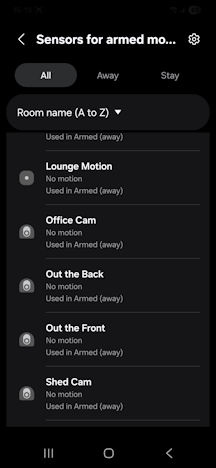
This is a few of my ST motion detector list, Tapo cameras and standalone motion detectors (by default Tapo cameras are identified by ST and put in the list) :
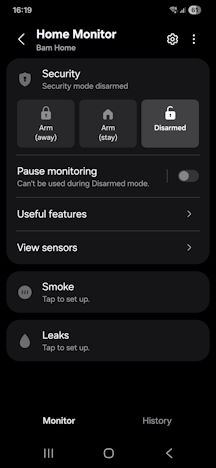
This is ST Geofencing showing currently Disarmed, but when I go out, Armed Away auto activates (I have ST Geofencing set to 150 yards) and I get ST notifications
And the ST Geofence Routine that switches on Armed :
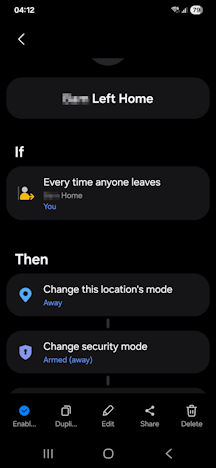
And of course another Routine to switch from Armed to Disarmed when I get home
Working for me
- Copy Link
- Report Inappropriate Content
- Copy Link
- Report Inappropriate Content
- Copy Link
- Report Inappropriate Content
My problem is that I can't find a valid solution. With the At home/Away buttons I can easily set the cameras to notify me of motion BUT I can't manage the sensors! With the Smet Action, as someone suggested, I can manage the sensors but for the cameras I can only choose whether to activate or deactivate Tracking but nothing else! There is no way, with just one tap, to set everything!
- Copy Link
- Report Inappropriate Content
With my solution the cameras are permanently active and within Smartthings you can use Geofencing to switch between notification or not
In essence you are doing exactly what Tapo motion sensors are doing, but using cameras, as the motion sensors cannot be turned off, they are constantly monitoring for movement
- Copy Link
- Report Inappropriate Content
- Copy Link
- Report Inappropriate Content
With this solution you lose functionality that comes with Tapo native notifications. Such as redirect to the recording on notification tap, (which most of the cases works). How did you solve that?
- Copy Link
- Report Inappropriate Content
Sorry, you've lost me with what you want
All I wanted to achieve was to have my cameras act as motion sensors and send me a phone notification when an intrusion occurs
My main requirement though, which is what this thread is about, is to have the notifications auto start and stop via Geofencing, which my solution does
- Copy Link
- Report Inappropriate Content
Information
Helpful: 134
Views: 28740
Replies: 134
Voters 134



























