
Solution What can I do if the "Feature Unavailable" message appears when using the Talk/Call features?


This Article Applies to:
All Tapo Cameras
Phenomenon Description:
When attempting to use the Talk or Voice Call feature on your Tapo camera, you may see the message:
“Due to local regulations, this feature is unavailable in your country/region.”
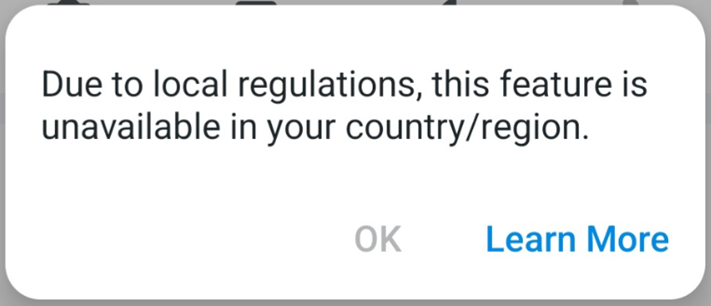
The root cause of the message
This message appears because, due to local government regulations, the 2-way audio functionality on TP-Link Tapo devices is blocked.
For example: Changes to TP-Link Tapo Services in the Sultanate of Oman. If your TP-Link account's region code is set to Oman (OM), this message will occur when trying to access the camera's Talk or Voice Call features.
Workaround
If you see the reported message in the Tapo app but your local regulations do not restrict the use of the 2-way audio feature on your camera, it might be because you accidentally set your TP-Link account region to a restricted area, such as Oman. In this case, you can try the following steps:
1. Create a New TP-Link ID:
- Register a new TP-Link account using a different email address.
- Ensure you select the correct region that matches your actual location.
For additional information on how to create a TP-Link account, please refer to this link: What is TP-Link ID and how to create a TP-Link ID?
2. Factory Reset the Camera:
Press and hold the reset button on the camera for 10 seconds to perform a factory reset.
3. Reconfigure the Camera:
Set up the camera again and bind it to the new TP-Link account you just created.
How to set up the Tapo camera
Further Assistance:
If the same phenomenon persists, please reply to this thread or start a new thread here with the following information for analysis.
1. A description of the phenomenon you are experiencing.
2. Where are you located? Where did you purchase the Tapo device?
3. Send me (@Solla-topee) your camera's MAC address via a private message. You can find it in the Tapo app > camera's Device Settings > Device Info page.
More Articles:
Troubleshooting for Tapo Camera's Privacy Mode Automatic Activation
Flexible Configuration: Setting up for Your Tapo Video Doorbell Camera’s Doorbell Feature
Introduction to Smart Dual Tracking on Tapo Outdoor Dual-Lens Camera