Deco BE68, BE67, BE77 and BE13000 Firmware 1.3.0 Introduces DoH/DoT, Internet Backup, 6RD Connection

Deco BE68, BE67, BE77 and BE13000 Firmware 1.3.0 Introduces DoH/DoT, Internet Backup, 6RD Connection

Deco BE68, BE67, BE77 and BE13000 Firmware 1.3.0 Introduces DoH/DoT, Internet Backup, 6RD Connection
a week ago - last edited Yesterday
Model: Deco BE68   Deco BE67  
Hardware Version: V1
Firmware Version: 1.3.0 Build 20260508-rel18114

Hey Everyone,
 

We’re excited to share early access to a new firmware update for the Deco BE68 / Deco BE67, Deco BE13000, and Deco BE75, packed with new features and enhancements designed to elevate your Deco Mesh Home Networking experience. This firmware is currently in beta; however, your testing and feedback may help accelerate its official release!


Applies to:

  • Deco BE68 / Deco BE67 / Deco BE77 / Deco BE13000 V1.0/V1.6 (All Regions)
  • Deco BE75 V2.0 (All Regions)


Modifications and Enhancements:

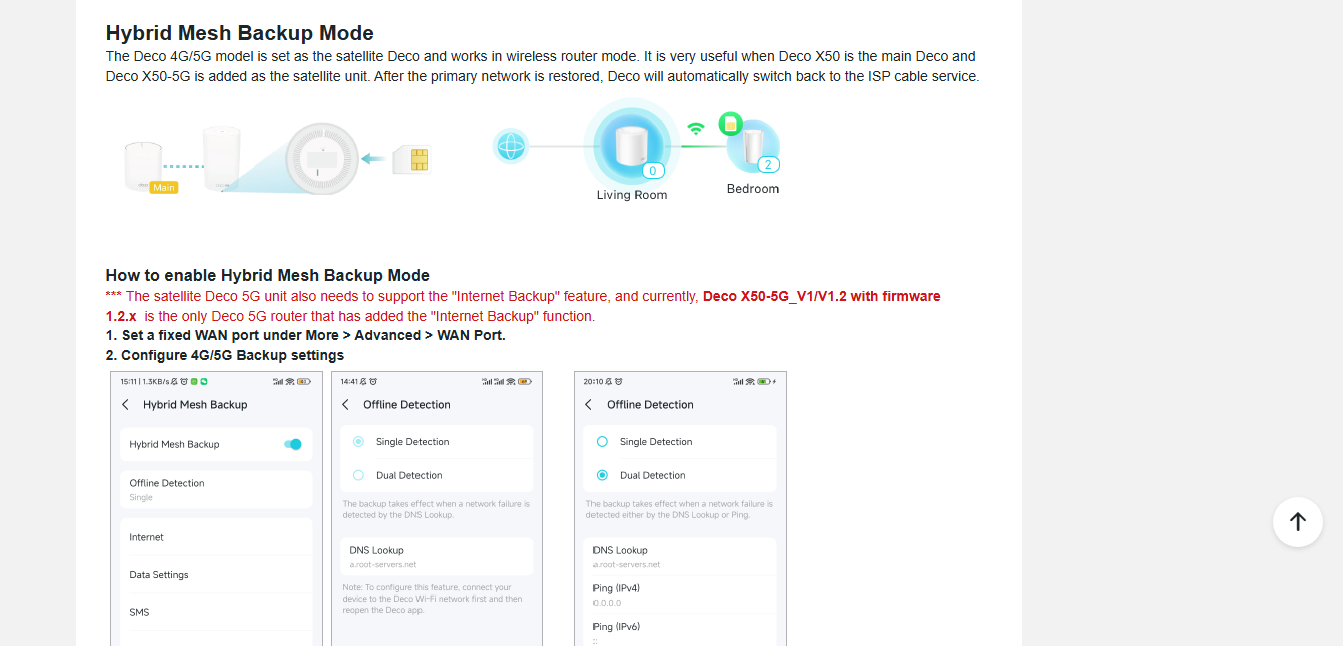
  • Added Hybrid Mesh Feature
  • Added Internet Backup Feature
  • Added DoH & DoT Feature
  • Added Support for 6RD Connection Type
  • HomeShield Feature Optimizations
  • Improved Overall System Security & Stability


Firmware Download Link:

  • Deco BE68 / Deco BE67 / Deco BE77 / Deco BE13000 V1.0/V1.6
  • Deco BE75 V2.0

1.3.0 Build 20260508-rel18114 (Pre-Release)


Note:

  • Pre-release and Beta firmware should be used at your own discretion. We cannot guarantee the functionality of features or technical support for Pre-Release or Beta Firmware. Features and support vary by model and Internet connection type.
  • Please ensure your Deco app is fully up-to-date.
  • This firmware cannot be reverted directly to the previous version. A Firmware Recovery Process is required to revert.
  • There will be an official firmware release in the future. If you are not comfortable using beta firmware, please wait for the official release or contact our support teams for assistance.
  • For detailed instructions on how to install this beta firmware on your Deco Mesh System, visit: How to manually update the firmware via web UI.


As always, we value your feedback. If you happen to encounter any concerns during or after the firmware upgrade, please feel free to comment below with the following information. Your input helps us continue to improve and provide the best possible products and support.
 

  • Provide a detailed network layout, including how the devices are connected.
     
  • Include a detailed description of the issue and as much information as possible regarding the specific conditions that seem to trigger the behavior.


Thank you for your continued support and for being part of our community.

Make Your Home Wi-Fi Greener with Power-Saving Features Check out Our Community Newsletter and Monthly Firmware Updates in our Knowledge Base Contact Support Join our Official Subreddits: , r/tplink, r/tapo, r/omada_networks
1
1
#1
14 Reply
Re:Deco BE68/BE67 Firmware 1.3.0 Introduces DoH/DoT, Internet Backup, and More!
a week ago - last edited a week ago

  @Ryan 


Is this for all regions? 


Does it also address the iPhone RCS Message Problem on WiFi issue? 


Please advise 


Thanks 

Need help with the Deco app, setup, Ethernet backhaul, network switch or rolling back firmware? Router or AP mode? https://community.tp-link.com/us/home/forum/topic/699816?page=1
0
0
#2
Re:Deco BE68/BE67 Firmware 1.3.0 Introduces DoH/DoT, Internet Backup, and More!
Wednesday

  @HelpFixDecoApp 

 Hi, welcome to the community.

Yes, this firmware is for all regions and resolves the iPhone RCS Message problem.

Best Regards

0
0
#3
Re:Deco BE68/BE67 Firmware 1.3.0 Introduces DoH/DoT, Internet Backup, and More!
Wednesday

  @Solla-topee 


Did you see my msg? I already let the us support team know via email in case you can't fix it. 

Need help with the Deco app, setup, Ethernet backhaul, network switch or rolling back firmware? Router or AP mode? https://community.tp-link.com/us/home/forum/topic/699816?page=1
0
0
#4
Re:Deco BE68/BE67 Firmware 1.3.0 Introduces DoH/DoT, Internet Backup, and More!
Wednesday - last edited Wednesday

  @HelpFixDecoApp 


I've updated the original post to include some additional details. 👍 

Make Your Home Wi-Fi Greener with Power-Saving Features Check out Our Community Newsletter and Monthly Firmware Updates in our Knowledge Base Contact Support Join our Official Subreddits: , r/tplink, r/tapo, r/omada_networks
0
0
#5
Re:Deco BE68 / BE67 / BE77 and BE13000 Firmware 1.3.0 Introduces DoH/DoT, Internet Backup, and More!
Wednesday

  @Ryan 


Does this also fix smb folder share? 

0
0
#6
Re:Deco BE68 / BE67 / BE77 and BE13000 Firmware 1.3.0 Introduces DoH/DoT, Internet Backup, and More!
Yesterday

  @Atomic78 


Doesn't appear too, and this is an OS problem.


NET VIEW error:


C:\>net view
System error 6118 has occurred.

The list of servers for this workgroup is not currently available


Yet using the share name works (like before):


C:\>net view \\tp-share
Shared resources at \\tp-share


Share name  Type  Used as  Comment

-------------------------------------------------------------------------------
G           Disk
The command completed successfully.


0
0
#7
Re:Deco BE68, BE67, BE77 and BE13000 Firmware 1.3.0 Introduces DoH/DoT, Internet Backup, 6RD Connection
Yesterday

  @Ryan 


This LINK is wrong, " Added Hybrid Mesh Feature ", it goes to Internet Back-up.


Can't find anything in Knowlesge Base either?


Google AI tells me this:


============

TP-Link’s "Hybrid Mesh" (under the Deco line) combines traditional wireless mesh with Powerline (PLC) technology. By transmitting data through your home's existing electrical wiring, these systems bypass thick walls and physical obstacles to deliver strong, seamless multi-gigabit coverage.

============


These are NOT Powerline Deco's so I don't understand that?


Can't see anything in the Deco App that even hints at that?


Other than that, seems to be working fine WITH no chages made from the settings the BE68 had.


Can't use 6RD as my ISP uses Stacked DNS. 

0
0
#8
Re:Deco BE68, BE67, BE77 and BE13000 Firmware 1.3.0 Introduces DoH/DoT, Internet Backup, 6RD Connection
Yesterday - last edited Yesterday

  @IrvSp 


You have to scroll down the page a little to find it :) 


bd1eb60e880b4f5e82b88fcc4eda9273


Thanks 

Need help with the Deco app, setup, Ethernet backhaul, network switch or rolling back firmware? Router or AP mode? https://community.tp-link.com/us/home/forum/topic/699816?page=1
0
0
#9
Re:Deco BE68, BE67, BE77 and BE13000 Firmware 1.3.0 Introduces DoH/DoT, Internet Backup, 6RD Connection
Yesterday

HelpFixDecoApp wrote

  @IrvSp 


You have to scroll down the page a little to find it :) 


bd1eb60e880b4f5e82b88fcc4eda9273


Thanks 


  @HelpFixDecoApp 


Not on MY BE68:


b6e1694970644b5bbb1216f83d242b90


Turn it OFF and I get this:


e9430c56f399493fb7d2af934f26e599


Stiil the LINK for info not correct. Wrong web page, and I can't even find one that pertains to that on the TP-Link KB articles.


0
0
#10
Re:Deco BE68, BE67, BE77 and BE13000 Firmware 1.3.0 Introduces DoH/DoT, Internet Backup, 6RD Connection
23 hours ago

  @IrvSp 


Well that's an issue LOL. Unless you have a different way to report it please open up a ticket using the directions below. 


First please access the Deco web UI by entering "tplinkdeco.net" in your browser. Navigate to Advanced > System > System Log, select "ALL" in the log type, and save the file to your local computer. Then follow the steps below making sure to attach the logs to the email.

I recommend sending an email to forumsupport.usa@tp-link.com with the following information:

Subject: [Forum Escalation][ID 864118Deco BE68, BE67, BE77 and BE13000 Firmware 1.3.0 Introduces DoH/DoT, Internet Backup, 6RD Connection

Forum Nickname: [User Provided]

Thread URL: https://community.tp-link.com/us/home/forum/topic/864118?replyId=1693834

Model&Version: [User Provided]

Description: [User Provided]

Any Other Relevant Information (Logs, Config Files, Images, etc.): [User Provided]

In the template above please fill in the areas that say [User Provided].  This will open a case with our engineering team, and they will work with you via email. 


Need help with the Deco app, setup, Ethernet backhaul, network switch or rolling back firmware? Router or AP mode? https://community.tp-link.com/us/home/forum/topic/699816?page=1
0
0
#11