
Beta Software Firmware 1.4.0 for Deco XE75/XE5300/XE75 Pro_V2/V3 Added Wi-Fi Access Control, WireGuard VPN & More


This Article Applies to:
Deco XE75(US/EU/AU/CA)_V2/V3
Deco XE5300(US)V2/V3
Deco WE10800(US)V2/V3
Deco XE75 Pro(US/EU/AU/CA)_V2/V3
Deco XE70 Pro(US)_V3
Vx.0=Vx.6(eg:V2.0=V2.6)
Firmware Modifications:
- Added WiFi Network Mode to enhance the overall performance of the 2.4GHz band.
- Added Camera Security.
- Added Whitelist/ Wi-Fi Access Control to support Allow List and Block List
- Supported Captive Portal for Guest Network.
- Supported Firmware Auto Update.
- Supported ECO Mode 1.0 to save power.
- Supported WireGuard VPN.
- Integrated third-party VPN services.
- Supported limiting client speeds.
- Supported fixing a specific port as the WAN port.
- Optimize client type recognition.
- Support managing new Kasa and Tapo product categories (including light strips, multi-port outlets, etc.).
Bug Fixes:
- Fixed the issue where Samsung devices could connect to the Deco WiFi but had near-zero network speeds.
Download Links
| Deco XE75/XE5300/WE10800_V2/V3 | 1.4.999_Build_20260319_rel_57690_Beta (updated 2026.3.19) |
| Deco XE75 Pro/XE70 Pro_V2/V3 | 1.4.999_Build_20260319_rel_57838__Beta (updated 2026.3.19) |
Update Notice:
- Please be sure you have read the Beta Test Agreement before upgrading the Pre-release firmware!
- Please make sure the Deco APP is up-to-date.
- The Beta firmware versions can’t be degraded directly to the previous 1.3.1/1.2.9, etc. versions.
- How to manually update the firmware via web UI.
As always, we value your feedback. If you happen to encounter any concerns during or after the firmware upgrade, please feel free to comment below with the following information. Your input helps us continue to improve and provide the best possible products and support.
- Provide a detailed network layout, including how the devices are connected.
- Include a detailed description of the issue and as much information as possible regarding the specific conditions that seem to trigger the behavior.
Thank you for your continued support and for being part of our community.
- Copy Link
- Subscribe
- Bookmark
- Report Inappropriate Content

is there any update?
- Copy Link
- Report Inappropriate Content

@Olivermm I think the same. It seems that everything has been put on hold and without news.
- Copy Link
- Report Inappropriate Content


the beta firmware will work on my v1 xe75?
- Copy Link
- Report Inappropriate Content

- Copy Link
- Report Inappropriate Content
So, after a year or so of using the prior 'beta', that set the 2.4Ghz channels (mostly) to 20Mhz, I finally updated to this beta. No other software other than the temporary beta with the 2.4ghz 20mhz channel fix has been stable for me. I'd asked in this forum at least twice if the new beta has the 20mhz channel width, but never got an answer. Someone on Reddit finally checked and confirmed for me that most of the units do indeed run in 20Mhz mode after upgrading, so I finally bit the bullet and updated.
So far, so good. Been ~24 hours now and the network is still running. Cameras all still on. Squeezeboxes squeezing. HA stuff is still ticking. I did have to update to the latest 1.3.1 release BEFORE it would upgrade, so I guess going from that old beta to the new one isn't supported (it would fail for me).
So, just to provide feedback. The beta does seem to provide much better stability than the release versions. In my case, none of the prior release firmwares from day one has ever provided a stable network where my devices would simply not drop all the time and/or become permanently offline.
I look forward to it becoming the new 'stable' release.
[EDIT] Thought I'd just add. I had to add 25 milliseconds to my desktop squeezebox players to re-sync music with the other players, due to the decreased wifi latency... (that's a good thing...)
Thanks.
- Copy Link
- Report Inappropriate Content

@HelpFixDecoApp You got to be kidding this is only for Hardware versions 2 and 3?? People are waiting for years for Wireguard VPN client support and when it finally arrives it is limited to a few models??
Also, all the documentation from TP-link on finding my hardware version is incorrect. There is no vx.x on any label and there is no version number in the app. The only think I see is eu/2.0 at the end of the s/n. those this mean it is v2? Current fw is 1.3.1 build 20251023 Rel. 43624, maybe that does tell something about the hardware version
and when will this fw be out of beta?
- Copy Link
- Report Inappropriate Content

Hi,
Usually, you can refer to the instructions below to check your Deco's hardware version.
How to Find the Hardware Version on Your TP-Link Device
Based on the information you provided, your Deco's hardware version is V2.0. If your Deco's model number is listed in this thread, you can try the pre-release firmware on your Deco. We do not have information on when the official firmware will be released; however, we will update this thread once it is available.
Best Regards
- Copy Link
- Report Inappropriate Content

There is a new early-release version that just came out today for V1
Here: https://community.tp-link.com/en/home/forum/topic/866776
- Copy Link
- Report Inappropriate Content
Anyone experienced problems with the client list using this firmware?
Since loading it on I've noticed that the client list updated once, then never updates again.
After a while I get the following message in the Deco app:
"Something went wrong while obtaining the client list. Please reboot the main Deco and connect to the wireless network again"
A reboot, will eventually refresh the client list once, but then it never changes and eventually the message above pops up again.
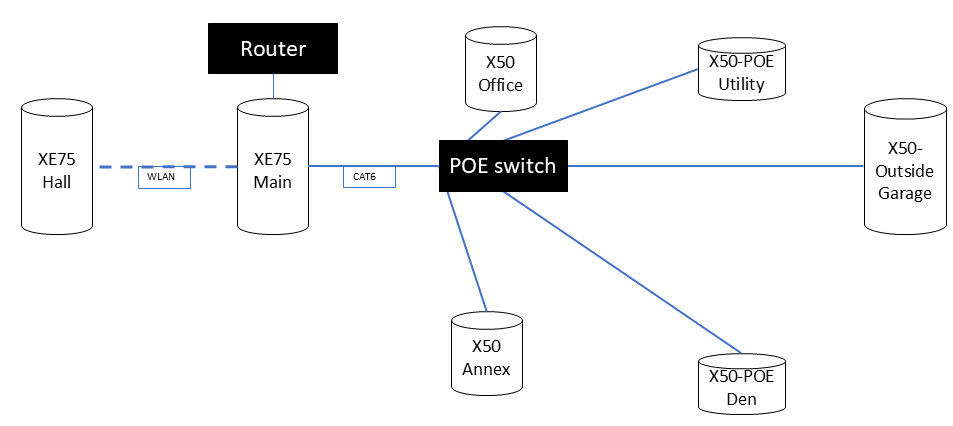
So running beta or early release firmware on everything except the X50-Outdoor 
Network:
Deco network running in AP mode consisting of:
2 x XE75 (2.0) - Firmware 1.4.999 Build 20260319 Rel. 57690
2 x X50 (1.0) - Firmware 1.10.0 Build 26033014 Rel. 79940
2 x X50-POE (2.0) - Firmware 1.7.0 Build 26050812 Rel. 21531
1 x X50-Outdoor (1.0) - Firmware 1.3.1 Build 20251030 Rel. 41614
Topology:
Everything is wired backhaul except one XE75 which is wireless.
Its not a dealbreaker, as devices seem to be roaming and connecting as expected, however its annoying and makes troubleshooting hard to do without being able to see what clients are connected to.
Thanks
]
- Copy Link
- Report Inappropriate Content

Hi all,
Is there anything information/expected release with version 1.4?
I'm desperately waiting for the stable release :)
- Copy Link
- Report Inappropriate Content
Information
Helpful: 6
Views: 31160
Replies: 118
Voters 2

