
Solution [Tapo C325WB V2] Cannot Enjoy Full-Color Night Vision Without Activating Spotlights


This Article Applies To:
Tapo C325WB V2
Phenomenon Description:
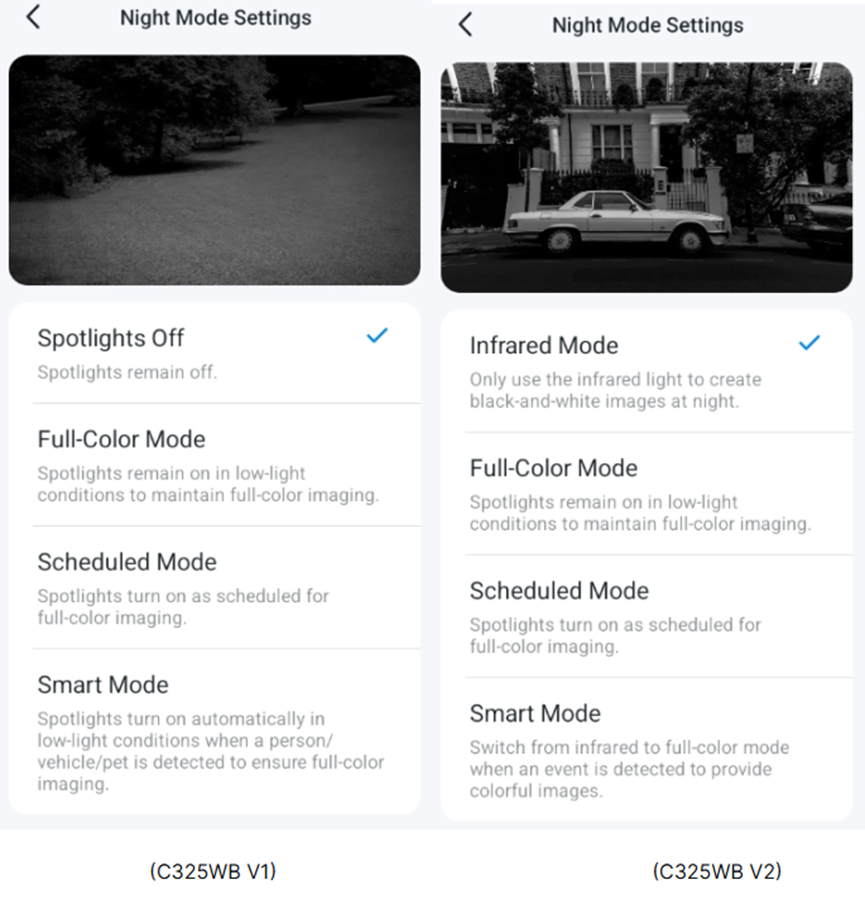
The Tapo C325WB V2 lacks a “Spotlight Off” option on its Night Mode Settings page, unlike the Tapo C325WB V1. As a result, users are unable to enjoy full-color night vision without activating spotlights. Below are the comparative images of the Night Mode Settings page for both versions.
Workaround:
Update on Feb 11, 2026.
The new official firmware (version 1.2.5 Build 260112 Rel.69632n) is being released gradually. It adds the Light Off Mode to the camera's Device Settings > Video & Display > Night Mode Settings page, enabling full-color image capture with ColorPro Night Vision while keeping spotlights off.
- If your camera receives the new firmware, please follow the instructions below to update the firmware in the Tapo app.
How to update the firmware of the Tapo devices on the Tapo App
- If your camera has not yet received the firmware, we suggest waiting patiently.
A new firmware adds the “Spotlight Off” mode to the Tapo C325WB V2. Before the official release, community users can have early access to the new firmware. If you would like to try it out, please send a private message to @Solla-topee with the following information.
1. Forum ID 852500 + A brief description of your usage scenario and why you want the “Spotlight Off” mode.
2. The MAC address of the Tapo C325WB V2.
★★ For users from the United States, please contact forumsupport.usa@tp-link.com instead.
Before the Upgrade:
(1) Please be sure you have read the Beta Test Agreement before upgrading the Pre-release firmware!
(2) How to update the firmware of the Tapo devices on the Tapo App
(3) Firmware downgrade is not supported. When a new official version is released, updating it will overwrite the beta version.
More Articles:
Tapo Camera Day/Night Mode Selection Guide: Best Settings Recommendations for Different Scenarios
What should I do if my Tapo camera triggers false detection?
Smart Home: Introduction to Common Smart Action Scenarios for Tapo Cameras
- Copy Link
- Subscribe
- Bookmark
- Report Inappropriate Content
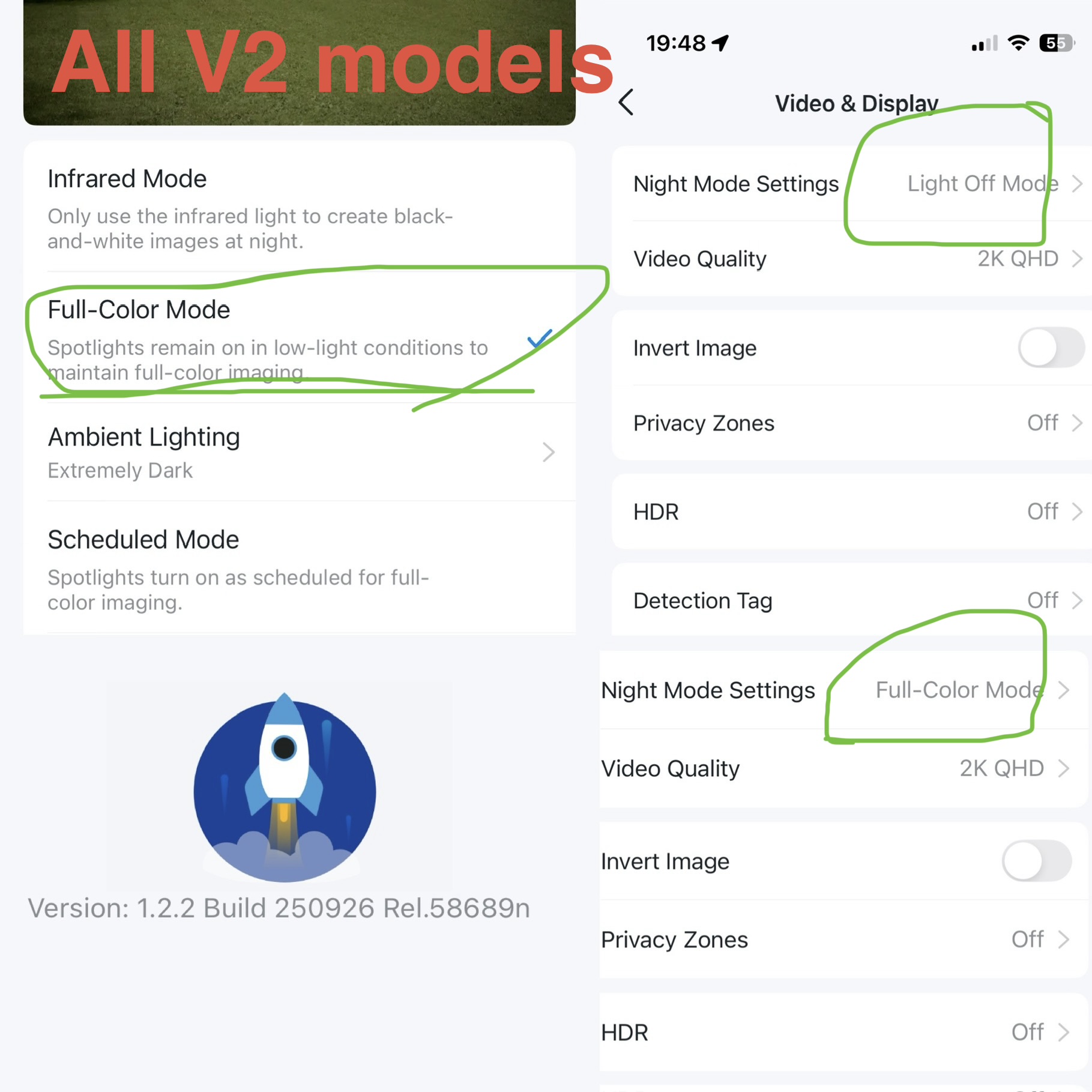 @Solla-topee I'm not sure how u would get the mac number. I have 4x v2.0 currently in use, all have the same update/ build number
version 1.2.2 build 250926 Rel. 58689n
3x of the V2.0 will show "Night Mode Settings - full colour mode" on the VIDEO & DISPLAY PAGE when you select the second option "full colour mode" on NIGHT MODE SETTINGS page
1x of the V2.0 will show "Night Mode Settings- Light off mode". It's this camera that doesn't switch back into "Infrared mode" despite making that selection (option 1)
this is why I believe it must have been sent the beta update back around 4th/5th October 25
Also read that V1 had 1/1.79 sensor and V2 has 1/1.88 sensor. Is there much difference between the 2 sizes and how much impact could that have on the low light image? Is that why the v2 looks more green fuzz and not clear colours ?
- Copy Link
- Report Inappropriate Content
Hi,
The two sensor sizes do not have much difference in low-light images. In your situation, does only the Tapo C325WB V2 with "Light Off Mode" display a green fuzz image?
Please send me (@Solla-topee) the 4 Tapo C325WB V2's MAC addresses via a private message.
Note: You can go to the camera's Device Settings > Device Info page to view its MAC address.
Best Regards
- Copy Link
- Report Inappropriate Content
@Solla-topee think I managed to send message with all Mac numbers
It's only green fuzz on the V2 spotlight off camera as far as I know although I can't really tell as the other 3x V2 cameras turn black/white IR under low light full colour option.
only way to really know if it's the same for all is to have spotlight off on all to test
- Copy Link
- Report Inappropriate Content

@Solla-topee How the Beta firmware works? When spotlight is disable, is IR allowed?
Appreciate if you could screenshot the Night Mode Settings interfaces of the Beta?
I have a V2 & am interested to try the Beta if all are good.
- Copy Link
- Report Inappropriate Content
Hi,
I did not receive your cameras' MAC addresses in the private message. You can send these MAC addresses to support.forum@tp-link.com with the subject "Forum ID 852500 + your nickname" for assistance.
Best Regards
- Copy Link
- Report Inappropriate Content
Hi,
In the new firmware, the Infrared Mode is still available in the Night Mode Settings page, just add a new Spotlight Off mode.
Best Regards
- Copy Link
- Report Inappropriate Content
Solla-topee wrote
Hi,
In the new firmware, the Infrared Mode is still available in the Night Mode Settings page, just add a new Spotlight Off mode.
Best Regards
@Solla-topee Further clarification. When spotlight is OFF, will IR be activated if ambient light falls below the threshold limit? If this is the case, while the night is not a complete darkness, we don't get to enjoy the full color night vision as in V1. Correct? I believe we need to have option to turn both spotlight & IR off for the greatest flexibility.
- Copy Link
- Report Inappropriate Content
Hi,
On the Tapo C325WB V2 with the new firmware that added the Spotlight Off mode, when you select Infrared Mode, the camera's IR LED turns on when the camera is in Night mode. When you select the Spotlight Off mode, the spotlight and the IR LED are both turned off.
Best Regards
- Copy Link
- Report Inappropriate Content
Hi,
Thank you for the MAC addresses provided. In your situation, the camera with the green-fuzz image does not use beta firmware. You can try to reboot that camera and see if it helps.
If the same phenomenon persists, please refer to the instructions below to collect the camera log for further analysis, and let me know once you have collected it.
How to get the log of Tapo Camera
Best Regards
- Copy Link
- Report Inappropriate Content
@Solla-topee reboot doesn't change anything. It's so odd that this V2 has light off mode where the others don't and this one no longer goes into IR even when that mode is selected. Same firmware as the others too.
Im going to have to wait for better weather before getting ladders out to be removing sd card to obtain diagnostic codes. But in the meantime do u want to shove the beta on the camera mac code ending db-78? I've got that pointed in the same sky direction as the green fuzz one and previous V1 so I can compare images eas
- Copy Link
- Report Inappropriate Content
Information
Helpful: 4
Views: 2972
Replies: 38
Voters 3


