
Troubleshooting Troubleshooting for better audio quality of my Tapo camera


Users may occasionally experience audio quality that does not meet expectations when using Tapo cameras. To better understand the root cause and improve overall audio performance, we recommend following the troubleshooting steps below or collecting relevant data to support further analysis.
1. Check Tapo Camera Hardware
- Ensure that the camera's microphone and speaker openings are not obstructed by any objects. If you're unsure where the microphone and speaker are, please refer to the camera's UG on our official website.
- Restart the camera, or press and hold the reset button for 10 seconds to reset the camera and reconfigure it. This can help resolve audio quality issues caused by unusual factors.
2. Check Tapo Camera Configuration
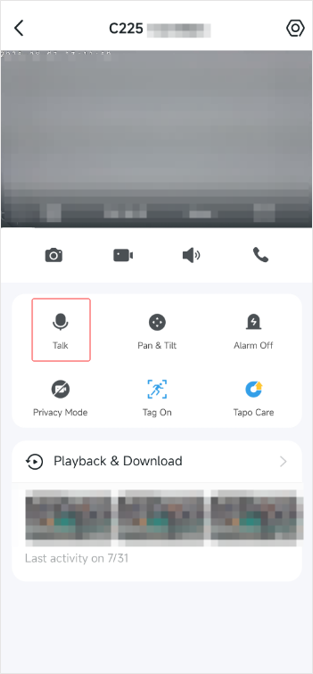
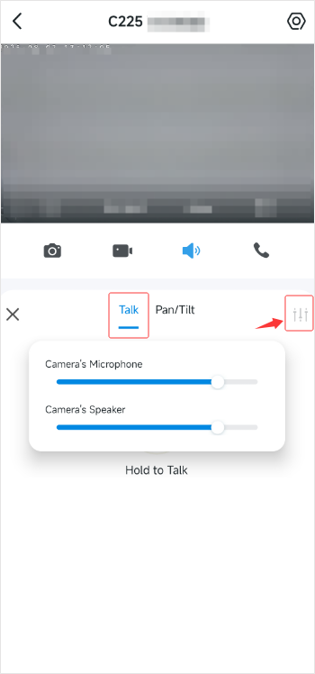
- Confirm that the microphone and speaker volumes are set to an appropriate level in the Tapo app (as shown in the figures below, we take the Tapo C225 as an example).
- Ensure that the volume on the mobile device used for viewing the camera's Live View or Playback is set to an appropriate level.
3. Check Camera Placement Environment
- Ensure that the camera is positioned to receive sound clearly without any obstacles. Avoid placing it in enclosed spaces or near surfaces that may reflect sound.
- Place a phone in the same location as the camera. Record a short video using the phone's camera. Similarly, manually record a short video on the Tapo camera's Live View page. Compare the two videos to determine if there are noticeable background noises and whether the camera's audio quality is affected by environmental factors.
4. Important Considerations for Testing Audio Quality
- Keep the mobile device at a distance from the camera during audio tests. Ideally, conduct tests in different rooms. Being too close during a voice call may cause audio feedback.
- Check if the audio quality needs to be improved in both the Playback recordings and when using the camera's Two-way Talk feature. If so, download the recordings from the Playback page and use the mobile device’s screen recorder feature to capture video during Two-way Talk for further analysis.
- Modify the speaker or headphone volume on the mobile device to see if noise levels change with volume adjustments.
Next Steps
If you have checked the camera's hardware, configuration, placement environment, and testing methods, and there are no problems, but the audio quality needs to be improved, we recommend contacting our technical support team with the following information for further assistance.
1. The camera's MAC address. You can find it in the Tapo app > camera's Device Settings > Device Info page.
2. A description of the phenomenon you are experiencing.
3. A description of the troubleshooting steps you took and the test results.
4. Provide a video that demonstrates the camera's audio quality.
5. The phone's model number, OS version, and the Tapo app version.
More Articles:
What to do if there is cracking and static noise when watching Tapo C120's live feed or video clip?
Tapo Camera Device Health Check
AI Zoom: Enlarging Detected AI Events in the Camera's Live View Page
- Copy Link
- Subscribe
- Bookmark
- Report Inappropriate Content

@Solla-topee The diagnosis that yous reccomended I do are ineffective. The gain for the microphone for these cameras had been changed, in an update yous released.
Your update changed the microphone gain so that it adjusted automatically, now the audio volume is low.
When I try to turn up the gain for the microphone, it will be good for a few seconds. Then it automatically turns itself down, even though the microphone gain is turned up on full.
Cans you change it back to how it was before or atleast make it optional for the microphone gain to be automatic or manual?
- Copy Link
- Report Inappropriate Content
Hi,
Typically, you can adjust the camera's microphone volume manually on the Tapo app > camera's Live View page. If you have adjusted the Tapo C210's microphone volume to the maximum value, but can't hear sound or the sound is very low on the camera's live view page when someone is talking to the camera, please record a video showing the reported phenomenon, then send it to us for further analysis.
You can upload the video to your cloud server (such as Google Drive) or YouTube, generate a download link, and send it to me (@Solla-topee) via a private message.
Best Regards
- Copy Link
- Report Inappropriate Content
Information
Helpful: 0
Views: 4691
Replies: 22
Voters 0
No one has voted for it yet.