
Solution [Tapo C325WB V2] Cannot Enjoy Full-Color Night Vision Without Activating Spotlights


This Article Applies To:
Tapo C325WB V2
Phenomenon Description:
The Tapo C325WB V2 lacks a “Spotlight Off” option on its Night Mode Settings page, unlike the Tapo C325WB V1. As a result, users are unable to enjoy full-color night vision without activating spotlights. Below are the comparative images of the Night Mode Settings page for both versions.
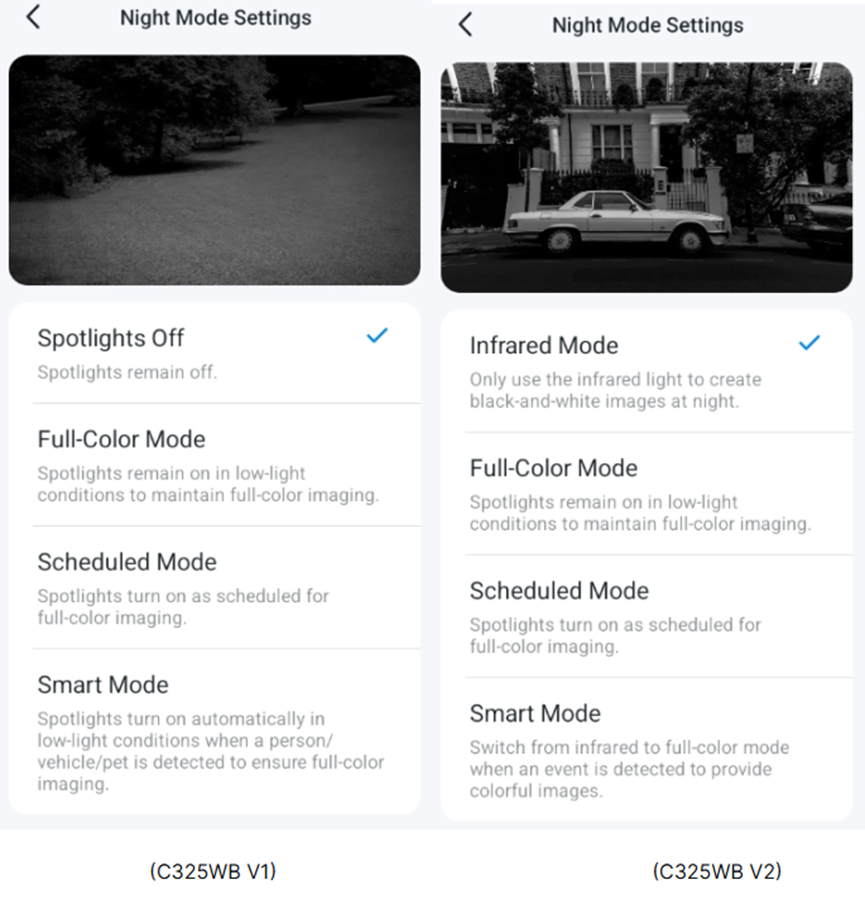
Workaround:
Update on Feb 11, 2026.
The new official firmware (version 1.2.5 Build 260112 Rel.69632n) is being released gradually. It adds the Light Off Mode to the camera's Device Settings > Video & Display > Night Mode Settings page, enabling full-color image capture with ColorPro Night Vision while keeping spotlights off.
- If your camera receives the new firmware, please follow the instructions below to update the firmware in the Tapo app.
How to update the firmware of the Tapo devices on the Tapo App
- If your camera has not yet received the firmware, we suggest waiting patiently.
A new firmware adds the “Spotlight Off” mode to the Tapo C325WB V2. Before the official release, community users can have early access to the new firmware. If you would like to try it out, please send a private message to @Solla-topee with the following information.
1. Forum ID 852500 + A brief description of your usage scenario and why you want the “Spotlight Off” mode.
2. The MAC address of the Tapo C325WB V2.
★★ For users from the United States, please contact forumsupport.usa@tp-link.com instead.
Before the Upgrade:
(1) Please be sure you have read the Beta Test Agreement before upgrading the Pre-release firmware!
(2) How to update the firmware of the Tapo devices on the Tapo App
(3) Firmware downgrade is not supported. When a new official version is released, updating it will overwrite the beta version.
More Articles:
Tapo Camera Day/Night Mode Selection Guide: Best Settings Recommendations for Different Scenarios
What should I do if my Tapo camera triggers false detection?
Smart Home: Introduction to Common Smart Action Scenarios for Tapo Cameras
- Copy Link
- Subscribe
- Bookmark
- Report Inappropriate Content
@Solla-topee I'm going to try send links to ur inbox with 1 minute footage from both cameras recorded at
- Copy Link
- Report Inappropriate Content

Solla-topee wrote
Hi,
On the Tapo C325WB's Night Mode Settings page, please select the Infrared mode, then send us a screenshot of the camera's live view page at night, even when the front part of the camera is completely covered.
Please note that the Full Color Mode and Infrared Mode take effect when the camera enters night mode. You may send us a video showing the camera's live feed at night with the Full Color Mode selected for further analysis.
Best Regards
@Solla-topee Let me further elaborate the issues faced with Beta firmware (for night scenario):
- I can only have color vision. Selecting any mode (light off, IR, full color or smart) produces identical color vision result.
- IR & spotlight failed to function in their respective mode (they are working perfectly in official firmware).
- When switching modes, the camera is laggy & produces grainy video quality. Reboot is necessary to restore to original normal quality.
I believe this is not an isolated case. Didn't the developer verify the functionality of each control setting before rolling out for Beta testing? Or am I getting the right version? Currently 1.2.2 Build 251016 Rel.58489n.
Despite of this, I personally think the color night vision quality of V2 is fantastic. The camera is optimised to monitor ground objects with good clarity. I don't care how it behaves on the sky.
- Copy Link
- Report Inappropriate Content
Hi,
I have escalated your case to our tech team, and they will contact you via email to assist you further and check if the V2's video quality can be improved. Please wait patiently.
Best Regards
- Copy Link
- Report Inappropriate Content
Hi,
The Infrared mode or Full Color mode selected on the camera's Night Mode Settings page takes effect when the camera enters night mode. With the new firmware on the Tapo C325WB V2, it seems the camera still works in Day mode, so the Infrared mode or Full Color mode does not work.
Regarding the grainy video quality when the camera switches modes, please try to exit the camera's live view page after switching modes, re-enter, ensure the video quality is set to the highest, and check whether the live view page returns to normal.
Best Regards
- Copy Link
- Report Inappropriate Content

@Solla-topee Hi, Like many others I've bought the V1 from the Tapo store for Aurora observation but the "Night mode" menu looks just like the one you've shown below for the V2. My firmware version is 1.2.2 and seems to be the latest. Have I been sold a V2, or if not, why can't I see a "Spotlights off" option at the top of my Night Mode menu? If it is a V2, how would I tell? I can't see it anywhere on any label or on the box.
- Copy Link
- Report Inappropriate Content
@JamesRowe 1.2.2 is the firmware for V2 camera but an update to 1.2.5 is slowly rolling out which will allow spotlight off mode
- Copy Link
- Report Inappropriate Content
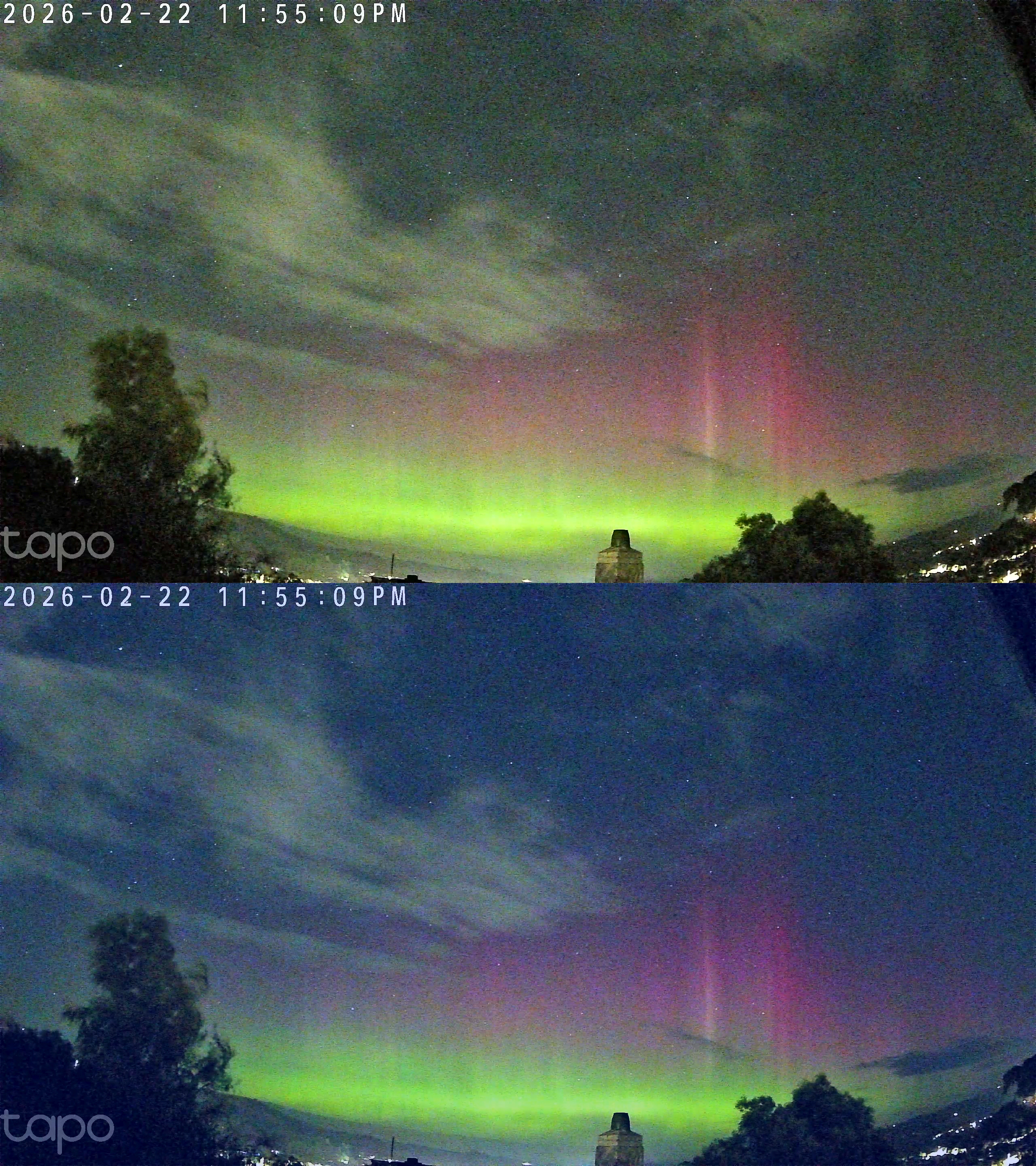
Top is C325wb V2 straight off camera.
Bottom is edited with the green knocked back and red raised a bit.
A bit of color tweaking in firmware to get rid of green noise and it should be good.
- Copy Link
- Report Inappropriate Content
JamesRowe wrote
@Solla-topee Hi, Like many others I've bought the V1 from the Tapo store for Aurora observation but the "Night mode" menu looks just like the one you've shown below for the V2. My firmware version is 1.2.2 and seems to be the latest. Have I been sold a V2, or if not, why can't I see a "Spotlights off" option at the top of my Night Mode menu? If it is a V2, how would I tell? I can't see it anywhere on any label or on the box.
Hi,
If you have set up the camera, on the Tapo app > camera's Device Settings > Device Info page, you can find the camera's firmware and hardware version info.
Best Regards
- Copy Link
- Report Inappropriate Content
Information
Helpful: 4
Views: 4164
Replies: 38
Voters 3


